v3.0 · macOS · Linux & Windows preview · MIT

Read any
Mach-O binary.

A focused desktop explorer for Mach-O, Fat binaries, .a archives, and the dyld shared cache. Drill from structure to code — sections, symbols, disassembly, ObjC & Swift metadata — in one window. Version 3 is a ground-up rewrite in Rust.

● Hardened parser checks ● Capstone disassembly ● Scriptable CLI + JSON
__TEXT,__text · arm64
FORMAT 01
Mach-O
thin executables, dylibs, bundles
FORMAT 02
Fat / Universal
multi-arch slices
FORMAT 03
.a Archive
static library members
FORMAT 04
dyld cache
list + extract images
Capabilities

Everything you need to take a binary apart.

From load commands down to a single disassembled instruction — and the modern Apple metadata most tools skip.

Structural views

Load commands, sections, symbols, relocations, and strings — laid out in a navigable tree mirroring the file on disk, with a hex view that follows your selection.

Load commandsSectionsRelocations

Capstone disassembly

Disassembly of __TEXT,__text next to the bytes it came from. Capstone is built in — nothing extra to install.

arm64x86_64armi386

Swift & ObjC metadata

Browse __swift5_* semantic graphs and Objective-C class/metadata structures decoded into readable rows.

__swift5_typesObjC classesprotocols

dyld shared cache

List every image inside a dyld shared cache, filter it, and extract one image or all of them — then drill straight back in.

listextractdrill-in

Hardened parsing

Bounds-checked parsing, tested against truncated and mutated binaries plus a fuzz target, so a malformed file degrades gracefully instead of crashing.

fuzzedregressionsafe

Productive table UX

Filter rows, copy a cell, a row or everything visible, export CSV, and move from the keyboard. Parsing runs off the UI thread, so large files keep the window responsive.

filterCSV exportkeyboard

Cross-references

An xref report of call and jump targets, computed addresses, memory references and stored pointers, tied back to symbols.

callspointerssymbols

Code signing & dyld info

Code Directory, requirements and decoded entitlements, plus rebase, bind, exports trie and chained fixups.

entitlementschained fixupsexports

Light & dark

Neutral light and dark themes, or follow the system setting. A built-in update check tells you when a new release is out.
lightdarksystem
The interface

One window, the whole binary.

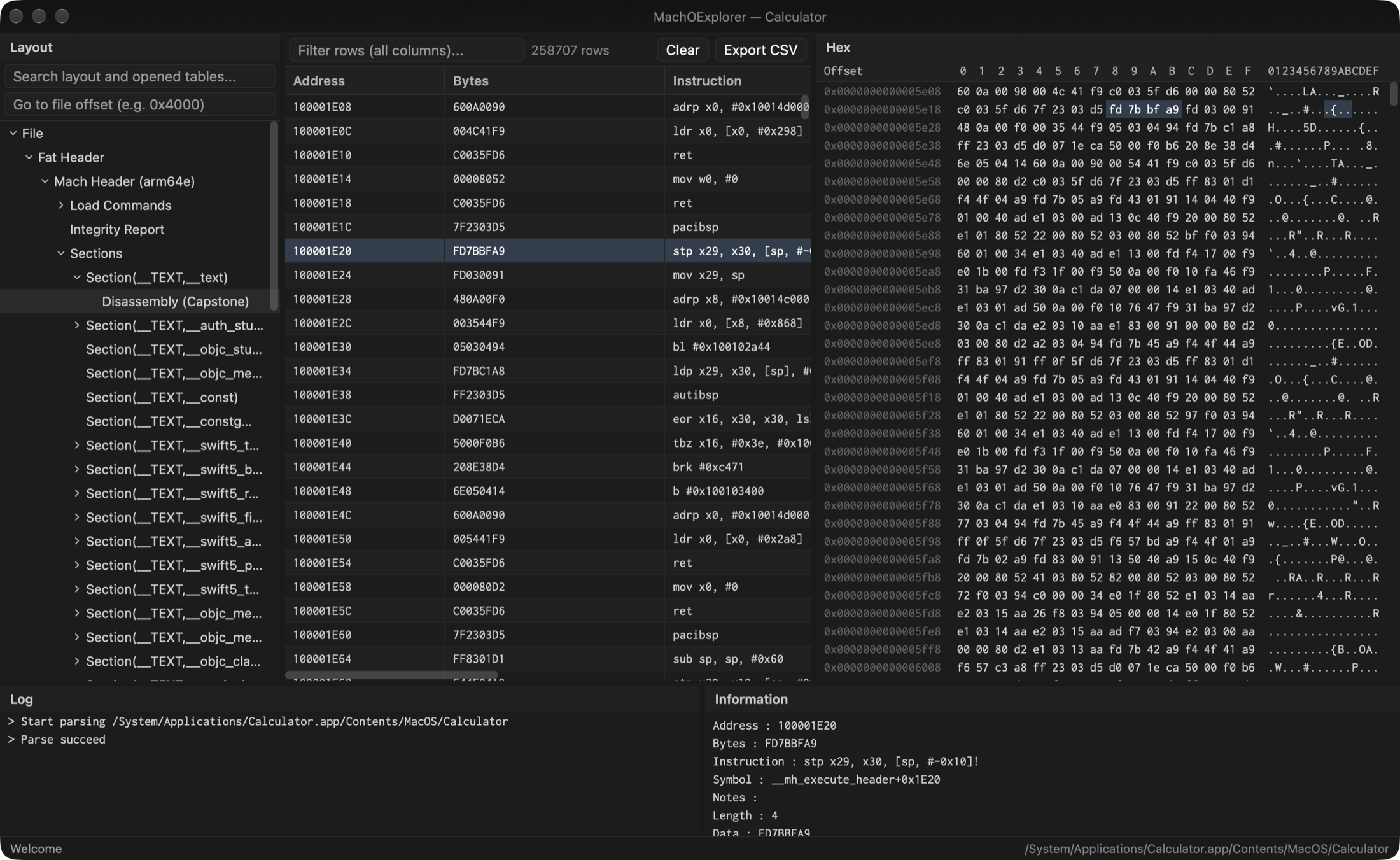
MachOExplorer — dark theme
MachOExplorer in the dark theme showing the layout tree, an arm64 disassembly table, the hex view and the information panel
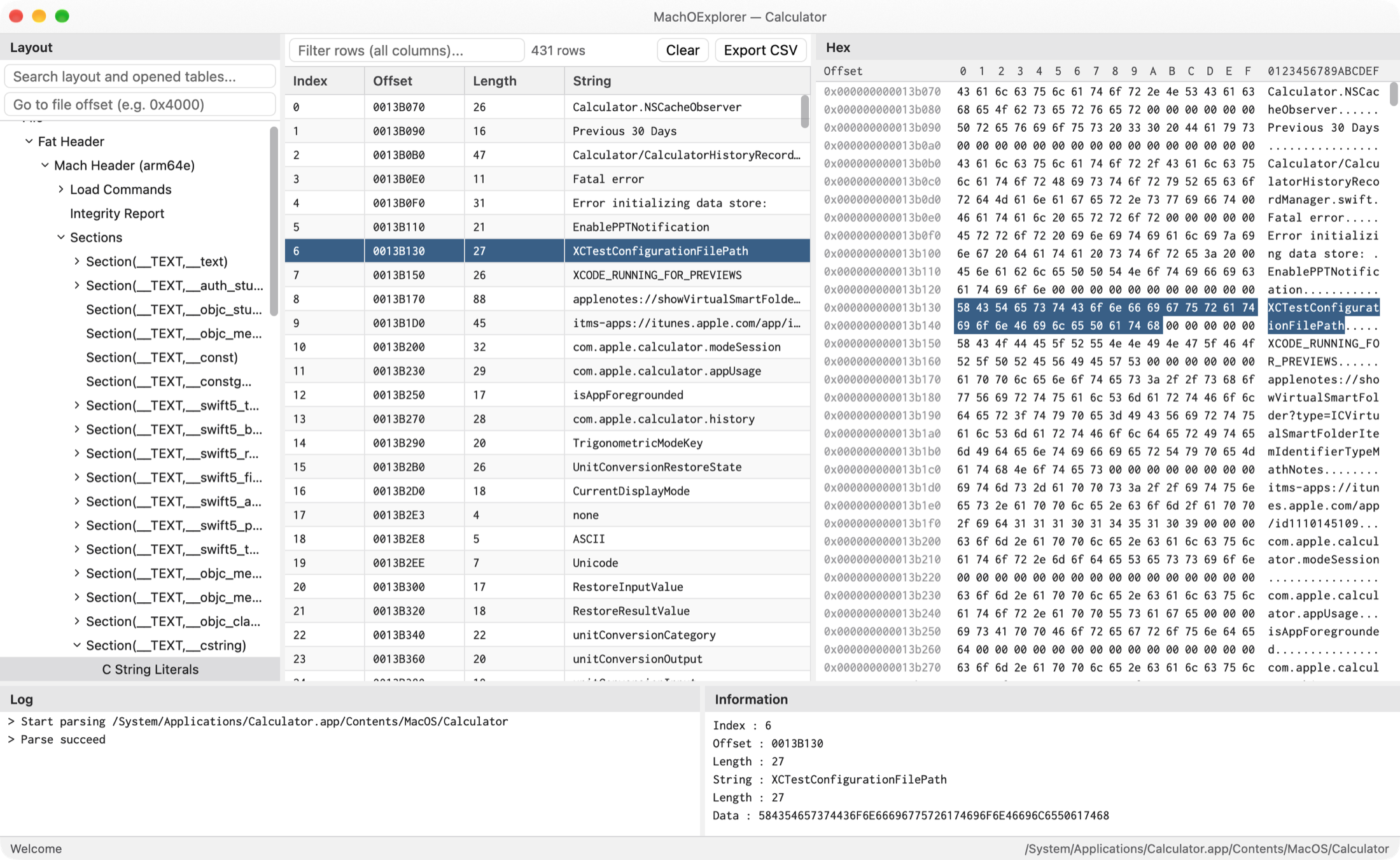
MachOExplorer — light theme
MachOExplorer in the light theme showing a C string literals table with the selected string highlighted in the hex view
01 · Layout tree

Mach header, load commands, sections, symbol & string tables, dynamic loader info — all in one navigable hierarchy.

02 · Tables & hex

Each node opens a filterable table; select a row and the hex view jumps to the exact bytes.

03 · Log & details

The log reports what was parsed and any warnings; the information panel spells out the selected row.

Headless mode

A CLI that speaks JSON.

Run the same analysis tree without the GUI — perfect for CI, batch jobs, and piping into jq.

  • --format
    text or JSONAutomation-friendly output with stable schemaVersion, summary & node paths.
  • --max-rows
    Bounded outputCap rows and tree depth for huge binaries; root-path & name filters to scope a subtree.
  • moex
    One binarySubcommands dump, parse, diff, cache-list & cache-extract.
analyze.sh
json + jq
dyld cache
copy
# the full analysis tree, as text
$ moex dump --max-depth 2 --table-mode summary sample/simple
 
file: sample/simple
- File
  - Mach Header (x86_64)
    [table summary] total=14
    - Load Commands
    - Sections
    - Symbol Table
copy
# JSON, then query it with jq
$ moex dump --format json sample/simple \
   | jq -c '.summary'
 
{"binaryNodes":39,"nodes":45,"tableNodes":43,"totalRows":385}
 
# write to a file instead
$ moex dump --format json --output analysis.json sample/simple
copy
# list images in a dyld shared cache
$ moex cache-list --json \
   dyld_shared_cache_arm64e UIKit
 
# extract one image back to a Mach-O
$ moex cache-extract --compact \
   dyld_shared_cache_arm64e UIKit ./UIKit.bin
Get started

Up and running in a minute.

Homebrew recommended

The fastest way on macOS — installs the cask straight from the tap.

copy $ brew tap everettjf/homebrew-tap
$ brew install --cask machoexplorer

Direct download

A signed and notarized DMG for macOS (Apple silicon and Intel). Linux (tarball) and Windows (installer or portable zip) builds are previews.

↗ github.com/everettjf/MachOExplorer/releases Releases →

Quick start

  1. Launch MachOExplorer and drop a file onto the window, or run MachOExplorer <path>.
  2. Walk the Layout tree; use the search box to jump to a section, symbol or value.
  3. Select a node to see its table and the matching bytes in the hex view.