writing
Breakpoint Every UIPasteboard Method with LLDBLLDB 断点 UIPasteboard 的所有方法
· Debugging & reverse engineering
Translated from Chinese — .
On this page
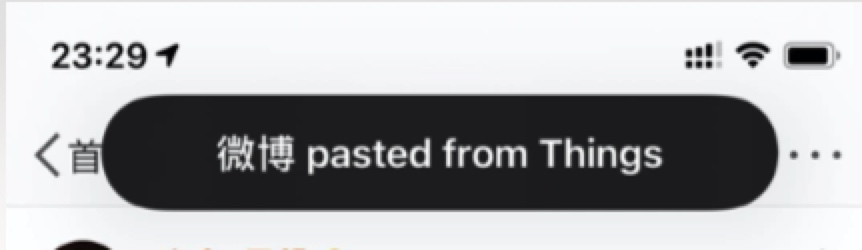
iOS 14 added a privacy feature: when an app reads content that another app copied to the clipboard, a brief banner is shown. Like this:
You can inspect every clipboard-related behavior in an app by setting a breakpoint on all UIPasteboard methods.
To break on every method of UIPasteboard, use the following command:
breakpoint set -r '\[UIPasteboard .*\]$'
Break at main first, then type the command above in the LLDB console.
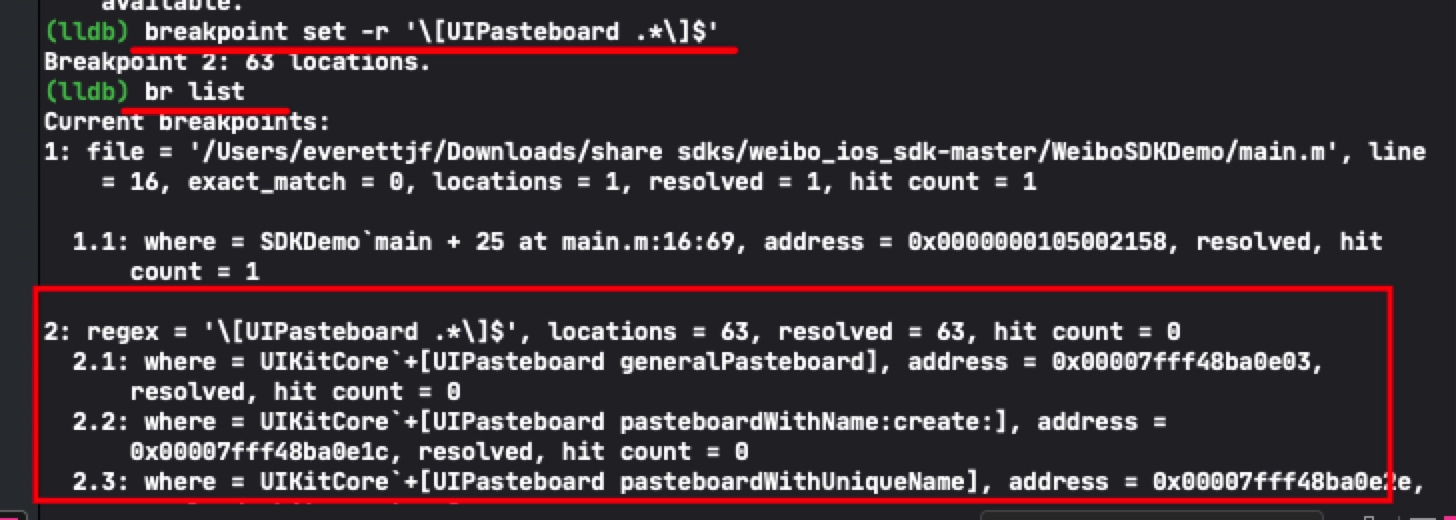
(The screenshot above only captures part of the UIPasteboard methods.)
Summary
Give it a try — you’ll notice that, besides our own calls, the system itself occasionally triggers UIPasteboard-related calls too.
Pretty interesting :)
文章目录
iOS14 新增了一个保护隐私的功能,当前App读取其他App复制到剪贴板中的内容时,会有个短暂的提示。如下图:
可以通过断点 UIPasteboard 的所有方法来检查App中与剪贴板有关的所有行为。
断点一个UIPasteboard的所有方法可以用如下命令:
breakpoint set -r '\[UIPasteboard .*\]$'
先断点到main,然后lldb终端输入以上命令。
(上图只截图了一部分UIPasteboard的方法)
总结
嗯,大家小试一下~ 会发现除了我们自己调用,系统也偶尔会触发UIPasteboard相关调用。
很有趣~