writing
Inspecting Objective-C Block Signatures with LLDBLLDB 快速打印 Objective-C 方法中 Block 参数的签名
· Debugging & reverse engineering
Translated from Chinese — .
On this page
When doing iOS reverse engineering you often run into parameters of block type. This article introduces an lldb script that can quickly print out the type of a block parameter in an Objective-C method.
Header files dumped by class-dump often contain method signatures like this:
- (void)doSomethingWithCompletionHandler:(CDUnknownBlockType)arg1;
CDUnknownBlockType is the block-type parameter. When we want to call this method, we need to know the type of this parameter.
I searched online and found a great article that explains a way to find the parameter type using lldb commands. The link is as follows:
http://www.swiftyper.com/2016/12/16/debuging-objective-c-blocks-in-lldb/
But typing the lldb commands one by one every time is quite a hassle. So I found another lldb script,
https://github.com/ddeville/block-lldb-script
However, it had fallen into disrepair and didn’t really work.
So let’s try to fix this script!
-> debugging .
-> debugging ..
-> debugging ...
-> ....
-> fixed, yeah :)
Installation
Install the lldb script
cd ~
git clone git@github.com:everettjf/zlldb.git
Then add the following line to the ~/.lldbinit file:
command script import ~/zlldb/main.py

Usage
For example, suppose we have the following block method
@interface Hello : NSObject
@end
@implementation Hello
+ (void)say:(NSString*)text callback:(void(^)(NSString *text,int x, NSString *y, double z, BOOL m))callback {
}
@end
It’s called like this:
[Hello say:@"world" callback:^(NSString *text, int x, NSString *y, double z, BOOL m) {
    }];
So we set a breakpoint on this call line:

If you’re doing reverse engineering work without the source code, you can set a breakpoint on the objc_msgSend line, like this:
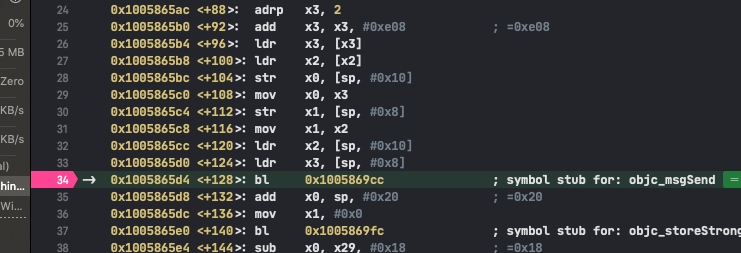
The block is the second parameter, so print out $arg4
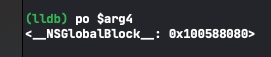
Then run the command zblock 0x100588080 (pass the block’s address to the zblock command), and the block’s parameters come out.
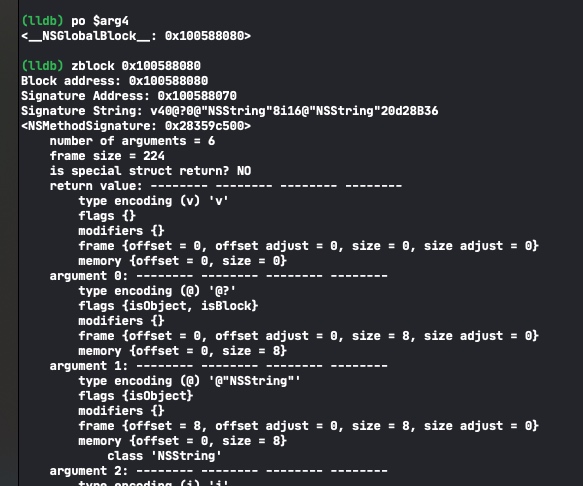
Based on the type encoding of each line, refer to Apple’s documentation to know what the block’s parameters are.
https://developer.apple.com/library/archive/documentation/Cocoa/Conceptual/ObjCRuntimeGuide/Articles/ocrtTypeEncodings.html
Code
https://github.com/everettjf/zlldb
Since the lldb script built into Xcode 11 started defaulting to Python 3, Facebook’s chisel still had some support issues (maybe it’s resolved now). zlldb is just where I put a few commands I commonly use, supporting Python 3 (i.e. the latest Xcode). Besides zblock, there are a few other simple commands; you can refer to the README.
References
- http://www.swiftyper.com/2016/12/16/debuging-objective-c-blocks-in-lldb/
- https://maniacdev.com/2013/11/tutorial-an-in-depth-guide-to-objective-c-block-debugging
- https://github.com/ddeville/block-lldb-script
- https://store.raywenderlich.com/products/advanced-apple-debugging-and-reverse-engineering
Enjoy :)
iOS逆向时经常会遇到参数为block类型,本文介绍一个lldb script,可快速打印出Objective-C方法中block参数的类型。
class-dump出的头文件中经常包含如下方法签名:
- (void)doSomethingWithCompletionHandler:(CDUnknownBlockType)arg1;
CDUnknownBlockType 就是block类型的参数。当我们要调用这个方法,就需要知道这个参数类型。
网上搜了下,发现一篇好文章,文章讲解了使用lldb命令找到参数类型的方法。连接如下:
http://www.swiftyper.com/2016/12/16/debuging-objective-c-blocks-in-lldb/
但每次都需要lldb逐个命令的敲打,很是麻烦。于是又搜到一个lldb脚本,
https://github.com/ddeville/block-lldb-script
然而年久失修,不怎么能工作。
那就尝试修复这个脚本吧!
-> debugging .
-> debugging ..
-> debugging ...
-> ....
-> fixed, yeah :)
安装
安装lldb script
cd ~
git clone git@github.com:everettjf/zlldb.git
然后在 ~/.lldbinit 文件中添加下行内容:
command script import ~/zlldb/main.py
使用
例如我们有如下block方法
@interface Hello : NSObject
@end
@implementation Hello
+ (void)say:(NSString*)text callback:(void(^)(NSString *text,int x, NSString *y, double z, BOOL m))callback {
}
@end
调用如下:
[Hello say:@"world" callback:^(NSString *text, int x, NSString *y, double z, BOOL m) {
    }];
那么我们断点到这个调用行:
如果是逆向工作的话,没有代码,那可以断点到 objc_msgSend这行,如下:
block是第二个参数,那么打印出$arg4
然后执行命令 zblock 0x100588080 (block的地址传给 zblock命令),然后block的参数就出来啦。
根据每一行的 type encoding 对照苹果的文档即可知道block的参数都有什么。
https://developer.apple.com/library/archive/documentation/Cocoa/Conceptual/ObjCRuntimeGuide/Articles/ocrtTypeEncodings.html
代码
https://github.com/everettjf/zlldb
由于Xcode11内置的lldb script开始默认Python3版本,facebook的chisel还有些支持问题(可能现在解决了)。zlldb就是把我自己常用的几个命令放到了这里,支持Python3(也就是最新版Xcode)。除了zblock外,还有几个简单的命令,大家可以参考README。
参考
- http://www.swiftyper.com/2016/12/16/debuging-objective-c-blocks-in-lldb/
- https://maniacdev.com/2013/11/tutorial-an-in-depth-guide-to-objective-c-block-debugging
- https://github.com/ddeville/block-lldb-script
- https://store.raywenderlich.com/products/advanced-apple-debugging-and-reverse-engineering
Enjoy :)