writing
Paste Keyboard: Stop WeChat Moments Text from Being Collapsed剪贴板输入法,让朋友圈文字不再被折叠
· Building tools & products
Translated from Chinese — .
On this page
Paste Keyboard has now been transferred. See: https://mp.weixin.qq.com/s/0dqe4Rj_pUGXwzRUKsj7iQ
Paste Keyboard solves the problem where WeChat Moments automatically collapses a large pasted block of text into a single line. With Paste Keyboard, your Moments text won’t get collapsed anymore.
Background
When you see a great passage of text online and want to copy-paste it directly to share on WeChat Moments, you’ll find that the published post gets collapsed into one line. Like this:
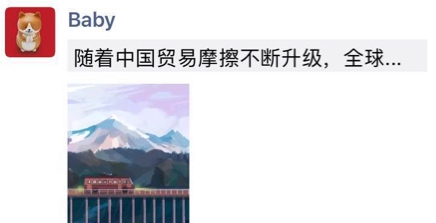
WeChat’s intention is good — it’s meant to encourage everyone to share original and genuine content.
WeChat has a simple algorithm to decide “when to collapse” — probably something like: judging whether there was an actual text input process.
Avoiding It with Paste Keyboard
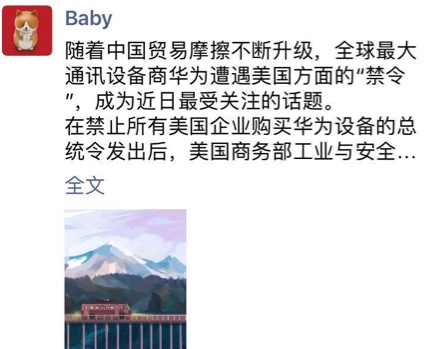
After entering text with Paste Keyboard, you can see it no longer gets collapsed. Like this:
Installation
Paste Keyboard is now on the App Store. Click here to download and install.
Configuration
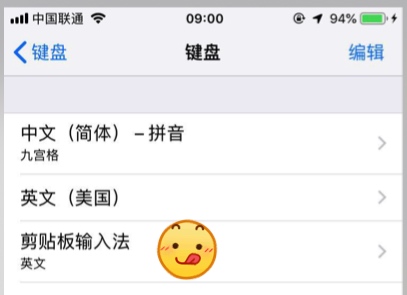
(1) First, open Settings - General - Keyboard - Keyboards, tap Add New Keyboard, and select Paste Keyboard.
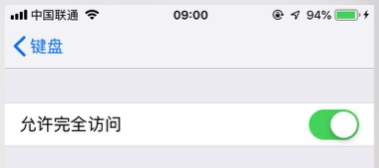
(2) Then, open Settings - General - Keyboard - Keyboards - Paste Keyboard and enable Allow Full Access.
Usage
(1) First copy a passage of text from anywhere.
(2) Then go to a place where you can enter text, such as WeChat Moments.
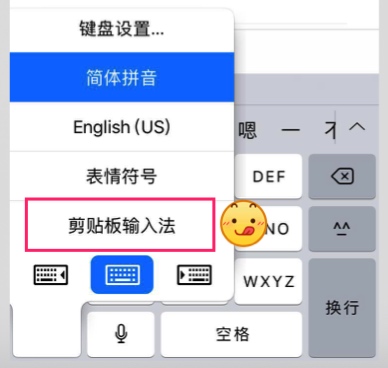
(3) Switch the keyboard to Paste Keyboard.
(4) Paste Keyboard will automatically grab the text in the system clipboard and show a brief preview. Now tap Input to start typing it in.
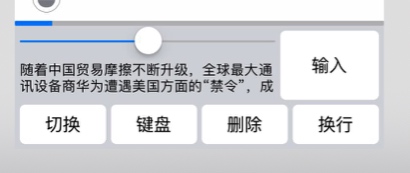
(5) Once input is finished, publish. The text won’t be collapsed. :)
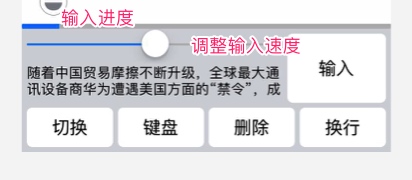
Input Progress and Speed
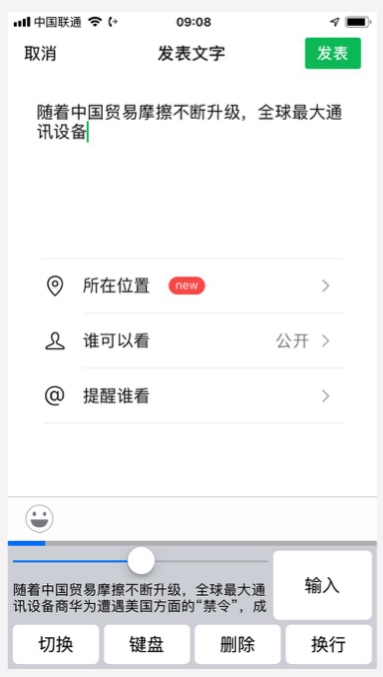
Full Screenshot
Summary
When browsing Moments I often see text getting collapsed, which always felt just a tiny bit awkward. Then one day I saw someone on Weibo share the idea of simulating input (it was a while ago on Weibo and I couldn’t find it again…), so I jotted down a TODO. With the base code from previously developing USB Keyboard, this development was pretty fast — I started on Friday night and it passed review by Monday morning. Apple was also great and approved it on the first review.
Originally 6 RMB, now free 6 bucks is too expensive, so let’s just make it free :)
If you find it useful, please share it around~
Be sure to follow my WeChat official account too :)
剪贴板输入法现已转让,详见:https://mp.weixin.qq.com/s/0dqe4Rj_pUGXwzRUKsj7iQ
剪贴板输入法(Paste Keyboard),用于解决微信朋友圈粘贴大量文本时被自动折叠为一行的问题。使用剪贴板输入法,可以让朋友圈文字不再被折叠。
背景
当网上看到一段文字很好,想直接复制粘贴分享到微信朋友圈时,你会发现发出的朋友圈会被折叠为一行。如下图:
微信的初衷是好的,为了鼓励大家原创和真实的分享。
微信有个简单的算法来判断“何时折叠”,大概可能是:判断有没有文本的输入过程。
使用剪贴板输入法避免
使用剪贴板输入法输入后,可见不被折叠了。如下图:
安装
剪贴板输入法已经登陆AppStore,点击 这里下载安装
配置
(1) 首先,打开 设置-通用-键盘-键盘,点击 添加新键盘,选择剪贴板输入法。
(2) 然后,打开 设置-通用-键盘-键盘-剪贴板输入法,启用允许完全访问。
使用
(1)先从任意地方复制一段文字。
(2)然后,进入一个可以输入文字的地方,例如微信朋友圈。
(3)切换输入法到剪贴板输入法。
(4)剪贴板输入法会自动获取系统剪贴板中的文字,并简略显示。此时点击输入即可开始输入。
(5)输入完成后发表。文本就不会被折叠啦。:)
输入进度和速度
完整截图
总结
平时浏览朋友圈经常看到一些文字被折叠,总觉得有那么一点点别扭。直到某一天看到微博有人分享了一下模拟输入的想法(微博有点久了,没有翻到……),于是记录了一个TODO。有了之前开发USB Keyboard的基础代码,这次开发比较快速,从周五晚上开始开发,到周一早上审核通过。苹果也很给力,一次审核通过。
原价6元,现价免费哦 6块钱太贵,那就免费咯 :)
大家觉得好用,多多分享哦~