writing
VSCode Extension: Quickly Open pub.dev Docs from pubspec DependenciesVSCode 扩展:从 pubspec 依赖快速打开 pub.dev 文档
· Building tools & products
Translated from Chinese — .
Recently I started taking a preliminary look at Flutter (https://flutter.dev/).
While studying some open-source code, I noticed a tiny need: pubspec.yaml has many dependencies, and as a beginner I’m unfamiliar with many of them, so I have to copy each one to https://pub.dartlang.org/ to search and look up the docs.
I figured I could develop a vscode plugin that adds a button next to each package name, so I’d only need to click it. (Ah, am I being too lazy?)
So today I developed such a vscode extension:
Pubspec Dependency Search
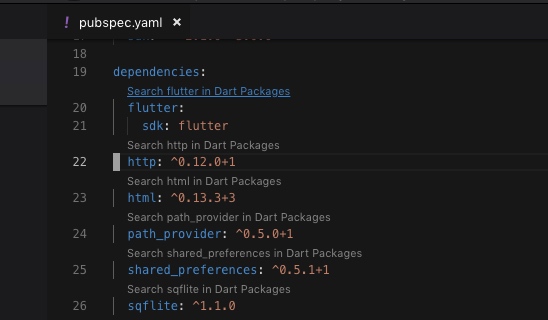
After installing the extension, when you open pubspec.yaml, the extension finds the dependencies and dev_dependencies and adds a line of text (a link) above each dependency. For example: Search flutter in Dart Packages.
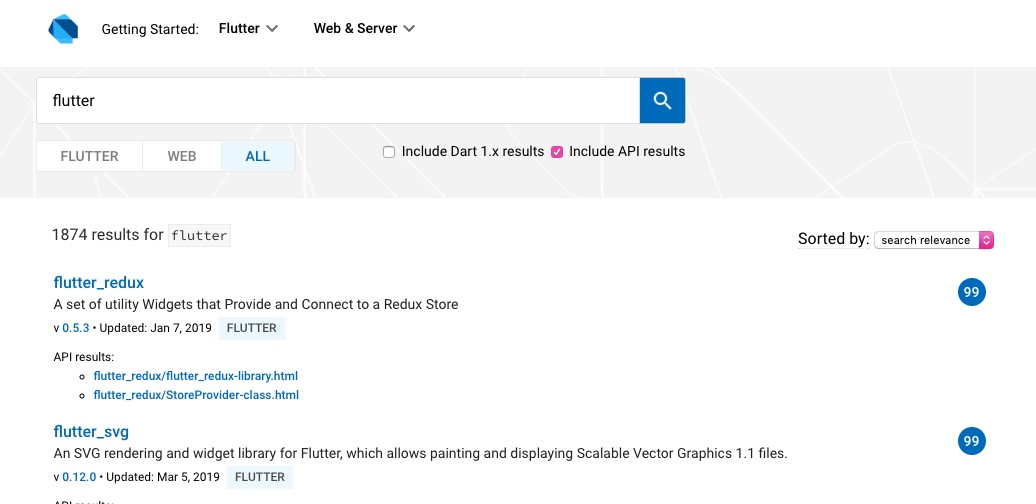
After clicking it, you can open Dart Packages to search.
Installation:
https://marketplace.visualstudio.com/items?itemName=everettjf.pubspec-dependency-search
Source code:
https://github.com/everettjf/vscode-pubspec-dependency-search
How it works:
- The principle is simple: after the vscode extension parses the dependencies in pubspec.yaml, it uses CodeLensProvider to tell vscode where to add the links.
- The link is just an assembled url: https://pub.dartlang.org/packages?q=flutter opened in the browser.
A few Flutter learning resources I’ve recently compiled:
- Quickly get familiar with the Dart language https://www.dartlang.org/guides/language/language-tour
- Quickly skim the docs https://flutter.dev/docs/development/ui/widgets-intro
- Go through the Cookbook examples once https://flutter.dev/docs/cookbook
- Flutter in Action https://book.flutterchina.club/
Then go ahead and start implementing your ideas~ Don’t forget to install the vscode extension Pubspec Dependency Search.
Yeah, interesting :)
最近初步学习了下 Flutter (https://flutter.dev/)。
在学习一些开源代码的过程中发现一个小小需求:pubspec.yaml 中有很多 dependencies ,初学者很多都不熟悉,需要逐个复制到 https://pub.dartlang.org/ 搜索查询文档。
想来可以开发一个vscode插件,在对应的package name旁边加个按钮,我只需要 click 一下。(啊,是不是太懒了)
于是今天就开发了这样一个vscode extension:
Pubspec Dependency Search
安装扩展后,当打开 pubspec.yaml 时,扩展会查找 dependencies 和 dev_dependencies ,并在每个依赖上面加一行字(链接)。例如: Search flutter in Dart Packages 。
点击后就可以打开Dart Packages来查找。
安装地址:
https://marketplace.visualstudio.com/items?itemName=everettjf.pubspec-dependency-search
源码:
https://github.com/everettjf/vscode-pubspec-dependency-search
原理:
- 原理很简单,vscode扩展解析pubspec.yaml 中的 dependencies 后, 通过 CodeLensProvider 告诉vscode要加入链接的位置。
- 链接就是拼凑出 url : https://pub.dartlang.org/packages?q=flutter 使用浏览器打开。
补充几个最近整理的Flutter学习资料:
- 快速熟悉Dart语言 https://www.dartlang.org/guides/language/language-tour
- 快速过一遍文档 https://flutter.dev/docs/development/ui/widgets-intro
- Cookbook例子操作一遍 https://flutter.dev/docs/cookbook
- Flutter实战 https://book.flutterchina.club/
然后就开始上手实现你的想法吧~别忘了安装vscode扩展 Pubspec Dependency Search 哦。
嗯,有趣 :)