writing
Analyzing How FastImageCache WorksFastImageCache 实现原理解析
· Performance & internals
Translated from Chinese — .
On this page
FastImageCache is a library that trades space for time to speed up image loading/rendering. The official README (https://github.com/path/FastImageCache) explains the principles in fair detail. This article goes through the most core parts once more, combined with the source code.
The Problem
The usual way a file is loaded is:
- +[UIImage imageWithContentsOfFile:] uses the Image I/O interface to create a CGImageRef from the read data. But at this point the image is not decoded.
- It’s assigned to a UIImageView.
- An implicit CATransaction detects the change in the layer tree.
- On the next main-thread run loop, Core Animation commits this implicit CATransaction, causing a copy of the image data.
Depending on the image, the copy process may include the following steps:
- Allocate memory for file reading/writing and decompression.
- Read the file contents from disk into memory.
- Decompress the image. Usually, decompression is fairly CPU-intensive (a CPU-bound operation).
- Core Animation renders using the decompressed data.
The Solution
1. Mapped Memory
The core of FastImageCache is the image table. It’s similar to the sprite sheet in game development http://en.wikipedia.org/wiki/Sprite_sheet#Sprites_by_CSS
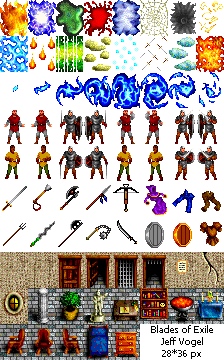
The entire file is mapped into memory via mmap, and then the image data is read from memory. The use of mmap reduces data copies.
mmap was introduced in a previous article, see https://xnu.app/2018/09/01/mmap/
2. Uncompressed Image Data
To avoid the expensive image decompression operation, the image table directly stores the decompressed image data. The image decompression is only performed once; future reads of the image directly use the decompressed data.
The decompressed image data takes up more disk space.
3. Byte Alignment
When analyzing an app with TimeProfiler, you often find that CA::Render::copy_image takes up a large amount of time. This is usually because Core Animation needs a byte-aligned image; an image that isn’t byte-aligned causes Core Animation to copy the image during rendering, thereby increasing rendering time.
The image table stores a byte-aligned image, thereby avoiding this cost.
In addition, the aligned bytes-per-row is 64, meaning the bytesPerRow parameter of CGBitmapContextCreate is a multiple of 64.
CGContextRef __nullable CGBitmapContextCreate(void * __nullable data,
    size_t width, size_t height, size_t bitsPerComponent, size_t bytesPerRow,
    CGColorSpaceRef cg_nullable space, uint32_t bitmapInfo)
A properly aligned bytes-per-row value must be a multiple of 8 pixels × bytes per pixel. For a typical ARGB image, the aligned bytes-per-row value is a multiple of 64.
Implementation Code
1. mmap
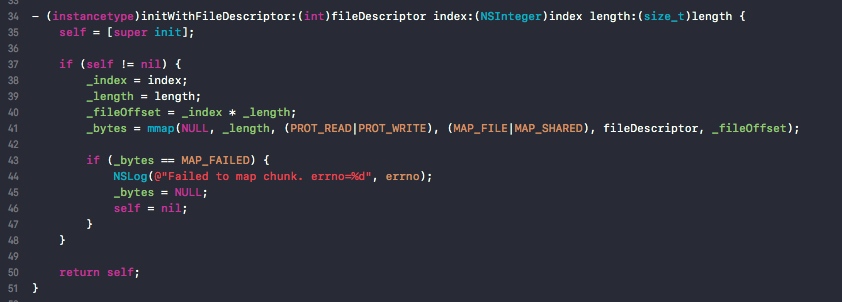
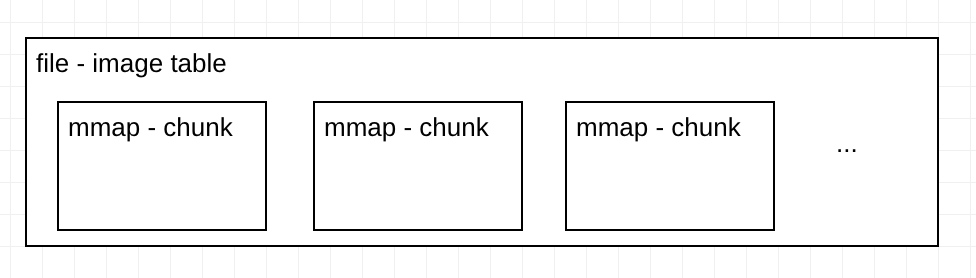
FastImageCache’s image table is a single file, mmap’d at different positions to map each Chunk. The logic of FICImageTableChunk is precisely to mmap different positions (the current Chunk) within one large file.
2. Decompressing the Image
(1) Writing the image to a Chunk
In this method -[FICImageTable setEntryForEntityUUID:sourceImageUUID:imageDrawingBlock:] the image’s data is created into the entry corresponding to the mmap.
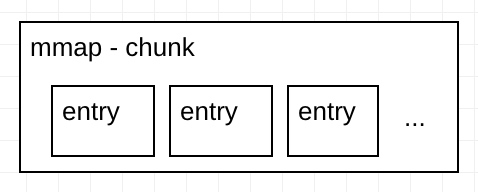
One Chunk corresponds to multiple entries; one entry is the data of one image.
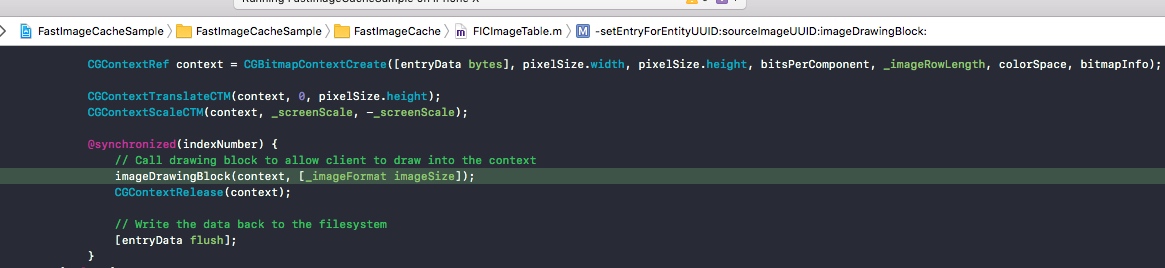
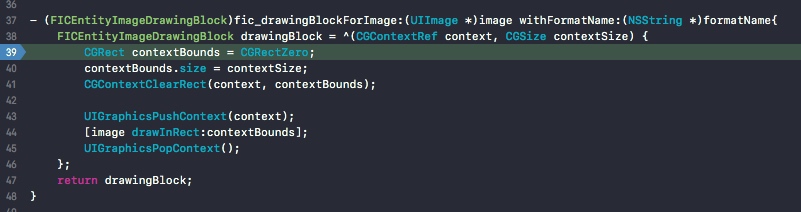
FastImageCache provides a block callback to let us provide the drawing ourselves (the intent is to let us do some additional processing too, such as rounded corners).
(2) Reading the image
Reading happens in -[FICImageTable newImageForEntityUUID:sourceImageUUID:preheatData:]
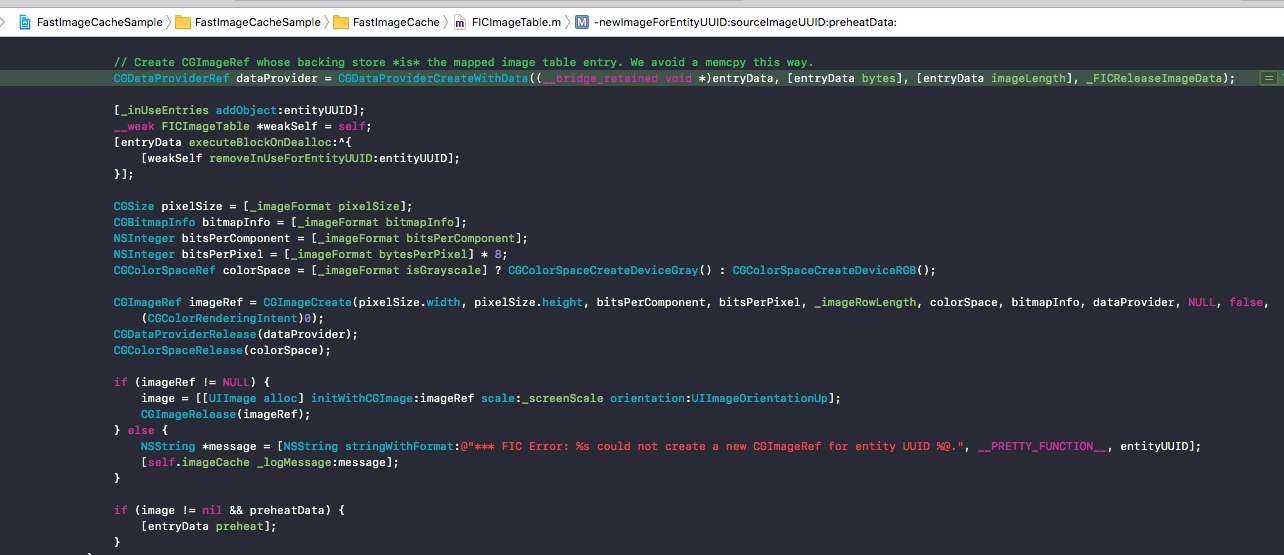
The most critical thing here is CGDataProviderCreateWithData. Through this API, the backing store of the CGImageRef is the mmap-mapped memory. This leverages the advantages of mmap to load the CGImageRef.
// Create CGImageRef whose backing store *is* the mapped image table entry. We avoid a memcpy this way.
GDataProviderRef dataProvider = CGDataProviderCreateWithData((__bridge_retained void *)entryData, [entryData bytes], [entryData imageLength], _FICReleaseImageData);
3. Byte Alignment
Core Animation needs 64-byte-aligned image data. As in the following code.
// Core Animation will make a copy of any image that a client application provides whose backing store isn't properly byte-aligned.
// This copy operation can be prohibitively expensive, so we want to avoid this by properly aligning any UIImages we're working with.
// To produce a UIImage that is properly aligned, we need to ensure that the backing store's bytes per row is a multiple of 64.

#pragma mark - Byte Alignment

inline size_t FICByteAlign(size_t width, size_t alignment) {
    return ((width + (alignment - 1)) / alignment) * alignment;
}

inline size_t FICByteAlignForCoreAnimation(size_t bytesPerRow) {
    return FICByteAlign(bytesPerRow, 64);
}
Other Code
An interesting piece of code,
- (void)preheat {
    int pageSize = [FICImageTable pageSize];
    void *bytes = [self bytes];
    NSUInteger length = [self length];

    // Read a byte off of each VM page to force the kernel to page in the data
    for (NSUInteger i = 0; i < length; i += pageSize) {
        *((volatile uint8_t *)bytes + i);
    }
}
Because of the mmap mechanism, the corresponding memory is only loaded into a page when it’s read. The code above forcibly reads this portion of memory, so the mmap-mapped image data is loaded into memory ahead of time (loading happens on a background thread), ultimately reducing the time cost on the main thread.
References
- Getting Pixels onto the Screen https://www.objc.io/issues/3-views/moving-pixels-onto-the-screen/
- Optimizing 2D Graphics and Animation Performance
https://developer.apple.com/videos/play/wwdc2012/506/
- iOS图片加载速度极限优化—FastImageCache解析 http://blog.cnbang.net/tech/2578/
Summary
Personally, I feel FastImageCache is too customized for the Path app. Some places that should be flexible (such as variable image sizes) aren’t flexible, while it has lots of other parameters. For generality, it also adds an MRU algorithm, file protection attributes, etc., which makes the code much more complex (messy).
If we only want to optimize the home page loading speed of an app, there could be a super-streamlined version. If you need it, then go make one.
文章目录
FastImageCache 是一个使用空间换时间的加速图片加载/渲染的库。官方(https://github.com/path/FastImageCache)的README比较详细的解释了原理。这篇文章就结合源码再次温习一遍最核心的部分。
问题
通常文件加载的方式是:
- +[UIImage imageWithContentsOfFile:]使用 Image I/O 接口从读取的数据创建CGImageRef。但此时没有解码图像。
- 赋值给UIImageView。
- 隐式的CATransaction检测到了layer tree的改变。
- 下一个主线程run loop,Core Animation 会提交这个隐式的CATransaction,引起图像数据的copy。
根据图像的不同,copy过程可能包含如下步骤:
- 申请用于文件读写和解压的内存。
- 从磁盘读取文件内容到内存。
- 解压图像,通常情况下,解压比较耗费CPU(CPU密集操作)。
- Core Animation使用解压后的数据进行渲染。
解决方案
1. Mapped Memory
FastImageCache的核心是image table。类似游戏开发中的雪碧图 http://en.wikipedia.org/wiki/Sprite_sheet#Sprites_by_CSS
将整个文件通过mmap映射到内存,然后从内存中读取图像数据。mmap的使用减少了数据拷贝。
mmap在之前的文章介绍过,见 https://xnu.app/2018/09/01/mmap/
2. Uncompressed Image Data
为了避免昂贵的图像解压操作,image table直接存储解压后的图像数据。图像的解压只会执行一次,未来读取图像时直接使用解压后的数据。
解压后的图像数据会占用更大的磁盘空间。
3. Byte Alignment
使用TimeProfiler分析应用时,经常发现 CA::Render::copy_image 占用较大的耗时。这通常是因为Core Animation需要一个字节对齐的图像,没有字节对齐的图像会导致Core Animation在渲染时复制一份图像。从而增加渲染耗时。
image table中会存储一个字节对齐的图像,从而避免这个耗时。
此外,对齐的bytes-per-row 是64,也就是CGBitmapContextCreate的bytesPerRow参数是64的整数倍。
CGContextRef __nullable CGBitmapContextCreate(void * __nullable data,
    size_t width, size_t height, size_t bitsPerComponent, size_t bytesPerRow,
    CGColorSpaceRef cg_nullable space, uint32_t bitmapInfo)
A properly aligned bytes-per-row value must be a multiple of 8 pixels × bytes per pixel. For a typical ARGB image, the aligned bytes-per-row value is a multiple of 64.
实现代码
1. mmap
FastImageCache的image table是一个文件,通过mmap不同的位置来映射到每一个Chunk。FICImageTableChunk 的逻辑就是为了在一个大的文件中mmap不同的位置(当前Chunk)
2. 解压图像
(1) 写入图像到Chunk
在这个方法中 -[FICImageTable setEntryForEntityUUID:sourceImageUUID:imageDrawingBlock:] 将图像的数据创建到mmap对应的entry中。
一个Chunk对应多个entry,一个entry就是一个图像的数据。
FastImageCache提供了block回调要让我们自己来提供绘制(本意是为了让我们还可以做一些处理,例如圆角)。
(2)读取图像
读取在 -[FICImageTable newImageForEntityUUID:sourceImageUUID:preheatData:]
这里最关键的是CGDataProviderCreateWithData,通过这个API可以让CGImageRef的后端存储(backing store)是mmap映射的内存。也就利用了mmap的优势来加载CGImageRef。
// Create CGImageRef whose backing store *is* the mapped image table entry. We avoid a memcpy this way.
GDataProviderRef dataProvider = CGDataProviderCreateWithData((__bridge_retained void *)entryData, [entryData bytes], [entryData imageLength], _FICReleaseImageData);
3. 字节对齐
Core Animation 需要64字节对齐的图像数据。如下代码。
// Core Animation will make a copy of any image that a client application provides whose backing store isn't properly byte-aligned.
// This copy operation can be prohibitively expensive, so we want to avoid this by properly aligning any UIImages we're working with.
// To produce a UIImage that is properly aligned, we need to ensure that the backing store's bytes per row is a multiple of 64.

#pragma mark - Byte Alignment

inline size_t FICByteAlign(size_t width, size_t alignment) {
    return ((width + (alignment - 1)) / alignment) * alignment;
}

inline size_t FICByteAlignForCoreAnimation(size_t bytesPerRow) {
    return FICByteAlign(bytesPerRow, 64);
}
其他代码
一个有意思的代码,
- (void)preheat {
    int pageSize = [FICImageTable pageSize];
    void *bytes = [self bytes];
    NSUInteger length = [self length];

    // Read a byte off of each VM page to force the kernel to page in the data
    for (NSUInteger i = 0; i < length; i += pageSize) {
        *((volatile uint8_t *)bytes + i);
    }
}
由于mmap的机制,对应的内存仅在读取的时候才会加载到page,上面的代码强制读取这部分内存,就让mmap的图像数据提前加载到了内存(加载时是在子线程),最终减少了主线程的耗时。
参考
- Getting Pixels onto the Screen https://www.objc.io/issues/3-views/moving-pixels-onto-the-screen/
- Optimizing 2D Graphics and Animation Performance
https://developer.apple.com/videos/play/wwdc2012/506/
- iOS图片加载速度极限优化—FastImageCache解析 http://blog.cnbang.net/tech/2578/
总结
个人感觉,FastImageCache太过于为Path这个应用定制了,一些该灵活的地方(例如图片大小不固定)没有灵活,反而很多其他参数特别多。为了通用性,还加入了MRU算法、文件保护属性等,导致代码复杂(乱)了很多。
如果我们仅仅为了优化App的首页加载速度,可以有一个超级精简的版本。如果你需要,那么来做一个吧。