writing
iOS Cross-Process Interaction: Dismissing the System Dictionary UI with a Pull-Down GestureiOS 跨进程交互:用下拉手势关闭系统词典界面
· Debugging & reverse engineering
Translated from Chinese — .
On this page
Apps on iOS also have a multi-process architecture, and it has been around since iOS 6 — it’s just that Apple has been using it only internally.
Source of the Need
The day after iBooksLookUpCloser was published to bigboss, a foreign friend emailed me, asking me to look at a Reddit question from a month earlier https://www.reddit.com/r/jailbreak/comments/95vjgd/request_please_some_one_fulfill_this_request_pull/?st=JLMLKHHM&sh=093359ff.
For more on iBooksLookUpCloser, refer to the previous article https://xnu.app/2018/09/03/ibooks-dictionary-close-tweak/.
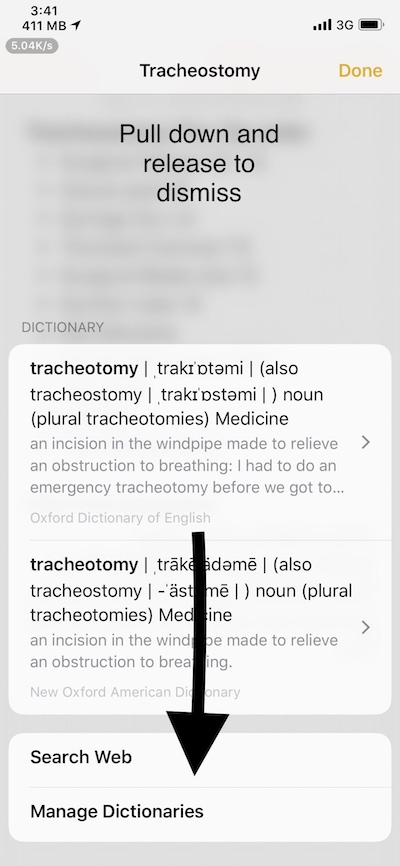
It’s very clear — they want to implement pull-down-to-close. I instantly felt “this is a great idea, much better experience than adding a Done button in the bottom left.” As shown below.
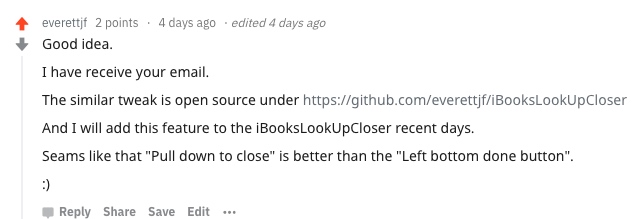
At the time I replied without thinking:
Remote View Controller
iBooks opens the word lookup UI; use cycript to view the VC, as follows:
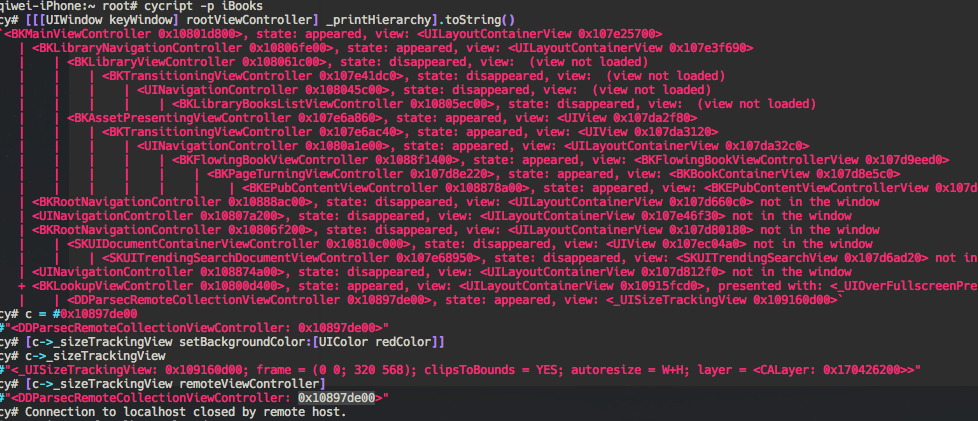
Again I saw the class DDParsecRemoteCollectionViewController. This class is a private class.
You can see the definition is as follows:
@interface DDParsecRemoteCollectionViewController : _UIRemoteViewController <DDParsecHostVCInterface> {
What the heck is _UIRemoteViewController? Searching seems to turn up only these three articles from 2012:
https://oleb.net/blog/2012/10/remote-view-controllers-in-ios-6/
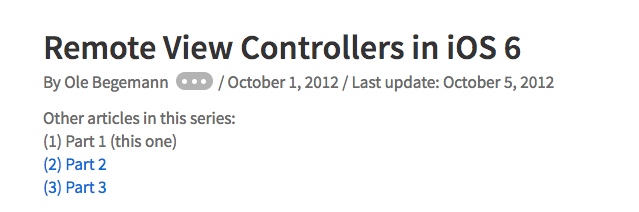
It turns out Apple already implemented this remote-process ViewController mechanism back in iOS 6. It’s quite similar to Android’s multi-process mechanism, such as the multi-process architecture on the Android side of WeChat Mini Programs. Presumably today’s WKWebView uses a similar mechanism too.
And so I realized I had replied too soon (showed off too early).

Finding the Target Process
A guru from “iOS Application Reverse Engineering” gave me a tip, saying “remember, this class contains the ID of the remote process.” Suddenly it all made sense — since it’s a multi-process architecture, such a natural conclusion, how did I not think of it at the time?
In _UIRemoteViewController I found these two properties.
@property (nonatomic, readonly) NSString *serviceBundleIdentifier;
@property (nonatomic, readonly) int serviceProcessIdentifier;
Print them out, aha.
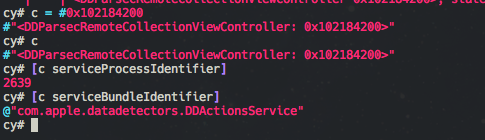
Aha, the bundle id com.apple.datadetectors.DDActionsService
Open another shell, run ps aux, and sure enough I found this process.
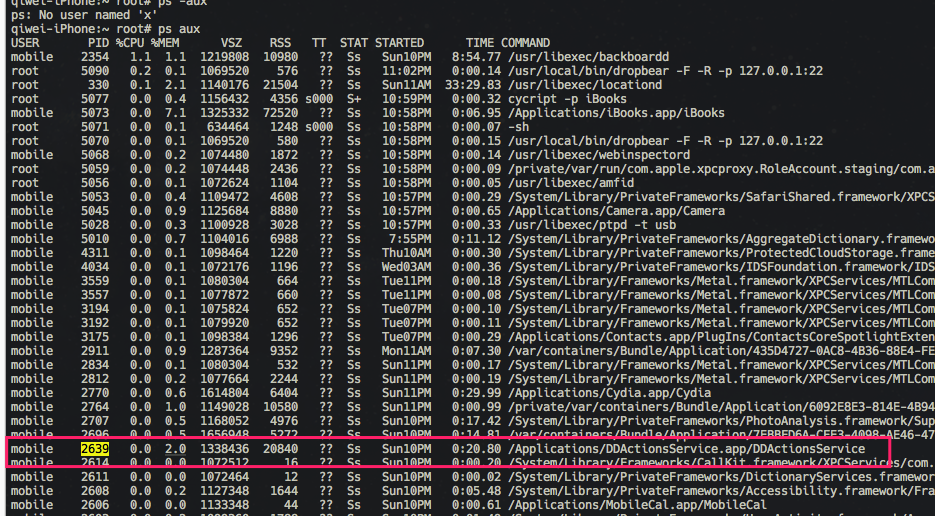
The Target Shifts to the New Process
At this point, our dynamic library needs to be injected into the new process DDActionsService. Change the tweak’s injection bundle id to com.apple.datadetectors.DDActionsService.
Since it’s another process, that brings a new benefit. Hooking this one process means that iBooks, Safari, and any other apps using this process’s service all indirectly get this “pull-down-to-close” feature.
Nice, interesting, let’s continue.
Finding the Dictionary’s Home Page
Since this process has no keyWindow, the approach of printing the VC tree above no longer works. But there’s always a way.
First, quickly scp it out and take a look — class-dump.
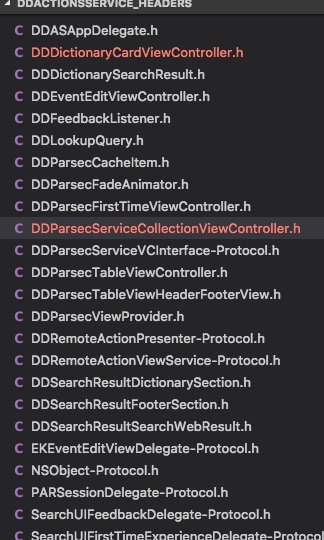
Lots of Protocols, but not many truly useful classes. So just hook a few at random to see which class is the dictionary’s home page. Using MonkeyDev’s Logos Tweak (or CaptainHook Tweak), I eventually found that DDParsecTableViewController is the home page.
#import <UIKit/UITableViewController.h>

@interface DDParsecTableViewController : UITableViewController
{
}

- (void)loadView;

@end
Looking at the header file, I confirmed it’s a subclass of UITableViewController.
Finding the Delegate
So to implement pull-down-to-close, I roughly need to know the three moments “touch down, move, release.” UITableViewDelegate implements UIScrollViewDelegate, and UIScrollViewDelegate has the three events we need.
So I need to find out who the tableView’s delegate is in this UITableViewController. Since it’s not convenient to quickly get the VC stack via keyWindow in cycript, I first hooked DDParsecTableViewController’s viewWillAppear event (or viewDidAppear, or any other event) to print out the self address of DDParsecTableViewController.
NSLog(@"%p",self);
Knowing the address, I then used cycript to quickly find the delegate.
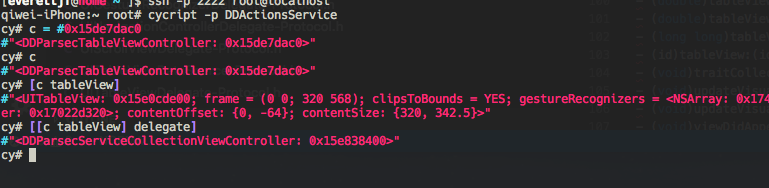
Found DDParsecServiceCollectionViewController — this class — and we’re almost done.
- (void)scrollViewWillBeginDragging:(UIScrollView *)scrollView{
- (void)scrollViewWillEndDragging:(UIScrollView *)scrollView withVelocity:(CGPoint)velocity targetContentOffset:(inout CGPoint *)targetContentOffset{

- (void)scrollViewDidScroll:(UIScrollView *)scrollView;
Through hooking or category, add the pull-down-to-close logic code respectively. Finally implemented it.
Done
For the specific code, refer to:
Demo Video of the Result
I couldn’t figure out how to share a video on Weibo, so I’ll post the Twitter one too https://twitter.com/everettjf/status/1038359512384585729
Uploading to bigboss
I estimate that by September 10, 2018 you’ll be able to search for DictionaryPullDownToClose in Cydia’s bigboss source.
Summary
- There’s always someone in the world with the same need as you.
- Maybe they have a better implementation.
- Search diligently.
- If you can’t find it, either the need has no value, or it’s priceless.
The four points above are pure nonsense.
Having implemented this feature, reading English with iBooks or Safari is more enjoyable. Happy.
iOS中的App也存在多进程架构,而且是从iOS6就开始了,只是苹果一直自己在用。
需求来源
iBooksLookUpCloser 发布到bigboss后的第二天,一位老外朋友就发来邮件,让我看看这个一个月前reddit的提问 https://www.reddit.com/r/jailbreak/comments/95vjgd/request_please_some_one_fulfill_this_request_pull/?st=JLMLKHHM&sh=093359ff 。
关于iBooksLookUpCloser参考上篇文章 https://xnu.app/2018/09/03/ibooks-dictionary-close-tweak/ 。
很清楚,是想实现下拉关闭。我瞬间感觉“这个想法好啊,比左下角加个Done按钮体验好多了“。如下图所示。
当时不假思索回复了一句:
Remote View Controller
iBooks打开查单词的界面,cycript查看VC,如下:
仍然是看到了 DDParsecRemoteCollectionViewController 这个类。这个类是个私有类。
可以看到定义如下:
@interface DDParsecRemoteCollectionViewController : _UIRemoteViewController <DDParsecHostVCInterface> {
_UIRemoteViewController 是个什么鬼?搜索貌似只发现了这三篇2012年的文章:
https://oleb.net/blog/2012/10/remote-view-controllers-in-ios-6/
原来苹果早在iOS6就实现了这种远程进程ViewController的机制。颇有类似Android多进程机制,比如微信小程序的Android端多进程架构。想必如今的WKWebView也是类似机制。
就这样,我发现回复太早了(装X装早了)。
找到目标进程
经《iOS应用逆向工程》某位大佬提示,说“记得这个类里包含远程进程的ID”。顿时豁然开朗,既然是多进程架构,这么顺理成章的事情,当时怎么没想到呢。
在 _UIRemoteViewController 中找到了这两个属性。
@property (nonatomic, readonly) NSString *serviceBundleIdentifier;
@property (nonatomic, readonly) int serviceProcessIdentifier;
打印出来,啊哈。
啊哈,bundle id com.apple.datadetectors.DDActionsService
开另一个shell,ps aux 果然找到了这个进程。
目标转移到了新进程
至此,我们的动态库需要注入到新的进程 DDActionsService。 修改tweak的注入bundle id 为 com.apple.datadetectors.DDActionsService 。
既然是另一个进程,那带来了一个新的好处。hook了这一个进程,那iBooks和Safari以及其他使用这个进程服务的App都间接加上了这个“下拉关闭”的功能。
嗯不错,有意思,继续。
找到字典首页
由于这个进程没有keyWindow, 上文打印VC树的方式无效了。但总有办法啦。
先马上scp出来一份,看看究竟,class-dump。
很多Protocol,真实有效的类并不多,那就随便hook几个看看哪个类是字典的首页。使用 MonkeyDev 的Logos Tweak (或CaptainHook Tweak) ,最终发现 DDParsecTableViewController 是首页。
#import <UIKit/UITableViewController.h>

@interface DDParsecTableViewController : UITableViewController
{
}

- (void)loadView;

@end
看下头文件,确认是一个UITableViewController的子类。
找到delegate
那么为了实现下拉关闭,大概需要知道“触摸按下,移动,松开”三个时间,UITableViewDelegate 实现了 UIScrollViewDelegate , UIScrollViewDelegate 有我们需要的三个事件。
那么需要找到 UITableViewController 中tableView的delegate是谁。由于不方便在cycript中快速通过keyWindow获取VC栈,那就先通过 hook DDParsecTableViewController 的viewWillAppear事件(或者viewDidAppear等任意事件),打印出 DDParsecTableViewController 的self地址。
NSLog(@"%p",self);
知道了地址,然后cycript快速找到delegate
找到了 DDParsecServiceCollectionViewController 这个类就接近完工了。
- (void)scrollViewWillBeginDragging:(UIScrollView *)scrollView{
- (void)scrollViewWillEndDragging:(UIScrollView *)scrollView withVelocity:(CGPoint)velocity targetContentOffset:(inout CGPoint *)targetContentOffset{

- (void)scrollViewDidScroll:(UIScrollView *)scrollView;
分别通过hook或者category的方式,加上下拉关闭的逻辑代码。终于实现了。
完工
具体代码参考:
实现效果视频
没找到微博的视频怎么分享,也放推特的吧 https://twitter.com/everettjf/status/1038359512384585729
上传bigboss
估计2018年9月10日就能在cydia的bigboss源里搜到 DictionaryPullDownToClose 了。
总结
- 世界上总有和你一样需求的人。
- 或许他有更好的实现方法。
- 努力找寻。
- 找不到的话,要么这个需求没价值,要么就是无价。
上面四条纯属瞎掰掰。
实现了这个功能,用iBooks或Safari看英文更愉快了,开森。