writing
Exploring Facebook's iOS Client - The FBInjectable Section探索 Facebook iOS 客户端 - Section FBInjectable
· Performance & internals
Translated from Chinese — .
On this page
- Observation
- How to Locate It
- Decrypt (crack the shell)
- Initial Search with strings
- Analyze with Hopper and IDA
- Initial Location in Hopper
- Confirm the Meaning of FBInjectable with MachOView
- Confirm the Meaning of getsectiondata’s Return Value with lldb
- Initial Conclusion
- View with class-dump
- Look at the lldb Call Stack Again
- Look at the Headers Again
- Conclusion
- Creating FBInjectable
- Recap
- Example and Further Explanation
- What’s the Benefit
- Difficulties Encountered During Exploration
- Summary
Observation
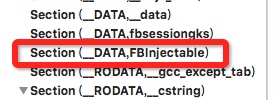
Viewing Facebook’s executable with MachOView, I found the FBInjectable and fbsessiongks data sections. This article explores the creation and purpose of the FBInjectable data section.
How to Locate It
Device: iPhone5, jailbroken, iOS 8.4, armv7
Decrypt (crack the shell)
Use Clutch or dumpdecrypted to get the unencrypted Facebook armv7 executable.
Initial Search with strings
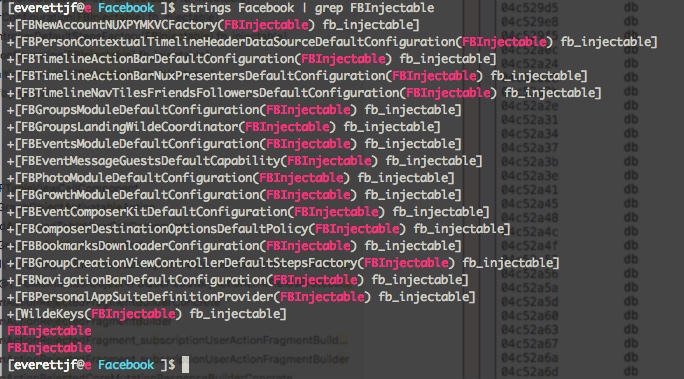
Use strings to search for the keyword FBInjectable; we can use the string as an entry point.
Analyze with Hopper and IDA
It’s best to analyze with both Hopper and IDA. Each App has its own pros and cons; use them together.
Analysis is slow; on my MBP CPU 2.2 i7 it took over an hour.
After analysis is done, you can freely roam through arm.
Initial Location in Hopper
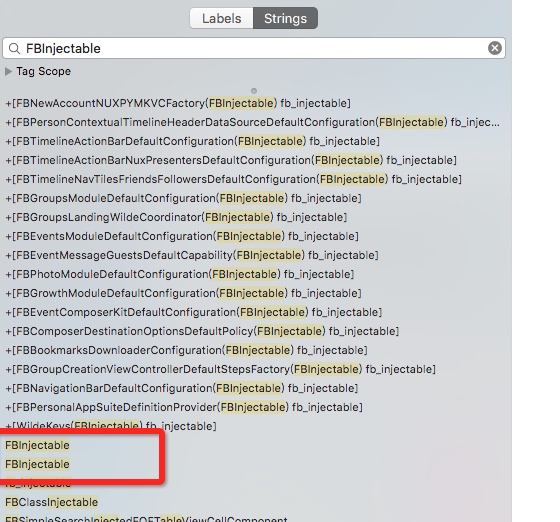
Search for the string FBInjectable
Look at one that has cross-references


Jump over to view it; we can see the address is at 0x0334cc1c, and FBInjectable is the third argument to getsectiondata.
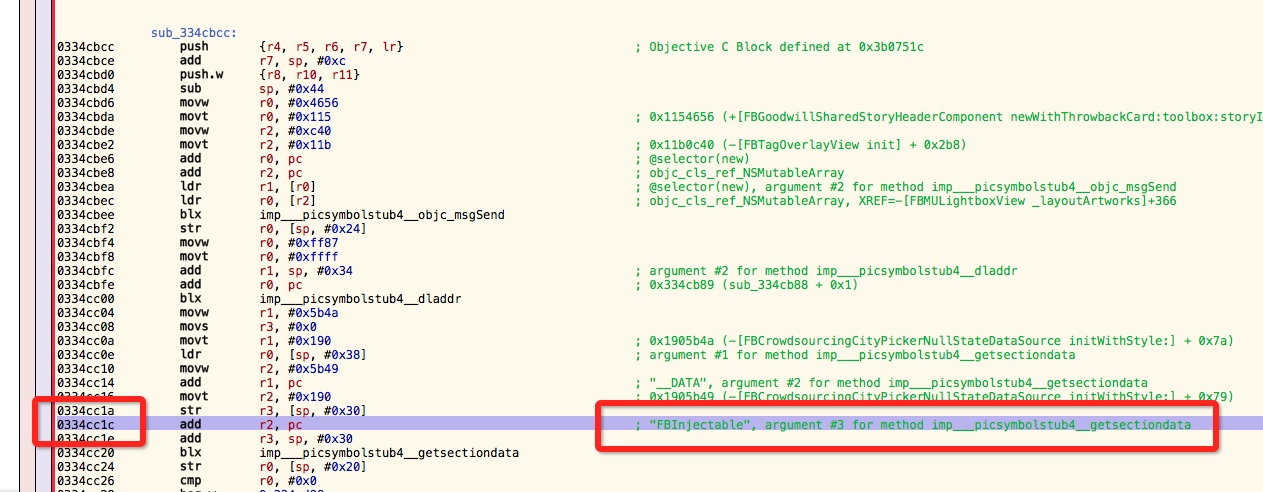
The call address of getsectiondata is 0x0334cc20.
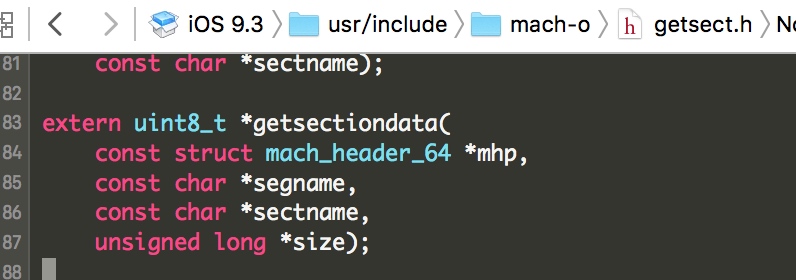
getsectiondata’s definition is as follows:
Disassembly:
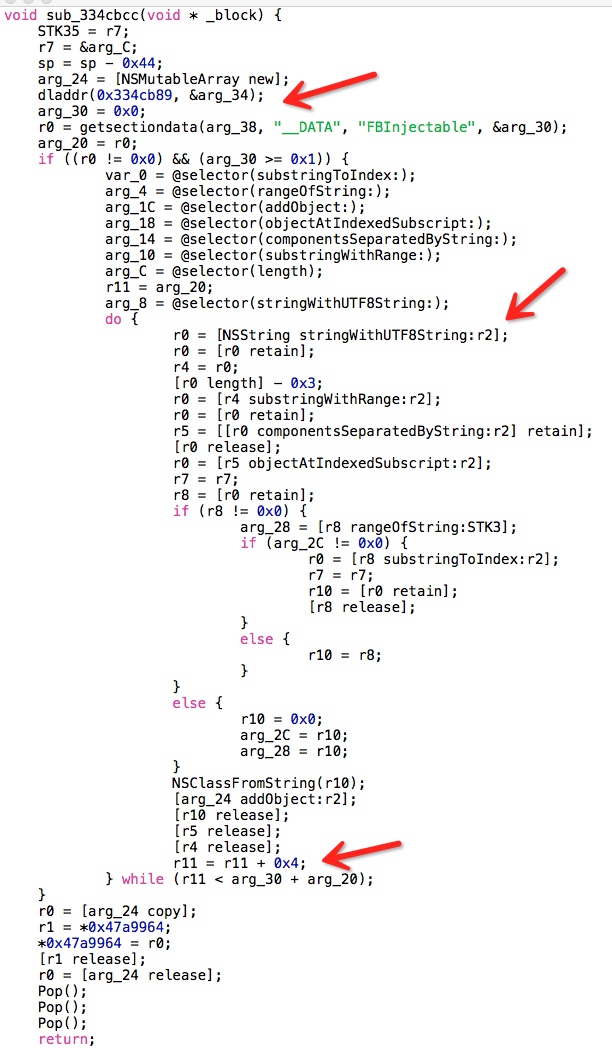
We need to pay special attention to the r11 variable. Hopper’s disassembled code seems to drop some very key r2 info. But after reading it through, we can roughly tell it’s iterating over getsectiondata’s return value, doing some processing every 4 bytes.
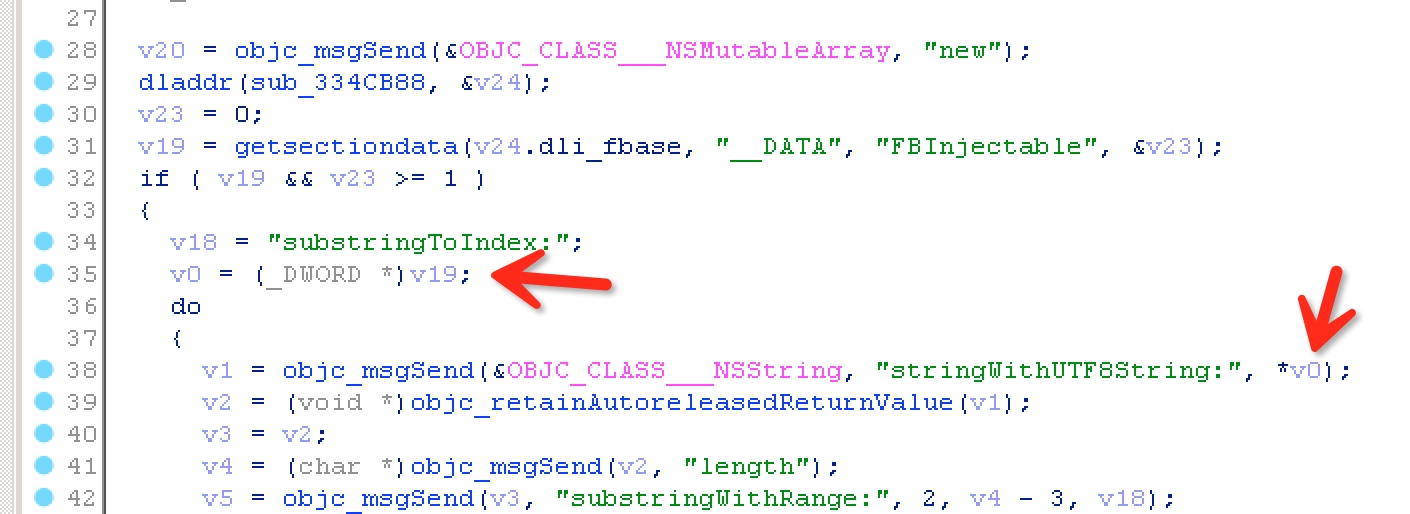
If IDA has the F5 decompile feature, we can see the image below. It doesn’t drop the key info here. v19 is the return value, cast to a DWORD pointer (I’m familiar with this from Windows development — double word, word is two bytes, DWORD is four bytes), and then this pointer is dereferenced.
That is, it treats the first four bytes in getsectiondata’s return buffer as the memory address of a string.
Confirm the Meaning of FBInjectable with MachOView
Look again at the first four bytes of the FBInjectable section, B8DB8404; because of little-endian, the memory address is 0x0484DBB8.
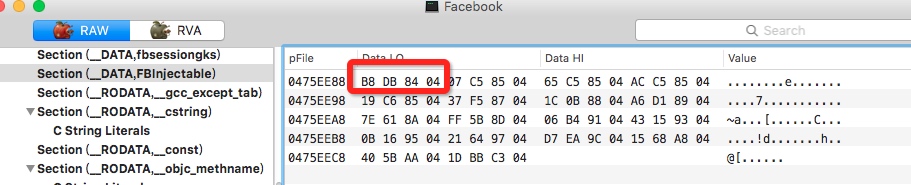
Jump to this address in Hopper:

The other four-byte groups are all like this.
Confirm the Meaning of getsectiondata’s Return Value with lldb
To confirm whether Facebook calls getsectiondata after launch and passes in FBInjectable, we can first set a conditional breakpoint.
Launch the App with debugserver:
everettjfs-iPhone:~ root# debugserver -x backboard *:1234 /var/mobile/Containers/Bundle/Application/A7811200-13B6-4053-BAED-8D3E8DE7C929/Facebook.app/Facebook
Add a conditional breakpoint:
70 = F
95 = _

(lldb) br set -n getsectiondata -c '(int)*(char*)$r2 == 70'
Continue running, and we find it can break here.
Single-step, and print the return value, the data in r0.

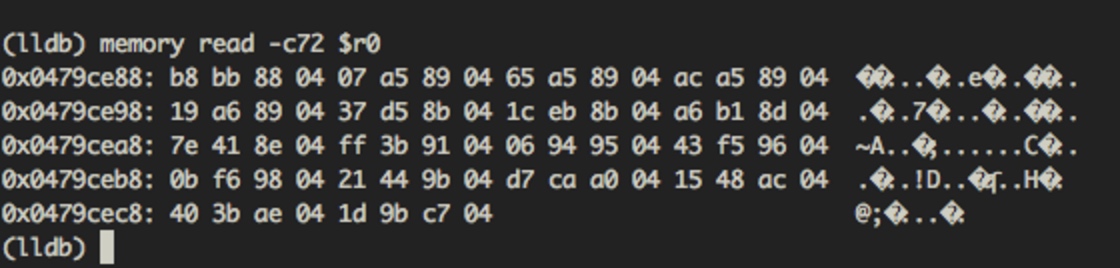
Here we find a problem: it’s different from the FBInjectable section’s data.
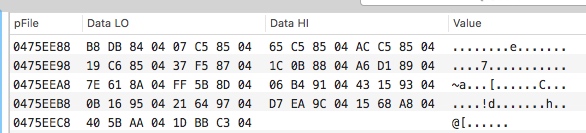
But we find a pattern: subtracting each 4-byte value gives exactly the ASLR offset address. (For example: 0x0488bbb8 - 0x0484dbb8 = 0x3e000)
That is, the FBInjectable data section’s data was modified before getsectiondata was called. Let’s ignore the modification method for now (a modification method will be introduced below) and keep exploring.
Print the current method’s return value.
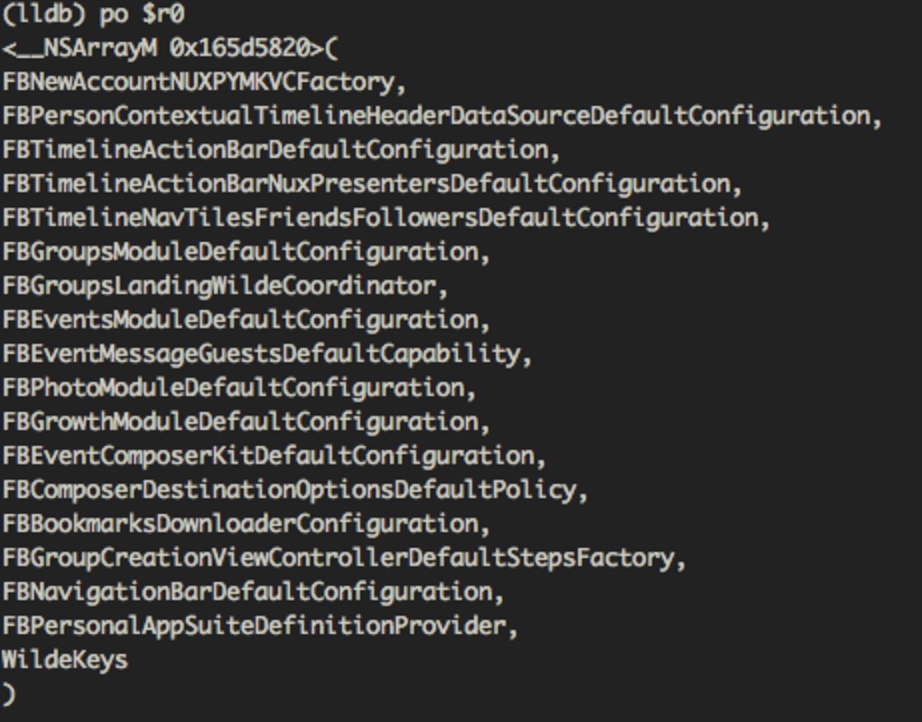
We can see this is very similar to the result of the initial strings search for FBInjectable.
PS: Using a conditional breakpoint this step makes launch especially slow. But the purpose of the conditional breakpoint is only to confirm whether this call exists. Since debugging requires launching the App many times, you can also break directly at the target address. (On launch, first break at start, then use image list to view the ASLR offset, then compute getsectiondata’s address, then br s -a ADDRESS.)
Initial Conclusion
From this we can tell that what’s stored in FBInjectable is

the addresses of these kinds of strings; on armv7 (32-bit) each address takes 4 bytes, and the 18 addresses above take a total of 72 bytes. Through FBInjectable’s data we can get these 18 strings.
View with class-dump
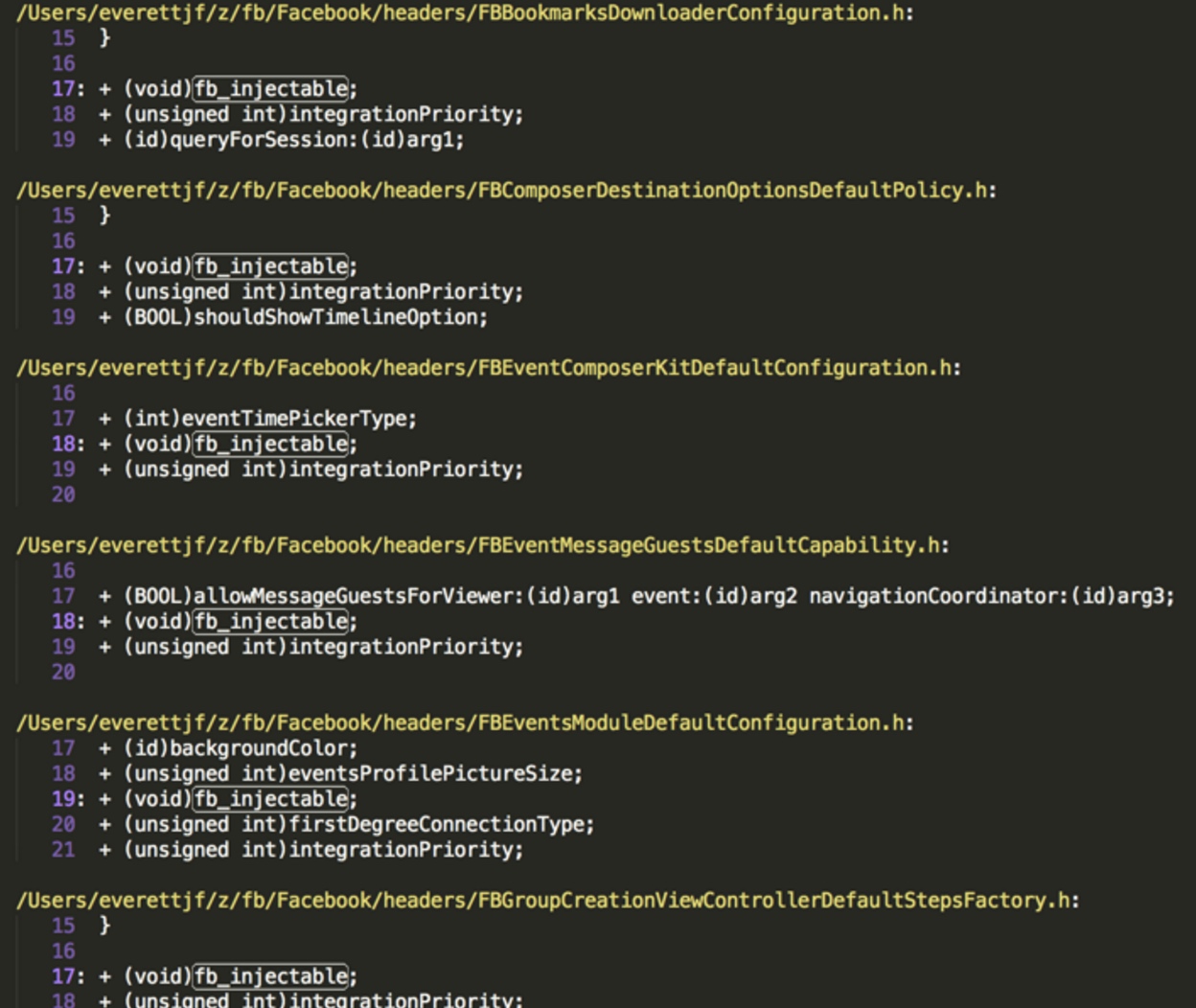
Search for fb_injectable in the headers,
Look at the lldb Call Stack Again

In the image we see lots of folly symbols. folly is Facebook’s open-source C++ Library focused on performance, but I don’t know why it has such a big impact on lldb’s symbols. (When I have time I need to learn more about how lldb’s symbols are looked up.) Anyway, the addresses are correct. We can subtract the ASLR offset from the addresses in the frames to get the addresses in the file.
Based on the call stack, we can trace to the following location:
The jump here may be a bit big, but based on the addresses of those frames in the call stack, it’s easy to see the image below (this is just one of the 18 configurations).
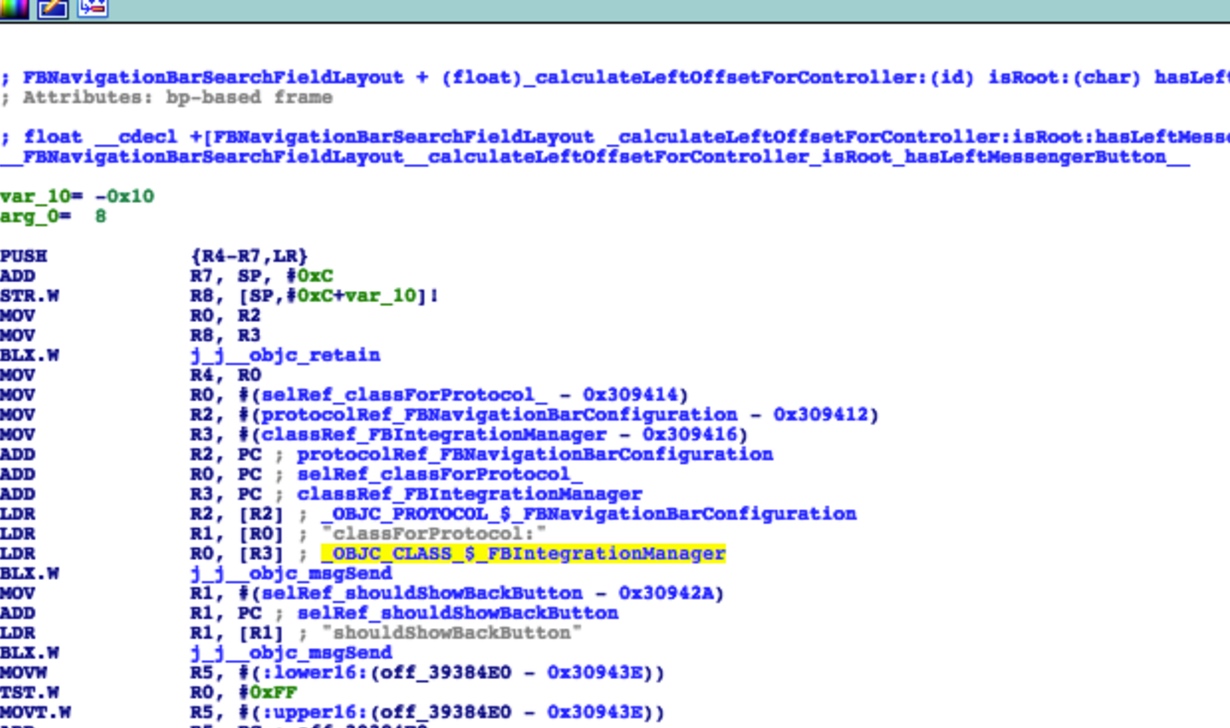
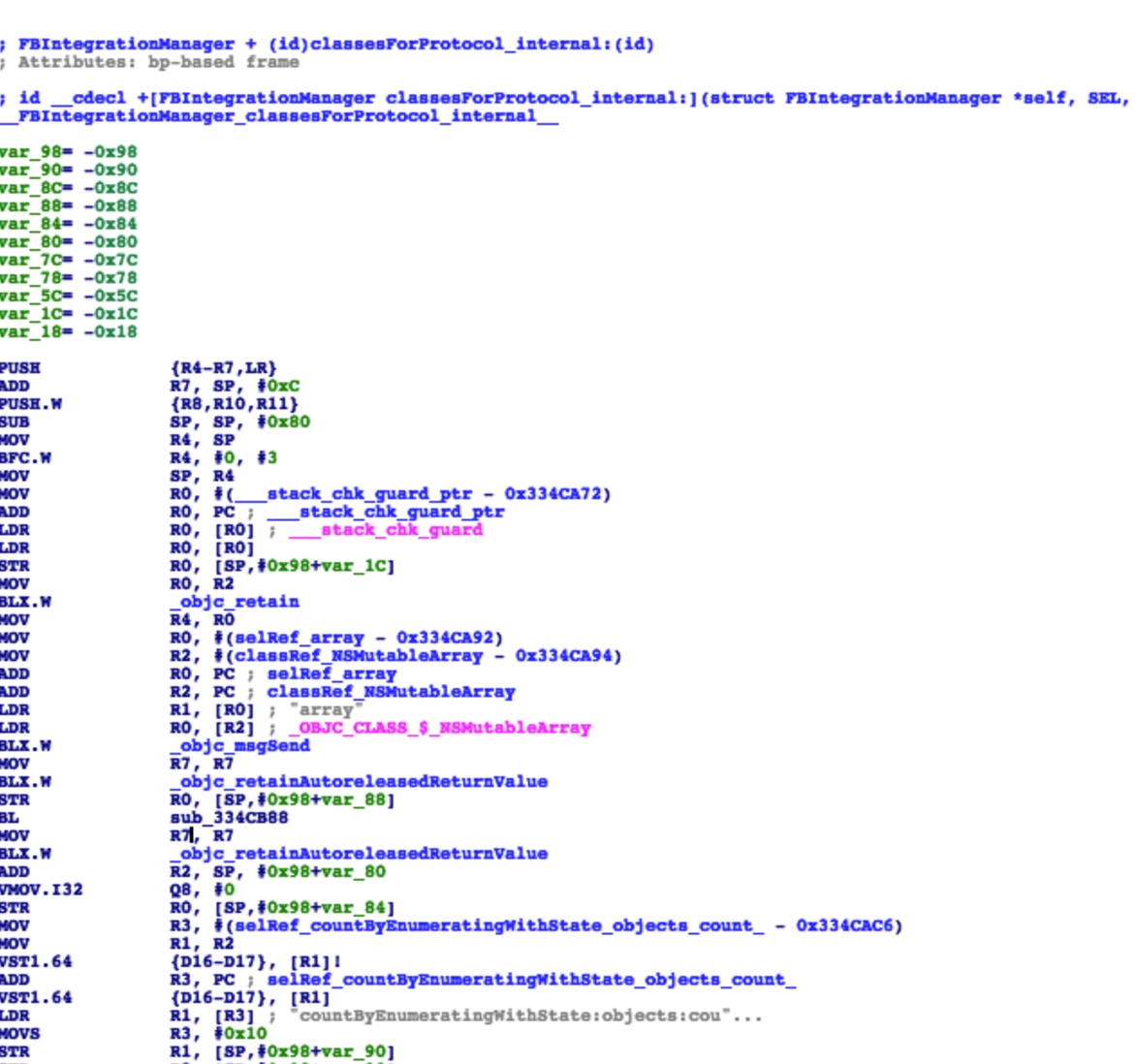
The general flow is as follows:
FBNavigationBarSearchFieldLayout class’s
+ (float)_calculateLeftOffsetForController:(id)arg1 isRoot:(BOOL)arg2 hasLeftMessengerButton:(BOOL)arg3;
calls FBIntegrationManager class’s
+ (Class)classForProtocol:(id)arg1;
which further calls
+ (id)classesForProtocol_internal:(id)arg1;
classesForProtocol_internal, on the first call (dispatch_once), loads FBInjectable’s content and gets these 18 strings, then converts them into the corresponding classes.
classForProtocol’s argument is the protocol FBNavigationBarConfiguration, and through this protocol it gets the class FBNavigationBarDefaultConfiguration.
Finally it calls a static method,
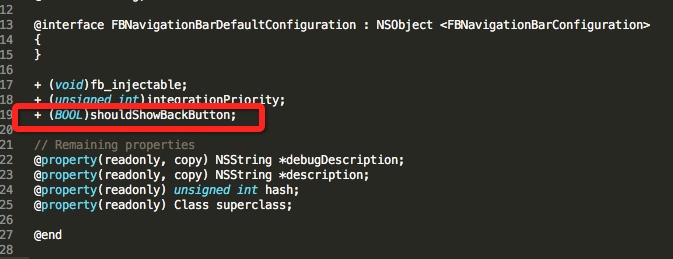
Look at the Headers Again
These 18 classes have several things in common
- They all contain the fb_injectable method.
- They all contain the integrationPriority method.
- They’re all static methods.
-
They each implement a similarly-named protocol. For example: FBNavigationBarDefaultConfiguration implements the protocol FBNavigationBarConfiguration.

- The protocol mentioned in item 4 inherits another protocol FBIntegrationToOne.
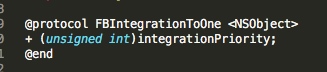
Conclusion
At this point, we basically know FBInjectable’s purpose, and can draw the following conclusion.
The FBInjectable section is used to change some configurations during the packaging stage. This configuration may affect the UI, functionality (Policy), and various other aspects.
FBNewAccountNUXPYMKVCFactory,
FBPersonContextualTimelineHeaderDataSourceDefaultConfiguration,
FBTimelineActionBarDefaultConfiguration,
FBTimelineActionBarNuxPresentersDefaultConfiguration,
FBTimelineNavTilesFriendsFollowersDefaultConfiguration,
FBGroupsModuleDefaultConfiguration,
FBGroupsLandingWildeCoordinator,
FBEventsModuleDefaultConfiguration,
FBEventMessageGuestsDefaultCapability,
FBPhotoModuleDefaultConfiguration,
FBGrowthModuleDefaultConfiguration,
FBEventComposerKitDefaultConfiguration,
FBComposerDestinationOptionsDefaultPolicy,
FBBookmarksDownloaderConfiguration,
FBGroupCreationViewControllerDefaultStepsFactory,
FBNavigationBarDefaultConfiguration,
FBPersonalAppSuiteDefinitionProvider,
WildeKeys
These classes share the following info:
- The +(void)fb_injectable method.
- This method is just a marker.
- Used to conveniently locate this class.
- They each implement a protocol corresponding to the current class.
- For example: the FBNewAccountNUXPYMKVCFactory class corresponds to the FBNewAccountNUXPYMKVCFactory protocol.
- Another example: the FBNavigationBarDefaultConfiguration class corresponds to the FBNavigationBarConfiguration protocol.
- Another example: the FBEventsModuleDefaultConfiguration class corresponds to the FBEventsModuleConfiguration protocol.
- This corresponding protocol must implement FBIntegrationToOne. That is, the current class also includes the + (unsigned int)integrationPriority; method.
- For example: FBNewAccountNUXPYMKVCFactory, FBNavigationBarConfiguration, FBEventsModuleConfiguration all inherit the FBIntegrationToOne protocol. This causes classes like FBNewAccountNUXPYMKVCFactory to also include the + (unsigned int)integrationPriority; method.
- This method is used to specify the lookup priority.
- FBIntegrationToOne, by its name, can only integrate 1. It means choosing 1 based on priority.
For example:
float __cdecl +[FBNavigationBarSearchFieldLayout _calculateLeftOffsetForController:isRoot:hasLeftMessengerButton:]

FBNavigationBarConfiguration

循环判断哪个类实现了这个协议,最后找到FBNavigationBarDefaultConfiguration,然后获取shouldShowBackButton。
Creating FBInjectable
You can use the __attribute((used,section("segmentname,sectionname"))) keyword to place a variable into a special section.
attribute reference http://gcc.gnu.org/onlinedocs/gcc-3.2/gcc/Variable-Attributes.html
For example:
char * kString1 __attribute((used,section("__DATA,FBInjectable"))) = "string 1";
char * kString2 __attribute((used,section("__DATA,FBInjectable"))) = "string 2";
char * kString3 __attribute((used,section("__DATA,FBInjectable"))) = "string 3";
PS: Article correction: the code above changed unused to used. No reference is needed, which avoids being optimized away in release.
Recap
A compile-time configuration selection mechanism.
At compile time, certain configuration classes are selected to be included in compilation (more precisely, at link time, certain configuration classes’ object files are selected to be included in linking) or assigned a configuration priority. At runtime, the App gets all configuration classes through FBInjectable, and uses each configuration class’s corresponding protocol to get the specific configuration currently in use.
Example and Further Explanation
The Demo imitates this mechanism.
Code: https://github.com/everettjf/Yolo/tree/master/FBInjectableTest
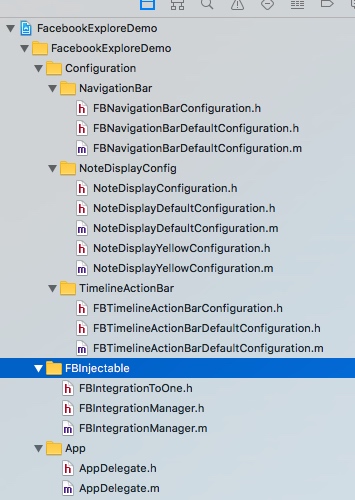
The Demo implements three configuration classes; each configuration class uses code like the following to automatically create the FBInjectable section. (printf is just to prevent it from being optimized away by the compiler; there should be other ways to prevent it from being optimized away, but I haven’t found one yet — if you know, please tell me. Thanks to classmate vr2d in the iOS reverse-engineering group: changing the first argument of attribute to used avoids being optimized away in release. I still need to be careful — at the time I felt a bit weird seeing unused, but didn’t carefully look up its meaning.)
#define FBInjectableDATA __attribute((used, section("__DATA,FBInjectable")))
char * kNoteDisplayDefaultConfiguration FBInjectableDATA = "+[NoteDisplayDefaultConfiguration(FBInjectable) fb_injectable]";

@implementation NoteDisplayDefaultConfiguration

+ (void)fb_injectable{
}
+ (NSUInteger)integrationPriority{
    return 0;
}

+ (BOOL)showDeleteButton{
    return YES;
}
+ (UIColor *)noteBackgroundColor{
    return [UIColor blackColor];
}

@end
Reading the FBInjectable section:
        Dl_info info;
        dladdr(readConfigurationClasses, &info);

#ifndef __LP64__
//        const struct mach_header *mhp = _dyld_get_image_header(0); // both works as below line
        const struct mach_header *mhp = (struct mach_header*)info.dli_fbase;
        unsigned long size = 0;
        uint32_t *memory = (uint32_t*)getsectiondata(mhp, "__DATA", InjectableSectionName, & size);
#else /* defined(__LP64__) */
        const struct mach_header_64 *mhp = (struct mach_header_64*)info.dli_fbase;
        unsigned long size = 0;
        uint64_t *memory = (uint64_t*)getsectiondata(mhp, "__DATA", InjectableSectionName, & size);
#endif /* defined(__LP64__) */
The final usage is as follows:
    Class config = [FBIntegrationManager classForProtocol:@protocol(NoteDisplayConfiguration)];
    NSLog(@"cls = %@",config);
    NSLog(@"color = %@",[config noteBackgroundColor]);
What’s the Benefit
Configuration files can be scattered across their own files, saving the code to register configuration files uniformly. This way configuration files are easier to add and remove.
Difficulties Encountered During Exploration
http://iosre.com/t/facebook-app-fbinjectable-section/4685
At the time I hadn’t written the Demo yet, and thought it needed manual modification, but it suddenly dawned on me while writing the Demo.
Summary
The steps above are only the steps I re-organized after exploration; in the actual exploration the steps may interleave with each other.
What’s strange is that Facebook doesn’t seem to have mentioned this “configuration selection” little trick in any article. Neither Twitter nor Google turned up any info about FBInjectable. Fortunately we can explore it through reverse engineering.
文章目录
现象
MachOView查看Facebook的可执行文件,发现 FBInjectable 和 fbsessiongks 的数据段,这篇文章就探索下 FBInjectable 数据段的产生与用途。
如何定位
设备:iPhone5 越狱 iOS8.4 armv7
砸壳
Clutch 或 dumpdecrypted,获取到未加密的Facebook armv7 可执行文件。
初步查找 strings
使用strings 搜搜关键词FBInjectable,可知可以通过字符串作为切入点。
使用Hopper和IDA分析
使用Hopper和IDA分析好。两个App各有优缺点,配合使用。
分析较慢,我的MBP CPU2.2 i7 分析1个小时以上。
分析完成后就可以畅游arm了。
Hopper中初步定位
搜索字符串FBInjectable
查看存在交叉引用的一个
跳转过去查看,可知地址在 0x0334cc1c,且FBInjectable是作为 getsectiondata 的第三个参数。
getsectiondata 的调用地址为 0x0334cc20。
getsectiondata 的定义如下:
反汇编:
需要重点关注下,r11这个变量。Hopper反汇编的代码貌似丢掉一些很关键的r2的信息。但看完能大概知道这里在遍历 getsectiondata的返回值,每4个字节做了一些处理。
如果IDA 有F5 反汇编功能,可以看到下图。这里没有丢掉关键的信息。v19作为返回值,转换为DWORD指针(做Windows开发比较熟悉,double word,word 是双字节,DWORD就是四字节),然后又把这个指针解引用。
也就是把getsectiondata的返回值buffer中的前四个字节当做字符串的内存地址。
MachOView 确认FBInjectable含义
再次看 FBInjectable 段的前四个字节,B8DB8404,由于little-endian的原因,内存地址为0x0484DBB8。
Hopper中跳转到这个地址:
其他四个字节都是这样。
lldb 确认getsectiondata返回值含义
为确认Facebook启动后是否调用了 getsectiondata,并传入了FBInjectable,可以先条件断点。
使用debugserver启动App:
everettjfs-iPhone:~ root# debugserver -x backboard *:1234 /var/mobile/Containers/Bundle/Application/A7811200-13B6-4053-BAED-8D3E8DE7C929/Facebook.app/Facebook
添加条件断点:
70 = F
95 = _

(lldb) br set -n getsectiondata -c '(int)*(char*)$r2 == 70'
继续运行,发现可以断下来。
单步运行,打印返回值 r0的数据。
到这里我们发现个问题,与FBInjectable section的数据不一样。
但发现个规律,每4位相减正好是 ASLR 偏移地址。(例如: 0x0488bbb8 - 0x0484dbb8 = 0x3e000)
也就是说 FBInjectable 数据段 的数据在调用getsectiondata之前就被修改了。这里暂且忽略修改的方法(下文会介绍一种修改方法),继续探索。
打印当前方法的 返回值。
可见这里与开始strings查找FBInjectable时的结果很相似,
PS:这一步使用条件断点会导致启动特别慢。但条件断点的目的只是为了确认是否有这个调用。由于调试中要多次启动App,也可以直接断点到目标地址。(启动时,先断点到start,然后image list 查看ASLR偏移地址,再计算出getsectiondata的地址,然后 br s -a ADDRESS)
初步结论
由此可知,FBInjectable中存储的是
这类字符串的地址,armv7(32位)下每个地址占用4个字节,上图18个地址总共占用72个字节。通过FBInjectable的数据可以获取到这18个字符串。
class-dump查看
在头文件中搜索fb_injectable,
再看lldb调用栈
图中看到好多folly的符号,folly是Facebook开源的专注于性能的C++ Library,但不知为何会对lldb的符号有这么大的影响。(有时间需要进一步了解下lldb的符号如何查找的)。不过,地址都是正确的。可以通过frame中的地址减去ASLR偏移地址,得到文件中的地址。
根据调用堆栈,可以跟踪到如下位置:
这里跨度可能有点大,但根据调用栈中的那些frame的地址,很容易看到下图内容(这只是18个配置中的一个)。
大概流程如下:
FBNavigationBarSearchFieldLayout 类的
+ (float)_calculateLeftOffsetForController:(id)arg1 isRoot:(BOOL)arg2 hasLeftMessengerButton:(BOOL)arg3;
调用了 FBIntegrationManager 类的
+ (Class)classForProtocol:(id)arg1;
进一步调用了
+ (id)classesForProtocol_internal:(id)arg1;
classesForProtocol_internal 会在首次调用时(dispatch_once)时加载FBInjectable的内容并获取这18个字符串,进而转化为对应的类。
classForProtocol的参数是 协议 FBNavigationBarConfiguration,通过这个协议获取到 类FBNavigationBarDefaultConfiguration。
最终调用静态方法,
再看头文件
这18个类有几个共同点
- 都包含方法 fb_injectable。
- 都包含方法 integrationPriority。
- 都是静态方法。
-
都会实现一个类似名称的协议。例如:FBNavigationBarDefaultConfiguration 实现协议 FBNavigationBarConfiguration。
- 第4条提到的协议都会继承另一个协议 FBIntegrationToOne。
结论
至此,基本能知道FBInjectable的作用了,可以得出如下结论。
FBInjectable section用于在打包阶段更改一些配置。这个配置可能影响到界面(UI)、功能(Policy)等各个方面。
FBNewAccountNUXPYMKVCFactory,
FBPersonContextualTimelineHeaderDataSourceDefaultConfiguration,
FBTimelineActionBarDefaultConfiguration,
FBTimelineActionBarNuxPresentersDefaultConfiguration,
FBTimelineNavTilesFriendsFollowersDefaultConfiguration,
FBGroupsModuleDefaultConfiguration,
FBGroupsLandingWildeCoordinator,
FBEventsModuleDefaultConfiguration,
FBEventMessageGuestsDefaultCapability,
FBPhotoModuleDefaultConfiguration,
FBGrowthModuleDefaultConfiguration,
FBEventComposerKitDefaultConfiguration,
FBComposerDestinationOptionsDefaultPolicy,
FBBookmarksDownloaderConfiguration,
FBGroupCreationViewControllerDefaultStepsFactory,
FBNavigationBarDefaultConfiguration,
FBPersonalAppSuiteDefinitionProvider,
WildeKeys
这些类有以下共同信息:
- +(void)fb_injectable 方法。
- 这个方法只是个标记。
- 用于方便的查找到这个类。
- 都会实现一个与当前类对应的协议。
- 例如:FBNewAccountNUXPYMKVCFactory类 对应 FBNewAccountNUXPYMKVCFactory协议。
- 再例如:FBNavigationBarDefaultConfiguration类 对应 FBNavigationBarConfiguration协议。
- 再例如:FBEventsModuleDefaultConfiguration类 对应 FBEventsModuleConfiguration协议。
- 这个对应的协议一定会实现 FBIntegrationToOne。也就是说当前类还包括 + (unsigned int)integrationPriority; 方法。
- 例如:FBNewAccountNUXPYMKVCFactory、FBNavigationBarConfiguration、FBEventsModuleConfiguration都会继承 FBIntegrationToOne 协议。就导致 FBNewAccountNUXPYMKVCFactory等类也都包含 + (unsigned int)integrationPriority; 方法。
- 这个方法用于指定查找优先级。
- FBIntegrationToOne 从名称看,只能集成1个。就是根据优先级选择1个的意思。
例如:
float __cdecl +[FBNavigationBarSearchFieldLayout _calculateLeftOffsetForController:isRoot:hasLeftMessengerButton:]

FBNavigationBarConfiguration

循环判断哪个类实现了这个协议,最后找到FBNavigationBarDefaultConfiguration,然后获取shouldShowBackButton。
FBInjectable的创建
可以使用 __attribute((used,section("segmentname,sectionname"))) 关键字把某个变量的放入特殊的section中。
attribute 参考 http://gcc.gnu.org/onlinedocs/gcc-3.2/gcc/Variable-Attributes.html
例如:
char * kString1 __attribute((used,section("__DATA,FBInjectable"))) = "string 1";
char * kString2 __attribute((used,section("__DATA,FBInjectable"))) = "string 2";
char * kString3 __attribute((used,section("__DATA,FBInjectable"))) = "string 3";
PS:文章修改:上面代码unused改为used。不需要引用,即可避免release下被优化掉。
概括
编译时的配置选择机制。
编译时期选择某些配置类加入编译(精确说是,链接时期选择某些配置类的目标文件加入链接)或者配置优先级,App运行时通过FBInjectable获取到所有配置类,并使用每个配置类对应的协议获取当前使用的具体配置。
例子及进一步说明
Demo中模仿了这个机制。
代码: https://github.com/everettjf/Yolo/tree/master/FBInjectableTest
Demo中实现了三种配置类,每个配置类使用类似下面的代码自动创建FBInjectable 段。 (printf只是为了防止被编译器优化掉,应该有其他方法防止优化掉,暂时没找到,如果你知道,请告诉我哈 ,感谢iOS逆向工程群内的vr2d同学,attribute的第一个参数改为used,就可以避免release下被优化掉。还需认真呀,当时看到unused就感觉有点怪,但没有仔细查找含义。)
#define FBInjectableDATA __attribute((used, section("__DATA,FBInjectable")))
char * kNoteDisplayDefaultConfiguration FBInjectableDATA = "+[NoteDisplayDefaultConfiguration(FBInjectable) fb_injectable]";

@implementation NoteDisplayDefaultConfiguration

+ (void)fb_injectable{
}
+ (NSUInteger)integrationPriority{
    return 0;
}

+ (BOOL)showDeleteButton{
    return YES;
}
+ (UIColor *)noteBackgroundColor{
    return [UIColor blackColor];
}

@end
读取FBInjectable段:
        Dl_info info;
        dladdr(readConfigurationClasses, &info);

#ifndef __LP64__
//        const struct mach_header *mhp = _dyld_get_image_header(0); // both works as below line
        const struct mach_header *mhp = (struct mach_header*)info.dli_fbase;
        unsigned long size = 0;
        uint32_t *memory = (uint32_t*)getsectiondata(mhp, "__DATA", InjectableSectionName, & size);
#else /* defined(__LP64__) */
        const struct mach_header_64 *mhp = (struct mach_header_64*)info.dli_fbase;
        unsigned long size = 0;
        uint64_t *memory = (uint64_t*)getsectiondata(mhp, "__DATA", InjectableSectionName, & size);
#endif /* defined(__LP64__) */
最后使用方式如下:
    Class config = [FBIntegrationManager classForProtocol:@protocol(NoteDisplayConfiguration)];
    NSLog(@"cls = %@",config);
    NSLog(@"color = %@",[config noteBackgroundColor]);
这样有什么好处
配置文件可分散在各自文件中,省去了统一注册配置文件的代码。这样配置文件更容易添加和删除。
探索中遇到的困难
http://iosre.com/t/facebook-app-fbinjectable-section/4685
当时还没有些Demo,以为需要手动修改,但写Demo的过程中才恍然大悟。
总结
以上步骤只是我在探索后重新整理的步骤,真正探索过程中可能步骤相互穿插。
奇怪的是Facebook 貌似没有在任何文章中提到这个“配置选择”的小方法。Twitter和Google都没有搜到任何关于FBInjectable的信息。还好可以通过逆向来探索。