writing
SegmentFault Hackathon 2016 SummarySegmentFault Hackathon 2016 总结
· Personal essays
Translated from Chinese — .
On this page
Background
Last weekend I spent two days with a friend (a two-person team) participating in the hackathon hosted by segmentfault and angelhack, the Beijing stop. The theme was “Renaissance.”
After a simple opening on Saturday and a quick API briefing (too quick), the brainstorming officially started at 2pm in the afternoon. The provided SDKs were: agora’s video calling SDK and wacom’s WILL SDK.
On this basis we had a few ideas:
- Video drawing teaching. agora provides the video feature, wacom provides the drawing tablet feature. Since both SDKs have demos, we should be able to assemble it quickly.
- Anonymous video. Randomly connect with another person who has the App open.
- Anonymous interest video. Choose an interest built into the App, and you can video chat with all users who enter that interest.
However, we always felt these ideas were “uncreative.” The video SDK claims 30-minute integration, and the WILL SDK should be easy to use too. Wouldn’t everyone be doing this video feature? Would a simple video call be uncreative?
An Old Idea
Then, at this point, an “old idea” came back. A while ago, after watching “The Brain”, I started learning the Rubik’s cube myself. I thought making an App to assist solving the Rubik’s cube would be more creative.
The idea of making this App existed before this hackathon, and I’d done some research too, with the focus of course on using AR to assist solving the cube. For AR I naturally thought of Vuforia, but Vuforia can only recognize markers; for something like a Rubik’s cube where each face’s color composition changes and you need to recognize the colors, Vuforia can’t do it (or I couldn’t find a way). So OpenCV entered the scene. I found this https://github.com/AndroidSteve/Rubik-Cube-Wizard; this App is mainly used on Google Glass, and the author has no plans to port it to phones https://github.com/AndroidSteve/Rubik-Cube-Wizard/tree/master/Rubik%20Solver/docs
I thought I could do it. But I found a lot of OpenCV usage. Later I spent quite a bit of time learning OpenCV. Translating from Rubik-Cube-Wizard’s Java code…
Of course it wasn’t finished yet, and the hackathon arrived.
It Started
I thought this would be more unique, almost no one would do it. (At the time I felt this was more distinctive, but later I realized I was wrong.)
Using OpenCV to recognize the cube seemed hard to achieve in these two days. So I gave up on that.
So I used UIView combined with transform to simulate a 3D Rubik’s cube. (That day I also looked into openGL and metal; I’m not familiar with either, so I combined UIViews.)
The most important thing is the input of each face’s info; I thought of three quick input methods:
- Buttons
- Voice
- Photo
- Video
- AR
-
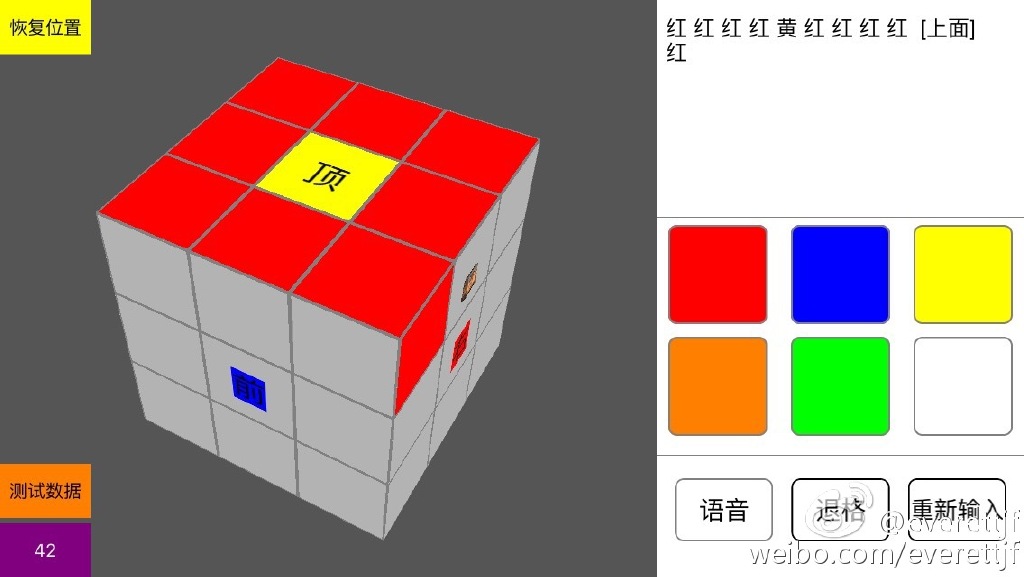
Buttons, as shown below:
- Voice, can use iFlytek recognition.
- Photo, i.e. photograph each face. Recognize the colors at fixed positions.
- Video, similar to this https://github.com/bluquar/cubr
- AR, that’s the Rubik-Cube-Wizard one.
Solving Algorithm
https://github.com/muodov/kociemba
In the end, I made it work using buttons and voice. The code is here. https://github.com/xfteam/xfrubiks
Summary
- In the end I stayed up all night to make this App, but only used buttons and voice, and the demo coordination wasn’t good, leading to a poor result.
- The event sponsors provided SDKs, and of course it’s best to use them. Using them naturally earns extra points. (Of course the purpose of this event can’t be purely for winning; doing what you want to do is the most important.)
- During the demo, I still need to practice. I found that although I’m almost 30, I still get nervous in some small settings. My expression wasn’t natural enough. And during the demo phase, you should still rehearse simply as much as possible. The coordination with my friend wasn’t smooth enough. A little joke we’d designed turned into a flop due to expression and coordination problems.
- This year’s venue was at an incubator office near the Bird’s Nest; the environment was nice, with lots of sofas.
- The ideas we didn’t pursue, like video drawing teaching, would actually be quite nice if made. We gave up too hastily.
- Thinking about it, we have the technical skills, but there are many other factors. The approach to solving problems, the commercial value of the idea. A pure toy doesn’t mean much. And so on.
- Although the competition was tiring, I still enjoyed the process. (Especially making this Rubik’s cube solving assistant App. Although there are some details to watch out for when using it. Ha.)
背景
上周末两天与朋友(两个人组队)参加了segmentfault与angelhack举办的hackathon,北京站。主题是“文艺复兴”。
周六经过简单开场,以及简单的API宣讲(太简单)。下午2点正式开始了构思。提供的sdk有:agoria的视频通话sdk 与 wacom的WILL sdk。
在这个基础上我们有了个想法:
- 视频绘画教学。agoria提供视频功能,wacom提供绘图板功能。由于两个sdk都有demo,应该能很快组装起来。
- 匿名视频。随机与打开App的另一方建立连接。
- 匿名兴趣视频。选择App中内置的兴趣,可以与所有进入这个兴趣的用户视频。
然而,我们总觉得这些想法“没有创意”。视频sdk号称30分钟集成,WILL sdk也应该容易使用。岂不是所有人都做这个视频功能?简单的视频通话会不会没有创意?
老想法
然而,此时一个”老想法“又来了。前段时间看了”最强大脑“后自己也学习起魔方。想来做一个辅助还原魔方的App会更有创意。
做这个App的想法在这次hackathon之前就有,也做了一些调查,当然重点是想使用AR来辅助还原魔方。AR自然想到了Vuforia,然而Vuforia只能识别marker,对于魔方这种每个面的颜色组成会变化,且需要识别出颜色来,Vuforia做不到(或者我没找到办法)。于是OpenCV登场。找到了这个 https://github.com/AndroidSteve/Rubik-Cube-Wizard ,这个App主要用在 Google Glass上,且作者没有计划移植到手机上https://github.com/AndroidSteve/Rubik-Cube-Wizard/tree/master/Rubik%20Solver/docs
想来我可以做。但发现大量OpenCV的使用。后来投入较多时间去学习OpenCV。照着 Rubik-Cube-Wizard 的Java代码翻译……
当然还没有完成,hackathon 就来了。
开始了
想来这个更独特,几乎不可能有人做。(当时感觉这个更有特色,但后来发现不对)
使用OpenCV识别魔方,想来这两天很难做到。就放弃了。
于是,使用UIView配合transform模拟了个立体的魔方。(当天也调查了openGL和metal,对这两个都不熟悉,就使用UIView组合了)。
最主要的就是魔方每个面信息的输入,想了三个快速输入的方式:
- 按钮
- 语音
- 拍照
- 视频
- AR
-
按钮如下图:
- 语音,可以使用讯飞识别。
- 拍照,也就是每个面都拍照。识别出固定位置的颜色。
- 视频,类似这个 https://github.com/bluquar/cubr
- AR,就是Rubik-Cube-Wizard这个了。
还原算法
https://github.com/muodov/kociemba
最后,做出来使用按钮、语音的方式。代码在这里。https://github.com/xfteam/xfrubiks
总结
- 最后熬夜做出了这个App,但只使用了按钮、语音,且演示阶段配合不好,导致效果不好。
- 活动赞助商提供了sdk,当然最好还是要用啦。用自然会加分啦。(当然这个活动目的不能纯粹为了获奖,做自己想做的才是最重要的)
- 演示阶段,自己还需要锻炼。发现自己虽然年近30,但有些小场合还是会紧张。表达的不够自然。且演示阶段还是尽量能简单排练下。与朋友的配合不够默契。本来设计的小笑话,由于表达与配合问题,成了鸡肋。
- 今年活动的场所在鸟巢附近的一家孵化器办公场所,环境很好,沙发很多。
- 没落实的这几个想法,视频绘画教学等,如果做出来其实还是很不错的。放弃的太过草率。
- 想想我们技术是有的,但还有更多其他因素。解决问题的思路,想法的商业价值。单纯的玩具意义并不大。等等。
- 比赛虽然很累,但还是很享受这个过程。(尤其是做出了这个辅助还原魔方的App。虽然使用时有些细节需要注意。哈)