writing
Reverse Engineering the UI Implementation of WeChat's Chat Screen逆向探索微信聊天界面的 UI 实现逻辑
· Debugging & reverse engineering
Translated from Chinese — .
On this page
Background
At work I’m responsible for developing the IM feature, and I’ve done quite a bit of studying WeChat in my spare time. This article mainly focuses on the “chat message screen” implementation in WeChat’s iOS client UI.
The purpose of writing this article:
- Share how WeChat implements its chat screen.
- Demonstrate the main reverse-engineering workflow.
PS: Originally I reverse-engineered WeChat in order to solve a small problem in a project.
Preparation
Device: iPhone5, iOS 8.4, jailbroken
usbmuxd
➜  python-client python tcprelay.py -t 22:2222
Forwarding local port 2222 to remote port 22
......
ssh
ssh root@localhost -p 2222
Find the executable:
everettjfs-iPhone:~ root# ps aux | grep /App
mobile   38363   4.4  8.5   776400  88748   ??  Ss    8:55PM   0:52.96 /var/mobile/Containers/Bundle/Application/25FB096A-8122-49B5-9304-5FDB9080D9B0/WeChat.app/WeChat
Sandbox path:
everettjfs-iPhone:~ root# cycript -p WeChat
cy# [[NSFileManager defaultManager] URLsForDirectory:NSDocumentDirectory inDomains:NSUserDomainMask]
@[#"file:///var/mobile/Containers/Data/Application/F36BD1C1-1C39-4C83-AD4B-6D9F2B976330/Documents/"]
Decrypt (crack the shell):
everettjfs-iPhone:~ root# clutch -i
everettjfs-iPhone:~ root# clutch -b com.tencent.xin
Finished dumping com.tencent.xin to /var/tmp/clutch/5F6CA026-C176-4FB0-9569-90F2DD251385
Export the headers:
I don’t use class-dump-z here because class-dump-z fails to recognize many UIKit classes.
[everettjf@e w ]$ class-dump -s -S -H WeChat -o headers
First Peek
Locating the Controller
Open WeChat and enter a conversation with someone (this is the “chat message screen” we want to study).
everettjfs-iPhone:~ root# cycript -p WeChat
cy# [[[UIWindow keyWindow] rootViewController] _printHierarchy].toString()
<MMTabBarController 0x18265240>, state: appeared, view: <UILayoutContainerView 0x18265ac0>
   | <MMUINavigationController 0x1800f230>, state: appeared, view: <UILayoutContainerView 0x180cd0e0>
   |    | <NewMainFrameViewController 0x179a2400>, state: disappeared, view: <MMUIHookView 0x1827f980> not in the window
   |    | <BaseMsgContentViewController 0x179b3800>, state: appeared, view: <UIView 0x16e36c30>
   | <MMUINavigationController 0x181a40a0>, state: disappeared, view: <UILayoutContainerView 0x181a4400> not in the window
   |    | <ContactsViewController 0x17162800>, state: disappeared, view:  (view not loaded)
   | <MMUINavigationController 0x181adb10>, state: disappeared, view: <UILayoutContainerView 0x181ade00> not in the window
   |    | <FindFriendEntryViewController 0x179aec00>, state: disappeared, view:  (view not loaded)
   | <MMUINavigationController 0x18003e00>, state: disappeared, view: <UILayoutContainerView 0x18008cc0> not in the window
   |    | <MoreViewController 0x179ad400>, state: disappeared, view:  (view not loaded)
WeChat’s main screen is an MMTabBarController, with four TabBarItems, each corresponding to an MMUINavigationController. The corresponding RootViewControllers are:
- Chats (微信): NewMainFrameViewController
- Contacts (通讯录): ContactsViewController
- Discover (发现): FindFriendEntryViewController
- Me (我): MoreViewController
The “chat message screen” we focus on this time is BaseMsgContentViewController (state: appeared).
Observing the Views
Reveal
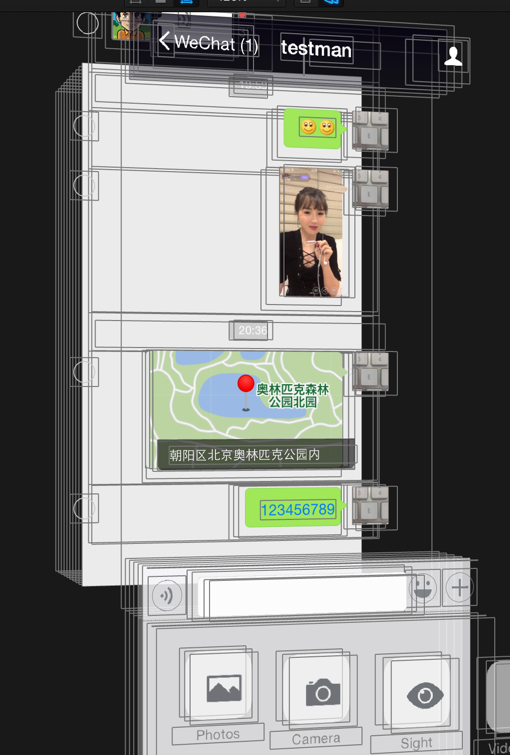
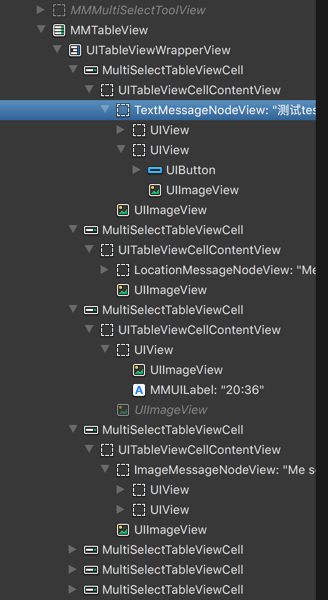
Send all kinds of messages in the screen; here let’s first send: text, image, location, voice. Observe with Reveal, as shown below:
MMTableView
From these two images we can see:
The entire message list is essentially an MMTableView (we’d generally do this ourselves too). From the class-dumped headers, we know MMTableView is a subclass of UITableView.
@interface MMTableView : UITableView <MMDelegateCenterExt>
The TableView’s Cell has only one type, MultiSelectTableViewCell. When I first saw this, it made me very curious. Why didn’t they use the traditional approach of one Cell per message?
@interface MultiSelectTableViewCell : UITableViewCell
MessageNodeView
The Cells are all MultiSelectTableViewCell, and what distinguishes the different messages is the content of contentView.
- Text message: TextMessageNodeView
- Image message: ImageMessageNodeView
- Location message: LocationMessageNodeView
- Voice message: VocieMessageNodeView (not visible in the screenshot above)
In addition, the timestamps between messages are also MultiSelectTableViewCell, just with a Label about the time as contentView.
Quick summary
Having figured out the basic structure of the message UI, the next step is to find out how these MessageNodeViews are created. Here a question naturally arises: all messages are MultiSelectTableViewCell, so how is Cell reuse implemented? Let’s keep exploring.
Observing the Controller
In the class-dumped headers, find the BaseMsgContentViewController class. You can find the BaseMsgContentViewController.h file; this header has 614 lines, which shows how complex this class is. (I’d guess WeChat’s early development didn’t anticipate the large number of requirements added later, so it became today’s Massive View Controller.)
Let me refine the goal of this operation: I want to know how each message in the chat is created and displayed.
Observing the class’s implementation, I found some related variables and methods:
// 字面上看,应该就是存储MessageNode的数组
NSMutableArray *m_arrMessageNodeData;
// 应该是存储所有支持的MessageNode Class类型
struct vector<Class, std::__1::allocator<Class>> m_messageNodeClass;
// 这就是主要是TableView
MMTableView *m_tableView;

// 预创建消息,有意思,一会儿仔细研究研究
- (void)preCreateMessageContentNode:(id)arg1;
- (void)preCreateMessageSplitNode:(id)arg1;
- (void)preCreateMessageTimeNode:(id)arg1;

// 初始化Class
- (void)initMessageNodeClass;
- (id)newMessageNodeViewForMessageWrap:(id)arg1 contact:(id)arg2 chatContact:(id)arg3;


// 获取node数目
- (unsigned int)getMsgNodeCount;
// 获取指定索引的node
- (id)getNodeDataByIndex:(unsigned int)arg1;
// 获取消息node数组
- (id)GetMessageNodeDataArray;

// 添加
- (void)addMessageNode:(id)arg1 layout:(BOOL)arg2 addMoreMsg:(BOOL)arg3;
- (void)addReceiveMessageNode:(id)arg1;
- (id)addSplitNode:(id)arg1 addMoreMsg:(BOOL)arg2;
- (void)addTimeNode:(id)arg1 layout:(BOOL)arg2 addMoreMsg:(BOOL)arg3;
// 移除
- (void)removeAllObjectsFromMessageNodeDatas;
- (void)removeObjectsFromMessageNodeDatas:(id)arg1;
// 更新
- (void)updateMessageNodeImageLoadingPercent:(unsigned long)arg1 percent:(unsigned long)arg2;
- (void)updateMessageNodeStatus:(id)arg1;
- (void)updateMessageNodeViewForOrientation:(id)arg1;

// 一些NodeView的事件
- (void)tagLink:(id)arg1 messageWrap:(id)arg2;
- (void)tapAppNodeView:(id)arg1;
- (void)tapFriendCard_NodeView:(id)arg1 WithContact:(id)arg2 WithMsg:(id)arg3;
- (void)tapImage_NodeView:(id)arg1;
- (void)tapLocation_NodeView:(id)arg1;
- (void)tapPushContact_NodeView:(id)arg1;
- (void)tapPushMail_NodeView:(id)arg1 withPushMailWrap:(id)arg2;
- (void)tapReader_NodeView:(id)arg1;
- (void)tapStatus_NodeView:(id)arg1;
- (void)tapText_NodeView:(id)arg1;
- (void)tapVideoStatus_NodeView:(id)arg1;
NSMutableArray *m_arrMessageNodeData;
Print it with cycript
cy# v = #0x15067600
#"<BaseMsgContentViewController: 0x15067600>"
cy# v->m_arrMessageNodeData
@[#"<CMessageNodeData: 0x15b95260>",#"<CMessageNodeData: 0x15adf260>",#"<CMessageNodeData: 0x15a4abb0>",#"<CMessageNodeData: 0x1580f190>",#"<CMessageNodeData: 0x15a49930>",#"<CMessageNodeData: 0x1589b8a0>",#"<CMessageNodeData: 0x15a41410>",#"<CMessageNodeData: 0x158783e0>",#"<CMessageNodeData: 0x15a4a3b0>",#"<CMessageNodeData: 0x15aa14f0>",#"<CMessageNodeData: 0x1475ce50>",#"<CMessageNodeData: 0x15bf9960>",#"<CMessageNodeData: 0x15b53f40>",#"<CMessageNodeData: 0x147ad9f0>",#"<CMessageNodeData: 0x15b6d240>",#"<CMessageNodeData: 0x15ba04b0>",#"<CMessageNodeData: 0x15b90050>",#"<CMessageNodeData: 0x15be7ba0>",#"<CMessageNodeData: 0x15b84eb0>"]
cy# v->m_arrMessageNodeData.count
19
Precondition: the chat with the other party already has many messages. When opening the chat message screen with the other party for the first time, you can see that WeChat loads only 19 messages by default.
What is CMessageNodeData?
@interface CMessageNodeData : NSObject
{
    int m_eMsgNodeType;
    CMessageWrap *m_msgWrap;
    UIView *m_view;
    unsigned long m_uCreateTime;
}
Note, there’s a UIView here.
@interface CMessageWrap : MMObject <IAppMsgPathMgr, ISysNewXmlMsgExtendOperation, IMsgExtendOperation, NSCopying>
{
    BOOL m_bIsSplit;
    BOOL m_bNew;
    unsigned long m_uiMesLocalID;
    long long m_n64MesSvrID;
    NSString *m_nsFromUsr;
    NSString *m_nsToUsr;
    unsigned long m_uiMessageType;
    NSString *m_nsContent;
    unsigned long m_uiStatus;
    unsigned long m_uiImgStatus;
    //.............省略大量字段.............
CMessageWrap is naturally the wrapper for the message data.
CMessageNodeData has a UIView *m_view variable; let’s see what it is:
y# d = v->m_arrMessageNodeData
@[#"<CMessageNodeData: 0x15b95260>",#"<CMessageNodeData: 0x15adf260>",#"<CMessageNodeData: 0x15a4abb0>",#"<CMessageNodeData: 0x1580f190>",#"
.....省略....
cy# var x = []; for(var i = 0; i < d.count;i++) x.push([d objectAtIndex:i].m_view); x
[#"<UIView: 0x1592f9c0; frame = (0 10; 320 28); layer = <CALayer: 0x147e6cc0>>",#"<TextMessageNodeView: 0x1582cca0; frame = (251 0; 60 59); layer = <CALayer: 0x158b1350>>",#"<TextMessageNodeView: 0x15a58d60; frame = (251 0; 60 59); layer = <CALayer: 0x15a3cdf0>>",#"<TextMessageNodeView: 0x15a3ba10; frame = (251 0; 60 59); layer = <CALayer: 0x15ab9ab0>>",#"<TextMessageNodeView: 0x15a31610; frame = (251 0; 60 59); layer = <CALayer: 0x15a31760>>",#"<TextMessageNodeView: 0x15a57dc0; frame = (251 0; 60 59); layer = <CALayer: 0x15a547b0
.....省略.......
odeView: 0x159ee260; frame = (186 0; 125 59); layer = <CALayer: 0x159ee3b0>>",#"<ImageMessageNodeView: 0x15b91cd0; frame = (179.5 0; 131.5 150); layer = <CALayer: 0x15b6e8e0>>",#"<UIView: 0x15b675d0; frame = (0 10; 320 28); layer = <CALayer: 0x15be5fa0>>",#"<LocationMessageNodeView: 0x15bdaee0; frame = (50 0; 261 139); layer = <CALayer: 0x15b7d290>>",#"<TextMessageNodeView: 0x15bbf400; frame = (144 0; 167 59); layer = <CALayer: 0x15be6770>>"]
So m_view is the UIView under the contentView of MultiSelectTableViewCell.
Here another question arises: there are only 4 Cells actually shown on screen, so why do all these CMessageNodeData’s m_view have values (not nil)? Could it be that reuse isn’t implemented? Yes — so far what I’ve found is that reuse really isn’t implemented.
To verify, I randomly sent a few hundred messages of various kinds, then printed all the m_view again.
 cy# d.count
419
cy# var x = []; for(var i = 0; i < d.count;i++) x.push([d objectAtIndex:i].m_view); x
[#"<UIView: 0x15c91540; frame = (0 10; 320 28); layer = <CALayer: 0x16096bb0>>",#"<AppUrlMessageNodeView: 0x160977e0; frame = (0 0; 327 149); layer = <CALayer: 0x16098f50>>",#"<UIView: 0x16098d70; frame = (0 10; 320 28); layer = <CALayer: 0x16099bd0>>",#"<ImageMessageNodeView: 0x1609b000; frame = (179.5 0; 131.5 150); layer = <CALayer: 0x1609a840>>",#"<ImageMessageNodeView: 0x160a3d80; frame = (
// ........省略..................
cy# x.length
419
Well, sure enough, none of the 419 m_view are nil.
My goodness, how can this work? But after observing the memory usage and thinking it over more carefully, this approach is actually acceptable. See below for details.
The reasons I came up with are:
- Memory usage isn’t too high (see below for specific data).
- It’s rare for a chat screen to have so many m_view. And when it does happen, since memory usage is acceptable, it doesn’t matter.
struct vector<Class, std::__1::allocator> m_messageNodeClass;
Here we can tell that BaseMsgContentViewController’s implementation file is BaseMsgContentViewController.mm, i.e. written in Objective-C++.
m_messageNodeClass is related to the following method:
- (void)initMessageNodeClass;
Decompile WeChat’s binary with Hopper:
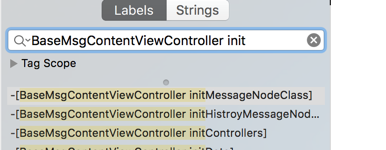
Then disassemble into C-like code:
void -[BaseMsgContentViewController initMessageNodeClass](void * self, void * _cmd) {
    r7 = &arg_C;
    sp = sp - 0xb4;
    r11 = self;
    r6 = *objc_ivar_offset_BaseMsgContentViewController_m_messageNodeClass;
    r5 = *(r11 + r6);
    r0 = *(r11 + 0xa4);
    if (r0 != r5) {
            do {
                    *(r11 + 0xa4) = r0 - 0x4;
                    r0 = *(r0 + 0xfffffffffffffffc);
                    [r0 release];
                    r0 = *(r11 + 0xa4);
            } while (r0 != r5);
            r6 = *objc_ivar_offset_BaseMsgContentViewController_m_messageNodeClass;
    }
    r8 = @selector(class);
    r0 = [MultiColumnReaderMessageNodeView class];
    r7 = r7;
    r0 = [r0 retain];
    r1 = r6 + 0x4;
    arg_B0 = r0;
    r2 = r6 + r11;
    r3 = *(r11 + r1);
    if (r3 < *(r2 + 0x8)) {
            arg_B0 = 0x0;
            *r3 = r0;
            *(r11 + r1) = *(r11 + r1) + 0x4;
    }
    else {
            void std::__1::vector<objc_class* __strong, std::__1::allocator<objc_class* __strong> >::__push_back_slow_path<objc_class* __strong>();
            [arg_B0 release];
    }
    r4 = *objc_ivar_offset_BaseMsgContentViewController_m_messageNodeClass;
    r0 = [ImageTextReaderMessageNodeView class];
	//.....省略......
It just push_backs all the supported MessageNode Classes into this vector.
Here we can see all the message types WeChat supports.
Manually organized into pseudocode:
std::vector<Class> m_messageNodeClass;
m_messageNodeClass.push_back([MultiColumnReaderMessageNodeView class]);
m_messageNodeClass.push_back([ImageTextReaderMessageNodeView class]);
m_messageNodeClass.push_back([HeadImgReaderMessageNodeaView class]);
m_messageNodeClass.push_back([MessageSysNodeView class]);
m_messageNodeClass.push_back([AttributedReaderMessageNodeaView class]);
m_messageNodeClass.push_back([ReaderNewMessageNodeView class]);
m_messageNodeClass.push_back([MultiReaderMessageNodeView class]);
m_messageNodeClass.push_back([MailMessageNodeView class]);
m_messageNodeClass.push_back([MassSendMessageNodeView class]);
m_messageNodeClass.push_back([ImageMessageNodeView class]);
m_messageNodeClass.push_back([VoiceMessageNodeView class]);
m_messageNodeClass.push_back([ShortVideoMessageNodeView class]);
m_messageNodeClass.push_back([VideoMessageNodeView class]);
m_messageNodeClass.push_back([ShareCardMessageNodeView class]);
m_messageNodeClass.push_back([EmoticonMessageNodeView class]);
m_messageNodeClass.push_back([GameMessageNodeView class]);
m_messageNodeClass.push_back([VoipContentNodeView class]);
m_messageNodeClass.push_back([AppTextMessageNodeView class]);
m_messageNodeClass.push_back([AppImageMessageNodeView class]);
m_messageNodeClass.push_back([AppEmoticonMessageNodeView class]);
m_messageNodeClass.push_back([AppFileMessageNodeView class]);
m_messageNodeClass.push_back([AppUrlMessageNodeView class]);
m_messageNodeClass.push_back([AppShakeMessageNodeView class]);
m_messageNodeClass.push_back([VoiceReminderConfirmNodeView class]);
m_messageNodeClass.push_back([VoiceReminderRemindNodeView class]);
m_messageNodeClass.push_back([AppProductMessageNodeView class]);
m_messageNodeClass.push_back([AppEmoticonSharedMessageNodeView class]);
m_messageNodeClass.push_back([AppWCProductMessageNodeView class]);
m_messageNodeClass.push_back([AppWCCardMessageNodeView class]);
m_messageNodeClass.push_back([AppTVMessageNodeView class]);
m_messageNodeClass.push_back([AppTrackRoomMessageNodeView class]);
m_messageNodeClass.push_back([AppRecordMessageNodeView class]);
m_messageNodeClass.push_back([AppNoteMessageNodeView class]);
m_messageNodeClass.push_back([AppHardWareRankMessageNode class]);
m_messageNodeClass.push_back([AppHardWareLikeNotifyMessageNode class]);
m_messageNodeClass.push_back([MultiTalkMessageNodeView class]);
m_messageNodeClass.push_back([WCPayTransferMessageNodeView class]);
m_messageNodeClass.push_back([WCPayTransferAcceptedMessageNodeView class]);
m_messageNodeClass.push_back([WCPayTransferRejectedMessageNodeView class]);
m_messageNodeClass.push_back([WCPayMessageBaseNodeView class]);
m_messageNodeClass.push_back([WCPayC2CMessageNodeView class]);
m_messageNodeClass.push_back([WCPayC2CFestivalMsgNodeView class]);
m_messageNodeClass.push_back([AppDefaultMessageNodeView class]);
m_messageNodeClass.push_back([TextMessageNodeView class]);
As you can see, WeChat is truly a huge project, supporting this many message types (the WeChat version I used: 6.3.19).
Take a random message, for example: MessageSysNodeView inherits from BaseMessageNodeView and then MMUIView
- (void) preCreateMessageXXXXNode
- (void)preCreateMessageContentNode:(id)arg1;
- (void)preCreateMessageSplitNode:(id)arg1;
- (void)preCreateMessageTimeNode:(id)arg1;
From these three methods starting with preCreateMessage, we can guess that the first-level subviews of MultiSelectTableViewCell’s contentView fall into three categories:
- The actual content ContentNode
- The separator Node
- The time Node
Find the corresponding code by disassembling in Hopper:
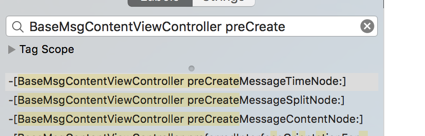
TimeNode
To go step by step, let’s first study TimeNode’s preCreate:
Since there’s code internally that gets arg2.m_view, we can basically guess that arg2 is of type CMessageNodeData. (We can confirm this later with lldb.)
The key code lines and pseudocode are roughly as follows:
void -[BaseMsgContentViewController preCreateMessageTimeNode:](void * self, void * _cmd, void * arg2) {
messageNodeData = arg2
if(messageNodeData.m_view == nil){
	// 就是填充m_view

	// 从MMThemeManager获取时间Node的高度
    r5 = [[MMThemeManager sharedThemeManager] retain];
    [[r5 getValueOfProperty:@"message_node_timeNode_height" inRuleSet:@"#message_node_view"] retain];

	UIView *timeRoot = [][UIView alloc]initWithFrame:....];

    r11 = [[MMUILabel alloc] init];
	// 这是label各种属性

	r10 = [[UIImageView alloc] init];
	// 设置ImageView各种属性
}
In the end it just builds this:
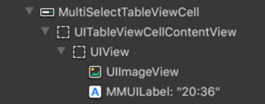
ContentNode
Knowing how TimeNode is preCreated, ContentNode is similar, just with more code.
void -[BaseMsgContentViewController preCreateMessageContentNode:](void * self, void * _cmd, void * arg2) {

messageNodeData = arg2
if(messageNodeData.m_view == nil){
	// 仍然是填充m_view

	// 判断是否自己发的消息
    r5 = [[r11 m_msgWrap] retain];
    arg_14 = [CMessageWrap isSenderFromMsgWrap:r5];

	如果是对方消息
	r0 = [r8 newMessageNodeViewForMessageWrap:r4 contact:r5 chatContact:STK-1];
	如果是我发送的消息
	r0 = [r8 newMessageNodeViewForMessageWrap:r6 contact:0x0 chatContact:STK-1];

	设置m_view

	//计算frame

	//GameNode特殊处理
	//语音特殊处理	r2 = [VoiceMessageNodeView class];

}
PS: An earlier version of this method was very long; the current version has been optimized. The newMessageNodeViewForMessageWrap method was added.
void * -[BaseMsgContentViewController newMessageNodeViewForMessageWrap:contact:chatContact:](void * self, void * _cmd, void * arg2, void * arg3, void * arg4) {

	// 这里循环判断vector中的每个类,交给每个类判断是否是自己的类型
    r0 = r5->m_messageNodeClass;

	for(Class in r0){

	// 先判断能否创建
    r4 = *(r0 + r11 * 0x4);
    if (([r4 canCreateMessageNodeViewInstanceWithMessageWrap: r2] & 0xff) != 0x0) goto loc_1609718;

	// 创建
    r0 = [r4 alloc];
    r4 = arg_8;
    r6 = arg_4;
    var_0 = r6;
    r5 = [r0 initWithMessageWrap:arg_C Contact:r4 ChatContact:STK-1];

	}
}
canCreateMessageNodeViewInstanceWithMessageWrap
Let’s look at the canCreateMessageNodeViewInstanceWithMessageWrap method.
char +[BaseMessageNodeView canCreateMessageNodeViewInstanceWithMessageWrap:](void * self, void * _cmd, void * arg2) {
    return 0x0;
}
First look at the base class of all NodeViews, BaseMessageNodeView, which returns 0x0 by default, i.e. NO. (On 32-bit, BOOL is char, so this returns a BOOL.)
Then pick a random subclass NodeView, for example: MessageSysNodeView
char +[MessageSysNodeView canCreateMessageNodeViewInstanceWithMessageWrap:](void * self, void * _cmd, void * arg2) {
    r4 = [arg2 retain];
    r5 = @selector(m_uiMessageType);
    if ([r4 m_uiMessageType] == 0x2710) {
            r5 = 0x1;
    }
    else {
            r0 = [r4 m_uiMessageType];
            r5 = 0x0;
            asm{ it         eq };
            if (r0 == 0x2712) {
                    r5 = 0x1;
            }
    }
    [r4 release];
    r0 = r5;
    return r0;
}
As you can see, if m_uiMessageType (a member of CMessageNodeData’s CMessageWrap) is 0x2710 or 0x2712, it’s considered this message type.
Now look at ImageMessageNodeView:
char +[ImageMessageNodeView canCreateMessageNodeViewInstanceWithMessageWrap:](void * self, void * _cmd, void * arg2) {
    r4 = [arg2 retain];
    r5 = @selector(m_uiMessageType);
    if (([r4 m_uiMessageType] == 0x3) || ([r4 m_uiMessageType] == 0xd)) {
            r5 = 0x1;
    }
    else {
            r0 = [r4 m_uiMessageType];
            r5 = 0x0;
            asm{ it         eq };
            if (r0 == 0x27) {
                    r5 = 0x1;
            }
    }
    [r4 release];
    r0 = r5;
    return r0;
}
So 0x3, 0xd, and 0x27 are all images.
There are many more messages; I won’t list them all.
Finally let’s look at TextMessageNodeView:
char +[TextMessageNodeView canCreateMessageNodeViewInstanceWithMessageWrap:](void * self, void * _cmd, void * arg2) {
    return 0x1;
}
It directly returns YES. So if a message isn’t any of the others, it’s handled as a text message. TextMessageNodeView is also exactly the last one push_back’d into m_messageNodeClass.
initWithMessageWrap
First look at BaseMessageNodeView:
void * -[BaseMessageNodeView initWithMessageWrap:Contact:ChatContact:](void * self, void * _cmd, void * arg2, void * arg3, void * arg4) {
	省略……
Then look at TextMessageNodeView’s initWithMessageWrap:Contact:ChatContact. The amount of code varies, but there’s no key code.
It just configures the properties of the various Views based on CMessageWrap.
Continue Researching
Next let’s try to find the source of the preCreate call.
Preparation
usbmuxd
➜  python-client python tcprelay.py -t 22:2222 1234:1234
Forwarding local port 2222 to remote port 22
Forwarding local port 1234 to remote port 1234
......
ssh
ssh root@localhost -p 2222
debugserver
everettjfs-iPhone:~ root# debugserver *:1234 -a WeChat
debugserver-@(#)PROGRAM:debugserver  PROJECT:debugserver-320.2.89
 for armv7.
Attaching to process WeChat...
Listening to port 1234 for a connection from *...
Waiting for debugger instructions for process 0.
lldb
[everettjf@e ~ ]$ lldb
(lldb) process connect connect://localhost:1234
Process 67776 stopped
* thread #1: tid = 0x214590, 0x31ef4474 libsystem_kernel.dylib`mach_msg_trap + 20, queue = 'com.apple.main-thread', stop reason = signal SIGSTOP
    frame #0: 0x31ef4474 libsystem_kernel.dylib`mach_msg_trap + 20
libsystem_kernel.dylib`mach_msg_trap:
->  0x31ef4474 <+20>: pop    {r4, r5, r6, r8}
    0x31ef4478 <+24>: bx     lr

libsystem_kernel.dylib`mach_msg_overwrite_trap:
    0x31ef447c <+0>:  mov    r12, sp
    0x31ef4480 <+4>:  push   {r4, r5, r6, r8}
Find the offset address
(lldb) image list -o -f
[  0] 0x000e7000 /private/var/mobile/Containers/Bundle/Application/25FB096A-8122-49B5-9304-5FDB9080D9B0/WeChat.app/WeChat(0x00000000000eb000)
[  1] 0x031c7000 /Library/MobileSubstrate/MobileSubstrate.dylib(0x00000000031c7000)
See the offset address after image list -o -f: 0x000e7000
Historical Messages
First look at the historical messages loaded by default when entering the chat message screen.
In Hopper, find the file offset address of BaseMsgContentViewController::preCreateMessageContentNode: : 0x0160a444

Compute the real offset address (I like using ipython as a calculator):
In [1]: hex(0x000e7000+0x0160a444)
Out[1]: '0x16f1444'
Set the breakpoint:
(lldb) br s -a 0x16f1444
Breakpoint 1: where = WeChat`___lldb_unnamed_function80337$$WeChat, address = 0x016f1444
Then tap a conversation to enter the message screen. The breakpoint will be hit.
Since the breakpoint is hit, let’s also check the parameter types of preCreateMessageContentNode:
(lldb) po $r0
<BaseMsgContentViewController: 0x17127c00>

(lldb) po (char*)$r1
"preCreateMessageContentNode:"

(lldb) po $r2
<CMessageNodeData: 0x1789bfb0>
Back to the topic, use the bt command to view the call stack:
(lldb) bt
* thread #1: tid = 0x214590, 0x016f1444 WeChat`___lldb_unnamed_function80337$$WeChat, queue = 'com.apple.main-thread', stop reason = breakpoint 1.1
  * frame #0: 0x016f1444 WeChat`___lldb_unnamed_function80337$$WeChat
    frame #1: 0x016f2516 WeChat`___lldb_unnamed_function80343$$WeChat + 990
    frame #2: 0x016f2bfe WeChat`___lldb_unnamed_function80345$$WeChat + 590
    frame #3: 0x016f397e WeChat`___lldb_unnamed_function80355$$WeChat + 690
    frame #4: 0x01708ac0 WeChat`___lldb_unnamed_function80565$$WeChat + 1416
    frame #5: 0x26c54b8e UIKit`-[UIViewController loadViewIfRequired] + 602
    frame #6: 0x26c548fc UIKit`-[UIViewController view] + 24
    省略
We can see these methods are all called on the main thread. frame#0 is the preCreateMessageContentNode method. frame #1 is the method that calls preCreateMessageContentNode. Let’s find frame#1’s method. Subtracting the offset address 0x000e7000 from the memory address 0x016f2516 gives the file offset address:
In [4]: hex(0x016f2516-0x000e7000)
Out[4]: '0x160b516'
Find this method in Hopper:
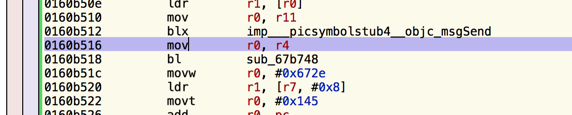
Found the method:

It’s this method:
void -[BaseMsgContentViewController addMessageNode:layout:addMoreMsg:](void * self, void * _cmd, void * arg2, char arg3, char arg4) {
Set a breakpoint at this method’s start address 0x16f2138 = 0x000e7000 + 0x0160b138: (first clear the previous breakpoint)
In [6]: hex(0x000e7000 + 0x0160b138)
Out[6]: '0x16f2138'
(lldb) br l
Current breakpoints:
1: address = WeChat[0x0160a444], locations = 1, resolved = 1, hit count = 1
  1.1: where = WeChat`___lldb_unnamed_function80337$$WeChat, address = 0x016f1444, resolved, hit count = 1
(lldb) br delete 1
1 breakpoints deleted; 0 breakpoint locations disabled.

(lldb) br s -a 0x16f2138
Breakpoint 3: where = WeChat`___lldb_unnamed_function80343$$WeChat, address = 0x016f2138
Look at the parameters:
(lldb) po $r0
<BaseMsgContentViewController: 0x17127c00>
(lldb) po (char*)$r1
"addMessageNode:layout:addMoreMsg:"
(lldb) po $r2
{m_uiMesLocalID=384, m_ui64MesSvrID=7606243121581773106, m_nsFromUsr=wxi*h12~19, m_nsToUsr=wxi*t21~19, m_uiStatus=2, type=1, msgSource="(null)"}
(lldb) po [$r2 class]
CMessageWrap
(lldb) p $r3
(unsigned int) $13 = 0
(lldb) p $r4
(unsigned int) $14 = 40
So the first parameter of BaseMsgContentViewController addMessageNode:layout:addMoreMsg is CMessageWrap, layout is 0, and addMoreMsg is 40.
With the same steps, look at the remaining methods in the call stack, all gathered together:
void -[BaseMsgContentViewController preCreateMessageContentNode:](void * self, void * _cmd, void * arg2) {
void -[BaseMsgContentViewController addMessageNode:layout:addMoreMsg:](void * self, void * _cmd, void * arg2, char arg3, char arg4) {
void -[BaseMsgContentViewController initHistroyMessageNodeData](void * self, void * _cmd) {
void -[BaseMsgContentViewController initData](void * self, void * _cmd) {
void -[BaseMsgContentViewController viewDidLoad](void * self, void * _cmd) {
Using Hopper’s disassembly to look at these methods, we again found initView and a series of init-prefixed functions. For example: initTableView initializes the tableView and calls reloadData. (initData comes first, initView later.)
The Source of Historical Messages
Look closely
void -[BaseMsgContentViewController initHistroyMessageNodeData](void * self, void * _cmd) {
...
            arg_1C = r8;
            r0 = [r5 GetMessageArray];
            r7 = r7;
Find the assembly code line for [r5 GetMessageArray]: 0x0160bb20.

Set a breakpoint at this line, then output $r0.
(lldb) br s -a 0x163db20 (这里我换了机器,重新启动了Weixin,内存偏移变为0x00032000,因此hex(0x0160BB20 + 0x00032000)=0x163db20)
(lldb) po $r0
<WeixinContentLogicController: 0x1582ad20>
(lldb) po (char*)$r1
"GetMessageArray"
(lldb) n
省略
(lldb) po $r0
<__NSArrayM 0x1584bf30>(
{m_uiMesLocalID=382, m_ui64MesSvrID=4946812604026242266, m_nsFromUsr=wxi*h12~19, m_nsToUsr=wxi*t21~19, m_uiStatus=2, type=1, msgSource="(null)"} ,
{m_uiMesLocalID=383, m_ui64MesSvrID=145730894416135475, m_nsFromUsr=wxi*h12~19, m_nsToUsr=wxi*t21~19, m_uiStatus=2, type=1, msgSource="(null)"} ,
省略
)
(lldb) po [[$r0 firstObject]class]
CMessageWrap
After single-stepping, you can also look at the return value $r0, i.e. all the messages CMessageWrap.
We can tell it’s the WeixinContentLogicController class; let’s look at this class:
@interface WeixinContentLogicController : BaseMsgContentLogicController
Looking for WeixinContentLogicController’s GetMessageArray method in Hopper, I couldn’t find it. So it’s in the parent class BaseMsgContentLogicController.
- BaseMsgContentLogicController GetMessageArray
Internally it calls WeixinContentLogicController GetMsg:FromID:Limit:LeftCount:LeftUnreadCount:
- WeixinContentLogicController GetMsg:FromID:Limit:LeftCount:LeftUnreadCount:

    r0 = [MMServiceCenter defaultCenter];
    arg_30 = 0xffffffff;
    r0 = [r0 retain];
    arg_24 = r0;
    arg_30 = 0x2;
    r2 = [CMessageMgr class];
    arg_30 = 0x3;
    r0 = [arg_24 getService:r2];
    arg_30 = 0xffffffff;
    arg_28 = [r0 retain];
    [arg_24 release];
    arg_30 = 0x4;
    asm{ stm.w      sp, {r3, r5, r6} };
    r0 = [arg_28 GetMsgByCreateTime:arg_20 FromID:arg_1C FromCreateTime:STK1 Limit:STK0 LeftCount:STK-1];
Roughly, it gets CMessageMgr from MMServiceCenter, then calls CMessageMgr’s GetMsgByCreateTime:arg_20 FromID:arg_1C FromCreateTime:STK1 Limit:STK0 LeftCount:STK-1 method.
There are two methods:
- (id)GetMsgByCreateTime:(id)arg1 FromID:(unsigned long)arg2 FromCreateTime:(unsigned long)arg3 Limit:(unsigned long)arg4 LeftCount:(unsigned int *)arg5;
- (id)GetMsgByCreateTime:(id)arg1 FromID:(unsigned long)arg2 FromCreateTime:(unsigned long)arg3 Limit:(unsigned long)arg4 LeftCount:(unsigned int *)arg5 FromSequence:(unsigned long)arg6;
The first calls the second method with FromSequence; let’s look at the second method in Hopper:
  r0 = *objc_ivar_offset_CMessageMgr_m_oMsgDB;
    r2 = *(r7 + 0x14);
    r0 = *(r6 + r0);
    arg_C = r2;
    arg_4 = r5 + 0x5;
    r5 = *(r7 + 0x10);
    arg_8 = r5;
    var_0 = r8;
    r0 = [r0 GetMsgByCreateTime:r10 FromID:arg_24 FromCreateTime:STK2 Limit:STK1 LeftCount:STK0 FromSequence:STK-1];
    r7 = r7;
    r4 = [r0 retain];
    r1 = @selector(HandleMsgList:MsgList:);
    [r6 HandleMsgList:r2 MsgList:STK3];
objc_ivar_offset_CMessageMgr_m_oMsgDB is CMessageDB *m_oMsgDB; That is, it calls CMessageDB’s GetMsgByCreateTime:r10
PS:
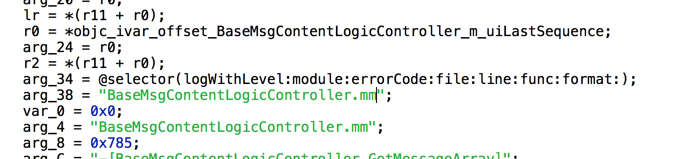
In Hopper you can see quite a bit of log info, and it even writes out the file name of the current implementation file. The suffix is .mm; of course it’s not just this one — many WeChat classes are implemented in Objective-C++. Including the message main screen’s BaseMsgContentViewController.mm, as well as many classes in CMessageMgr below. (Guessing, WeChat’s early developers were probably people who did C++ Windows client development. The C-prefixed classes…)
This CMessageMgr is also developed in Objective-C++. But Hopper can show that GetMsgByCreateTime: internally calls
int -[CMessageDB GetMsg:Where:order:Limit:](int arg0) {
which internally calls:
   r11 = *objc_ivar_offset_CMessageDB_m_oMMDB;
    r0 = *(r6 + r11);
    r3 = *0x26b20d8;
    asm{ stmeq.w    sp, {r4, r10} };
    arg_8 = r5;
    r5 = r8;
    r0 = [r0 GetMessagesByChatName:r5 onProperty:r3 where:STK1 order:STK0 limit:STK-1];
It calls the member CMMDB’s GetMessagesByChatName method.
@interface CMessageDB : NSObject
{
    CMMDB *m_oMMDB;
}
CMMDB’s GetMessagesByChatName method internally is as follows:
    res = [arg0 GetMessageTable:r11];
    r0 = [res getObjectsWhere:r10 onProperties:r4 orderBy:STK0 limit:STK-1];
That is, it calls getObjectsWhere on the return value of CMMDB::GetMessageTable.
void * -[CMMDB GetMessageTable:](void * self, void * _cmd, void * arg2) {
    r4 = [[CMMDB messageTableName:arg2] retain];
    r5 = [[self m_db] retain];
    r3 = [DBMessage class];
    r6 = [[r5 getTable:r4 withClass:r3] retain];
    r0 = loc_215a20c(r6, @selector(getTable:withClass:));
It calls m_db’s (WCDataBase *m_db;) getTable:withClass method. Stepping into it further, it just returns a WCDataBaseTable type.
Look at CMMDB’s header
@interface CMMDB : NSObject <WCDataBaseEventDelegate>
{
    NSRecursiveLock *m_lockMMDB;
    NSMutableSet *m_setMessageCreatedTable;
    NSMutableSet *m_setMessageExtCreatedTable;
    OpLogDB *m_oplogWcdb;
    WCDataBase *m_db;
    WCDataBaseTable *m_tableContact;
    WCDataBaseTable *m_tableContactExt;
    WCDataBaseTable *m_tableContactMeta;
    WCDataBaseTable *m_tableQQContact;
    WCDataBaseTable *m_tableSendMsg;
    WCDataBaseTable *m_tableUploadVoice;
    WCDataBaseTable *m_tableDownloadVoice;
    WCDataBaseTable *m_tableRevokeMsg;
    WCDataBaseTable *m_tableEmoticon;
    WCDataBaseTable *m_tableEmoticonUpload;
    WCDataBaseTable *m_tableEmoticonDownload;
    WCDataBaseTable *m_tableEmoticonPackage;
    WCDataBaseTable *m_tableBottle;
    WCDataBaseTable *m_tableBottleContact;
    WCDataBaseTable *m_tableMassSendContact;
}
It just gets the corresponding WCDataBaseTable instance based on the table type to fetch (here DBMessage class), used to operate on a certain table.
PS: WCDataBase is the wrapper for sqlite.
@interface WCDataBase : NSObject <WCDBCorruptReportInterface, WCDBHandlesPoolProtocol>
{
    WCDBHandlesPool *m_handlesPool;
    struct sqlite3 *m_dbHandle;
    NSData *m_dbEncryptKey;
    BOOL m_isMemoryOnly;
    NSString *m_nsDBPath;
    NSString *m_nsDBFilePath;
    NSString *m_nsDBName;
    NSRecursiveLock *m_oLock;
    unsigned int m_databaseID;
    unsigned int m_initTime;
    id <WCDataBaseEventDelegate> m_eventDelegate;
    WCDBCorruptReport *m_corruptReport;
}
Tracing the calls further, you get to:
int -[WCDataBase getObjectsOfClass:fromTable:onProperties:where:orderBy:limit:getError:](? arg0) {
This is the local query against sqlite.
Let’s stop here; we know the general flow. But it seems there’s an issue: this whole chain is done on the main thread — though it seems fast enough.
PS: WeChat’s local sqlite database design and the Objective-C++ wrapper are worth studying when there’s time.
New Messages
Above we found the call stack for loading historical chat messages when first opening the chat screen.
I also want to know the call stack when a new message arrives while in the conversation screen. So enter the chat screen, then set a breakpoint again, then send a message to this account from another phone (or yourself), and look at the call stack.
First enter the chat message page, then set a breakpoint at the preCreateMessageContentNode method again.
(lldb) br s -a 0x16f1444
Breakpoint 4: where = WeChat`___lldb_unnamed_function80337$$WeChat, address = 0x016f1444
(lldb) c
error: Process is running.  Use 'process interrupt' to pause execution.
Process 67776 stopped
* thread #1: tid = 0x214590, 0x016f1444 WeChat`___lldb_unnamed_function80337$$WeChat, queue = 'com.apple.main-thread', stop reason = breakpoint 4.1
    frame #0: 0x016f1444 WeChat`___lldb_unnamed_function80337$$WeChat
WeChat`___lldb_unnamed_function80337$$WeChat:
->  0x16f1444 <+0>: push   {r4, r5, r6, r7, lr}
    0x16f1446 <+2>: add    r7, sp, #0xc
    0x16f1448 <+4>: push.w {r8, r10, r11}
    0x16f144c <+8>: sub.w  r4, sp, #0x20
(lldb) bt
* thread #1: tid = 0x214590, 0x016f1444 WeChat`___lldb_unnamed_function80337$$WeChat, queue = 'com.apple.main-thread', stop reason = breakpoint 4.1
  * frame #0: 0x016f1444 WeChat`___lldb_unnamed_function80337$$WeChat
    frame #1: 0x016f2516 WeChat`___lldb_unnamed_function80343$$WeChat + 990
    frame #2: 0x018df210 WeChat`___lldb_unnamed_function87462$$WeChat + 472
    frame #3: 0x018df44e WeChat`___lldb_unnamed_function87463$$WeChat + 398
    frame #4: 0x01f6e3a2 WeChat`___lldb_unnamed_function115325$$WeChat + 1242
    frame #5: 0x2433e5ce Foundation`__NSThreadPerformPerform + 386
    frame #6: 0x235c5fae CoreFoundation`__CFRUNLOOP_IS_CALLING_OUT_TO_A_SOURCE0_PERFORM_FUNCTION__ + 14
Using the method above, you can get the call stack:
void -[BaseMsgContentViewController preCreateMessageContentNode:](void * self, void * _cmd, void * arg2) {
void -[BaseMsgContentViewController addMessageNode:layout:addMoreMsg:](void * self, void * _cmd, void * arg2, char arg3, char arg4) {
void -[BaseMsgContentLogicController DidAddMsg:](void * self, void * _cmd, void * arg2) {
void -[BaseMsgContentLogicController OnAddMsg:MsgWrap:](void * self, void * _cmd, void * arg2, void * arg3) {
void -[CMessageMgr MainThreadNotifyToExt:](void * self, void * _cmd, void * arg2) {
__NSThreadPerformPerform
__CFRUNLOOP_IS_CALLING_OUT_TO_A_SOURCE0_PERFORM_FUNCTION__
From the call stack, we roughly know CMessageMgr MainThreadNotifyToExt dispatches the message. We’re at the CMessageMgr class again.
The previous method is __NSThreadPerformPerform, so we know it was perform’d over from another thread. (Performing to the main thread adds it to the main thread’s RunLoop.)
Let’s look at MainThreadNotifyToExt’s parameters. Set a breakpoint at the first line of code:

Inspect with lldb:
(lldb) po $r0
po<CMessageMgr: 0x147afbe0>

(lldb) po $r0
<CMessageMgr: 0x147afbe0>

(lldb) po (char*)$r1
"MainThreadNotifyToExt:"

(lldb) po $r2
{
    1 = 1;
    2 = "wxid_pamzqdzakikt21";
    3 = "{m_uiMesLocalID=394, m_ui64MesSvrID=8508546064571928607, m_nsFromUsr=wxi*t21~19, m_nsToUsr=wxi*h12~19, m_uiStatus=3, type=1, msgSource=\"\"} ";
}

(lldb) po [$r2 class]
__NSDictionaryM
(lldb) po [[$r2 objectForKey:@"3"] class]
CMessageWrap

(lldb) po [[$r2 objectForKey:@"2"] class]
__NSCFString

(lldb) po [[$r2 objectForKey:@"1"] class]
__NSCFString
So the parameter is an NSDictionary, with keys being the strings 1, 2, 3, which are NSString, NSString, and CMessageWrap respectively.
So CMessageWrap is prepared by the background thread.
Hopper can show the general flow:
center = [MMServiceCenter defaultCenter]
service = getService:[MMExtensionCenter class]
IMsgExt ext = service getExtension:[IMsgExt class]
然后使用IMsgExt分发消息。
The IMsgExt protocol is as follows:
@protocol IMsgExt

@optional
- (void)OnAddMsg:(NSString *)arg1 MsgWrap:(CMessageWrap *)arg2;
- (void)OnAddMsgForSpecialSession:(NSString *)arg1 MsgList:(NSArray *)arg2;
- (void)OnAddMsgListForSession:(NSDictionary *)arg1 NotifyUsrName:(NSSet *)arg2;
- (void)OnBeginDownloadAppData:(CMessageWrap *)arg1;
- (void)OnBeginDownloadImage:(CMessageWrap *)arg1;
- (void)OnBeginDownloadVideo:(CMessageWrap *)arg1;
- (void)OnChangeMsg:(NSString *)arg1 OpCode:(unsigned long)arg2;
- (void)OnDelMsg:(NSString *)arg1;
- (void)OnDelMsg:(NSString *)arg1 DelAll:(BOOL)arg2;
- (void)OnDelMsg:(NSString *)arg1 MsgWrap:(CMessageWrap *)arg2;
- (void)OnGetNewXmlMsg:(NSString *)arg1 Type:(NSString *)arg2 MsgWrap:(CMessageWrap *)arg3;
- (void)OnModMsg:(NSString *)arg1 MsgWrap:(CMessageWrap *)arg2;
- (void)OnMsgDownloadAppAttachExpiredFail:(NSString *)arg1 MsgWrap:(CMessageWrap *)arg2;
- (void)OnMsgDownloadThumbFail:(NSString *)arg1 MsgWrap:(CMessageWrap *)arg2;
- (void)OnMsgDownloadThumbOK:(NSString *)arg1 MsgWrap:(CMessageWrap *)arg2;
- (void)OnMsgDownloadVideoExpiredFail:(NSString *)arg1 MsgWrap:(CMessageWrap *)arg2;
- (void)OnMsgNotAddDBNotify:(NSString *)arg1 MsgWrap:(CMessageWrap *)arg2;
- (void)OnMsgNotAddDBSession:(NSString *)arg1 MsgList:(NSArray *)arg2;
- (void)OnPreAddMsg:(NSString *)arg1 MsgWrap:(CMessageWrap *)arg2;
- (void)OnReceiveSight:(CMessageWrap *)arg1;
- (void)OnRevokeMsg:(NSString *)arg1 MsgWrap:(CMessageWrap *)arg2 ResultCode:(unsigned long)arg3 ResultMsg:(NSString *)arg4 EducationMsg:(NSString *)arg5;
- (void)OnSendSight:(NSString *)arg1;
- (void)OnShowPush:(CMessageWrap *)arg1;
- (void)OnUnReadCountChange:(NSString *)arg1;
- (void)OnUpdateVideoStatus:(NSString *)arg1 MsgWrap:(CMessageWrap *)arg2;
@end
I won’t keep analyzing the specifics. We roughly understand the UI-related flow.
Misc
Memory Usage
WeChat pre-creates the message view into the data object and doesn’t destroy it. “Doesn’t destroy” means: exiting the conversation screen won’t destroy it; continuously pulling down messages keeps creating more. At first glance this seems inconsiderate; let’s look at WeChat’s memory usage.
First, kill the WeChat process and reopen it.
Look at memory in this state:
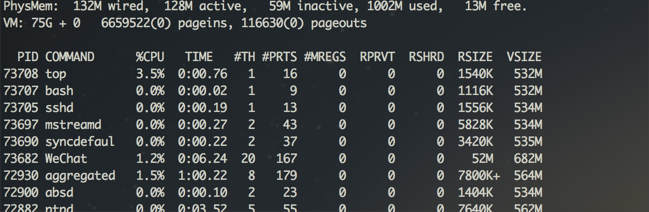
RSIZE=52M
Then, enter the chat screen:
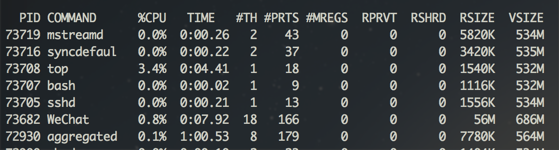
RSIZE=56M
Then, send a ton of messages (images, text, all kinds), 400+ of them, and pull them all down.
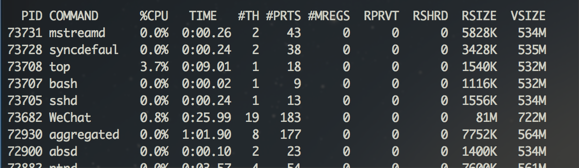
RSIZE=81M
This way, since the probability of opening that many messages in one conversation is low, and the memory usage is still acceptable. 81M feels relatively low. It seems this approach is fairly reliable.
This approach also has a performance advantage: there’s no need to repeatedly set the message View’s content (because it was preCreated), trading memory for performance.
ViewController
WeChat caches ViewControllers, i.e. opening the messages of the same user twice gives the same ViewController address.
There should be a caching strategy; I’ll research it when I have time.
QQ and Other Implementation Approaches
To support displaying many message types in an IM screen, the first thing you think of is definitely using multiple Cells. For example: TextCell, ImageCell, etc. The classic QQ actually uses this approach. You can check with Reveal.
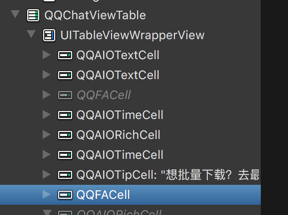
The Problem of Changing the frame in cellForRowAtIndexPath
If you adopt QQ’s Cell-based approach, there’s a UI detail to watch out for. See this article.
Demo
Based on WeChat’s message screen implementation above, I implemented a very simple screen Demo with a similar mechanism https://github.com/everettjf/Yolo/tree/master/WeChatLikeMessageDemo.
During implementation I found this mechanism has a benefit: when preCreating a message, you can know the cell’s height ahead of time (before heightForRowAtIndexPath), which conveniently solves the dynamic Cell height problem.
Summary
Reverse engineering lets us understand how an App is implemented (especially excellent, unopened-source Apps). Studying these excellent Apps can assist forward development.
I recommend the book iOS App Reverse Engineering, as well as the http://iosre.com forum.
背景
工作中自己负责IM功能的开发,平时对微信进行了不少研究学习。 这篇文章主要关注微信iOS客户端界面实现中的“聊天消息界面”实现。
写这篇文章的目的:
- 分享微信的聊天界面实现方式。
- 展示逆向主要流程。
PS: 最初是为了解决项目中的一个小问题才逆向的微信。
准备
设备:iPhone5 iOS 8.4 越狱
usbmuxd
➜  python-client python tcprelay.py -t 22:2222
Forwarding local port 2222 to remote port 22
......
ssh
ssh root@localhost -p 2222
找到可执行文件:
everettjfs-iPhone:~ root# ps aux | grep /App
mobile   38363   4.4  8.5   776400  88748   ??  Ss    8:55PM   0:52.96 /var/mobile/Containers/Bundle/Application/25FB096A-8122-49B5-9304-5FDB9080D9B0/WeChat.app/WeChat
沙盒路径:
everettjfs-iPhone:~ root# cycript -p WeChat
cy# [[NSFileManager defaultManager] URLsForDirectory:NSDocumentDirectory inDomains:NSUserDomainMask]
@[#"file:///var/mobile/Containers/Data/Application/F36BD1C1-1C39-4C83-AD4B-6D9F2B976330/Documents/"]
砸壳:
everettjfs-iPhone:~ root# clutch -i
everettjfs-iPhone:~ root# clutch -b com.tencent.xin
Finished dumping com.tencent.xin to /var/tmp/clutch/5F6CA026-C176-4FB0-9569-90F2DD251385
导出头文件:
这里不用class-dump-z 是因为class-dump-z会无法识别UIKit的很多类。
[everettjf@e w ]$ class-dump -s -S -H WeChat -o headers
初步窥探
定位Controller
打开微信,进入和某个人的会话(也就是这篇文章要研究的“聊天消息界面”)
everettjfs-iPhone:~ root# cycript -p WeChat
cy# [[[UIWindow keyWindow] rootViewController] _printHierarchy].toString()
<MMTabBarController 0x18265240>, state: appeared, view: <UILayoutContainerView 0x18265ac0>
   | <MMUINavigationController 0x1800f230>, state: appeared, view: <UILayoutContainerView 0x180cd0e0>
   |    | <NewMainFrameViewController 0x179a2400>, state: disappeared, view: <MMUIHookView 0x1827f980> not in the window
   |    | <BaseMsgContentViewController 0x179b3800>, state: appeared, view: <UIView 0x16e36c30>
   | <MMUINavigationController 0x181a40a0>, state: disappeared, view: <UILayoutContainerView 0x181a4400> not in the window
   |    | <ContactsViewController 0x17162800>, state: disappeared, view:  (view not loaded)
   | <MMUINavigationController 0x181adb10>, state: disappeared, view: <UILayoutContainerView 0x181ade00> not in the window
   |    | <FindFriendEntryViewController 0x179aec00>, state: disappeared, view:  (view not loaded)
   | <MMUINavigationController 0x18003e00>, state: disappeared, view: <UILayoutContainerView 0x18008cc0> not in the window
   |    | <MoreViewController 0x179ad400>, state: disappeared, view:  (view not loaded)
微信主界面是个MMTabBarController,有四个TabBarItem,分别对应一个MMUINavigationController。对应的RootViewController如下:
- 微信 NewMainFrameViewController
- 通讯录 ContactsViewController
- 发现 FindFriendEntryViewController
- 我 MoreViewController
此次我们关注的“聊天消息界面”,就是BaseMsgContentViewController (state:appeared)。
观察Views
Reveal
界面中各种类型的消息都发送一下,这里先发送:文本、图片、位置、语音。 使用Reveal观察,如下图:
MMTableView
从这两张图可以看到:
整个消息列表本质上是个 MMTableView (这个我们自己实现一般也是这么做)。从class-dump出的头文件中可知道,MMTableView是UITableView的子类。
@interface MMTableView : UITableView <MMDelegateCenterExt>
TableView的Cell只有一种类型, MultiSelectTableViewCell。这里开始看到时,很让我好奇。为什么没有采用传统的一个消息一个Cell的方式呢
@interface MultiSelectTableViewCell : UITableViewCell
MessageNodeView
Cell都是MultiSelectTableViewCell,而区分不同消息的是contentView的内容。
- 文本消息 : TextMessageNodeView
- 图像消息: ImageMessageNodeView
- 位置消息:LocationMessageNodeView
- 语音消息:VocieMessageNodeView (上面的截图看不到)
此外,消息之间的时间,也是MultiSelectTableViewCell,只是contentView是关于时间的Label。
简单总结
弄明白消息UI的基本结构,下一步就是找到如何创建这些MessageNodeView。这里很容易有个疑问,所有消息都是MultiSelectTableViewCell,那如何实现的Cell重用呢? 继续探索。
观察Controller
在class-dump出的头文件中找到 BaseMsgContentViewController类。可以找到 BaseMsgContentViewController.h文件,这个头文件有614行,可见这个类的复杂。(估计微信开发早期并没有考虑到后期的大量需求加入,于是成了今天的Massive View Controller)
这里细化此次行动的目的:想知道聊天中的每一条消息是如何创建、显示的。
观察类的实现,发现一些相关变量和方法:
// 字面上看,应该就是存储MessageNode的数组
NSMutableArray *m_arrMessageNodeData;
// 应该是存储所有支持的MessageNode Class类型
struct vector<Class, std::__1::allocator<Class>> m_messageNodeClass;
// 这就是主要是TableView
MMTableView *m_tableView;

// 预创建消息,有意思,一会儿仔细研究研究
- (void)preCreateMessageContentNode:(id)arg1;
- (void)preCreateMessageSplitNode:(id)arg1;
- (void)preCreateMessageTimeNode:(id)arg1;

// 初始化Class
- (void)initMessageNodeClass;
- (id)newMessageNodeViewForMessageWrap:(id)arg1 contact:(id)arg2 chatContact:(id)arg3;


// 获取node数目
- (unsigned int)getMsgNodeCount;
// 获取指定索引的node
- (id)getNodeDataByIndex:(unsigned int)arg1;
// 获取消息node数组
- (id)GetMessageNodeDataArray;

// 添加
- (void)addMessageNode:(id)arg1 layout:(BOOL)arg2 addMoreMsg:(BOOL)arg3;
- (void)addReceiveMessageNode:(id)arg1;
- (id)addSplitNode:(id)arg1 addMoreMsg:(BOOL)arg2;
- (void)addTimeNode:(id)arg1 layout:(BOOL)arg2 addMoreMsg:(BOOL)arg3;
// 移除
- (void)removeAllObjectsFromMessageNodeDatas;
- (void)removeObjectsFromMessageNodeDatas:(id)arg1;
// 更新
- (void)updateMessageNodeImageLoadingPercent:(unsigned long)arg1 percent:(unsigned long)arg2;
- (void)updateMessageNodeStatus:(id)arg1;
- (void)updateMessageNodeViewForOrientation:(id)arg1;

// 一些NodeView的事件
- (void)tagLink:(id)arg1 messageWrap:(id)arg2;
- (void)tapAppNodeView:(id)arg1;
- (void)tapFriendCard_NodeView:(id)arg1 WithContact:(id)arg2 WithMsg:(id)arg3;
- (void)tapImage_NodeView:(id)arg1;
- (void)tapLocation_NodeView:(id)arg1;
- (void)tapPushContact_NodeView:(id)arg1;
- (void)tapPushMail_NodeView:(id)arg1 withPushMailWrap:(id)arg2;
- (void)tapReader_NodeView:(id)arg1;
- (void)tapStatus_NodeView:(id)arg1;
- (void)tapText_NodeView:(id)arg1;
- (void)tapVideoStatus_NodeView:(id)arg1;
NSMutableArray *m_arrMessageNodeData;
cycript 打印出来
cy# v = #0x15067600
#"<BaseMsgContentViewController: 0x15067600>"
cy# v->m_arrMessageNodeData
@[#"<CMessageNodeData: 0x15b95260>",#"<CMessageNodeData: 0x15adf260>",#"<CMessageNodeData: 0x15a4abb0>",#"<CMessageNodeData: 0x1580f190>",#"<CMessageNodeData: 0x15a49930>",#"<CMessageNodeData: 0x1589b8a0>",#"<CMessageNodeData: 0x15a41410>",#"<CMessageNodeData: 0x158783e0>",#"<CMessageNodeData: 0x15a4a3b0>",#"<CMessageNodeData: 0x15aa14f0>",#"<CMessageNodeData: 0x1475ce50>",#"<CMessageNodeData: 0x15bf9960>",#"<CMessageNodeData: 0x15b53f40>",#"<CMessageNodeData: 0x147ad9f0>",#"<CMessageNodeData: 0x15b6d240>",#"<CMessageNodeData: 0x15ba04b0>",#"<CMessageNodeData: 0x15b90050>",#"<CMessageNodeData: 0x15be7ba0>",#"<CMessageNodeData: 0x15b84eb0>"]
cy# v->m_arrMessageNodeData.count
19
前提,与对方的聊天消息已经有很多条,首次打开与对方的聊天消息界面,可以看到微信默认只加载19条消息。
CMessageNodeData是什么?
@interface CMessageNodeData : NSObject
{
    int m_eMsgNodeType;
    CMessageWrap *m_msgWrap;
    UIView *m_view;
    unsigned long m_uCreateTime;
}
注意,这里有个UIView
@interface CMessageWrap : MMObject <IAppMsgPathMgr, ISysNewXmlMsgExtendOperation, IMsgExtendOperation, NSCopying>
{
    BOOL m_bIsSplit;
    BOOL m_bNew;
    unsigned long m_uiMesLocalID;
    long long m_n64MesSvrID;
    NSString *m_nsFromUsr;
    NSString *m_nsToUsr;
    unsigned long m_uiMessageType;
    NSString *m_nsContent;
    unsigned long m_uiStatus;
    unsigned long m_uiImgStatus;
    //.............省略大量字段.............
CMessageWrap自然就是对消息数据的封装。
CMessageNodeData有个UIView *m_view的变量,看看是什么:
y# d = v->m_arrMessageNodeData
@[#"<CMessageNodeData: 0x15b95260>",#"<CMessageNodeData: 0x15adf260>",#"<CMessageNodeData: 0x15a4abb0>",#"<CMessageNodeData: 0x1580f190>",#"
.....省略....
cy# var x = []; for(var i = 0; i < d.count;i++) x.push([d objectAtIndex:i].m_view); x
[#"<UIView: 0x1592f9c0; frame = (0 10; 320 28); layer = <CALayer: 0x147e6cc0>>",#"<TextMessageNodeView: 0x1582cca0; frame = (251 0; 60 59); layer = <CALayer: 0x158b1350>>",#"<TextMessageNodeView: 0x15a58d60; frame = (251 0; 60 59); layer = <CALayer: 0x15a3cdf0>>",#"<TextMessageNodeView: 0x15a3ba10; frame = (251 0; 60 59); layer = <CALayer: 0x15ab9ab0>>",#"<TextMessageNodeView: 0x15a31610; frame = (251 0; 60 59); layer = <CALayer: 0x15a31760>>",#"<TextMessageNodeView: 0x15a57dc0; frame = (251 0; 60 59); layer = <CALayer: 0x15a547b0
.....省略.......
odeView: 0x159ee260; frame = (186 0; 125 59); layer = <CALayer: 0x159ee3b0>>",#"<ImageMessageNodeView: 0x15b91cd0; frame = (179.5 0; 131.5 150); layer = <CALayer: 0x15b6e8e0>>",#"<UIView: 0x15b675d0; frame = (0 10; 320 28); layer = <CALayer: 0x15be5fa0>>",#"<LocationMessageNodeView: 0x15bdaee0; frame = (50 0; 261 139); layer = <CALayer: 0x15b7d290>>",#"<TextMessageNodeView: 0x15bbf400; frame = (144 0; 167 59); layer = <CALayer: 0x15be6770>>"]
可见,m_view就是MultiSelectTableViewCell的contentView下的那个UIView。
这里又有疑问:屏幕上显示的Cell其实就4个,为什么这些 CMessageNodeData中的m_view都有值(不是nil),难道没有实现重用?是的,目前我发现,确实没有实现重用。
为验证,我随便发送了几百条各种消息,再输出所有的m_view。
 cy# d.count
419
cy# var x = []; for(var i = 0; i < d.count;i++) x.push([d objectAtIndex:i].m_view); x
[#"<UIView: 0x15c91540; frame = (0 10; 320 28); layer = <CALayer: 0x16096bb0>>",#"<AppUrlMessageNodeView: 0x160977e0; frame = (0 0; 327 149); layer = <CALayer: 0x16098f50>>",#"<UIView: 0x16098d70; frame = (0 10; 320 28); layer = <CALayer: 0x16099bd0>>",#"<ImageMessageNodeView: 0x1609b000; frame = (179.5 0; 131.5 150); layer = <CALayer: 0x1609a840>>",#"<ImageMessageNodeView: 0x160a3d80; frame = (
// ........省略..................
cy# x.length
419
好吧,果然419个m_view都不是nil。
我的天呐,这怎么能行。不过观察下内存占用,以及再仔细想想,这种方案还是可以接受的。详细见下文。
我想到的原因如下:
- 内存占用并不会太多(具体数据见下文)。
- 聊天界面出现太多m_view的情形并不多。且出现时由于内存占用可接受,就无所谓了。
struct vector<Class, std::__1::allocator> m_messageNodeClass;
这里能看出BaseMsgContentViewController的实现文件是 BaseMsgContentViewController.mm,也就是Objective C++写的。
m_messageNodeClass与下面的方法有关:
- (void)initMessageNodeClass;
使用Hopper反编译WeChat的二进制文件:
再反汇编为c代码:
void -[BaseMsgContentViewController initMessageNodeClass](void * self, void * _cmd) {
    r7 = &arg_C;
    sp = sp - 0xb4;
    r11 = self;
    r6 = *objc_ivar_offset_BaseMsgContentViewController_m_messageNodeClass;
    r5 = *(r11 + r6);
    r0 = *(r11 + 0xa4);
    if (r0 != r5) {
            do {
                    *(r11 + 0xa4) = r0 - 0x4;
                    r0 = *(r0 + 0xfffffffffffffffc);
                    [r0 release];
                    r0 = *(r11 + 0xa4);
            } while (r0 != r5);
            r6 = *objc_ivar_offset_BaseMsgContentViewController_m_messageNodeClass;
    }
    r8 = @selector(class);
    r0 = [MultiColumnReaderMessageNodeView class];
    r7 = r7;
    r0 = [r0 retain];
    r1 = r6 + 0x4;
    arg_B0 = r0;
    r2 = r6 + r11;
    r3 = *(r11 + r1);
    if (r3 < *(r2 + 0x8)) {
            arg_B0 = 0x0;
            *r3 = r0;
            *(r11 + r1) = *(r11 + r1) + 0x4;
    }
    else {
            void std::__1::vector<objc_class* __strong, std::__1::allocator<objc_class* __strong> >::__push_back_slow_path<objc_class* __strong>();
            [arg_B0 release];
    }
    r4 = *objc_ivar_offset_BaseMsgContentViewController_m_messageNodeClass;
    r0 = [ImageTextReaderMessageNodeView class];
	//.....省略......
就是把所有支持的MessageNode的Class都push_back到这个vector中。
这里能看到微信支持的所有可显示的消息类型
手动整理伪代码如下:
std::vector<Class> m_messageNodeClass;
m_messageNodeClass.push_back([MultiColumnReaderMessageNodeView class]);
m_messageNodeClass.push_back([ImageTextReaderMessageNodeView class]);
m_messageNodeClass.push_back([HeadImgReaderMessageNodeaView class]);
m_messageNodeClass.push_back([MessageSysNodeView class]);
m_messageNodeClass.push_back([AttributedReaderMessageNodeaView class]);
m_messageNodeClass.push_back([ReaderNewMessageNodeView class]);
m_messageNodeClass.push_back([MultiReaderMessageNodeView class]);
m_messageNodeClass.push_back([MailMessageNodeView class]);
m_messageNodeClass.push_back([MassSendMessageNodeView class]);
m_messageNodeClass.push_back([ImageMessageNodeView class]);
m_messageNodeClass.push_back([VoiceMessageNodeView class]);
m_messageNodeClass.push_back([ShortVideoMessageNodeView class]);
m_messageNodeClass.push_back([VideoMessageNodeView class]);
m_messageNodeClass.push_back([ShareCardMessageNodeView class]);
m_messageNodeClass.push_back([EmoticonMessageNodeView class]);
m_messageNodeClass.push_back([GameMessageNodeView class]);
m_messageNodeClass.push_back([VoipContentNodeView class]);
m_messageNodeClass.push_back([AppTextMessageNodeView class]);
m_messageNodeClass.push_back([AppImageMessageNodeView class]);
m_messageNodeClass.push_back([AppEmoticonMessageNodeView class]);
m_messageNodeClass.push_back([AppFileMessageNodeView class]);
m_messageNodeClass.push_back([AppUrlMessageNodeView class]);
m_messageNodeClass.push_back([AppShakeMessageNodeView class]);
m_messageNodeClass.push_back([VoiceReminderConfirmNodeView class]);
m_messageNodeClass.push_back([VoiceReminderRemindNodeView class]);
m_messageNodeClass.push_back([AppProductMessageNodeView class]);
m_messageNodeClass.push_back([AppEmoticonSharedMessageNodeView class]);
m_messageNodeClass.push_back([AppWCProductMessageNodeView class]);
m_messageNodeClass.push_back([AppWCCardMessageNodeView class]);
m_messageNodeClass.push_back([AppTVMessageNodeView class]);
m_messageNodeClass.push_back([AppTrackRoomMessageNodeView class]);
m_messageNodeClass.push_back([AppRecordMessageNodeView class]);
m_messageNodeClass.push_back([AppNoteMessageNodeView class]);
m_messageNodeClass.push_back([AppHardWareRankMessageNode class]);
m_messageNodeClass.push_back([AppHardWareLikeNotifyMessageNode class]);
m_messageNodeClass.push_back([MultiTalkMessageNodeView class]);
m_messageNodeClass.push_back([WCPayTransferMessageNodeView class]);
m_messageNodeClass.push_back([WCPayTransferAcceptedMessageNodeView class]);
m_messageNodeClass.push_back([WCPayTransferRejectedMessageNodeView class]);
m_messageNodeClass.push_back([WCPayMessageBaseNodeView class]);
m_messageNodeClass.push_back([WCPayC2CMessageNodeView class]);
m_messageNodeClass.push_back([WCPayC2CFestivalMsgNodeView class]);
m_messageNodeClass.push_back([AppDefaultMessageNodeView class]);
m_messageNodeClass.push_back([TextMessageNodeView class]);
可见,微信真实个巨大的工程,支持的消息类型这么多(我使用的微信版本:6.3.19)。
随便看个消息,例如: MessageSysNodeView 继承自 BaseMessageNodeView 然后 MMUIView
- (void) preCreateMessageXXXXNode
- (void)preCreateMessageContentNode:(id)arg1;
- (void)preCreateMessageSplitNode:(id)arg1;
- (void)preCreateMessageTimeNode:(id)arg1;
由这三个preCreateMessage开头的方法,可猜测到 MultiSelectTableViewCell的contentView的第一层子View 存在三类:
- 具体内容ContentNode
- 分隔符Node
- 时间Node
Hopper反汇编找到对应代码:
TimeNode
为循序渐进,先研究下TimeNode的preCreate:
由于内部有取arg2.m_view的代码,能基本猜到 arg2是 CMessageNodeData类型。(后面可以用lldb证实)
关键代码行及伪代码大概如下:
void -[BaseMsgContentViewController preCreateMessageTimeNode:](void * self, void * _cmd, void * arg2) {
messageNodeData = arg2
if(messageNodeData.m_view == nil){
	// 就是填充m_view

	// 从MMThemeManager获取时间Node的高度
    r5 = [[MMThemeManager sharedThemeManager] retain];
    [[r5 getValueOfProperty:@"message_node_timeNode_height" inRuleSet:@"#message_node_view"] retain];

	UIView *timeRoot = [][UIView alloc]initWithFrame:....];

    r11 = [[MMUILabel alloc] init];
	// 这是label各种属性

	r10 = [[UIImageView alloc] init];
	// 设置ImageView各种属性
}
最终就是构成这个:
ContentNode
知道了TimeNode如何preCreate的,那ContentNode就类似了,只是代码更多。
void -[BaseMsgContentViewController preCreateMessageContentNode:](void * self, void * _cmd, void * arg2) {

messageNodeData = arg2
if(messageNodeData.m_view == nil){
	// 仍然是填充m_view

	// 判断是否自己发的消息
    r5 = [[r11 m_msgWrap] retain];
    arg_14 = [CMessageWrap isSenderFromMsgWrap:r5];

	如果是对方消息
	r0 = [r8 newMessageNodeViewForMessageWrap:r4 contact:r5 chatContact:STK-1];
	如果是我发送的消息
	r0 = [r8 newMessageNodeViewForMessageWrap:r6 contact:0x0 chatContact:STK-1];

	设置m_view

	//计算frame

	//GameNode特殊处理
	//语音特殊处理	r2 = [VoiceMessageNodeView class];

}
PS:这个方法之前的版本很长,现在的版本进行了优化。新增了newMessageNodeViewForMessageWrap方法。
void * -[BaseMsgContentViewController newMessageNodeViewForMessageWrap:contact:chatContact:](void * self, void * _cmd, void * arg2, void * arg3, void * arg4) {

	// 这里循环判断vector中的每个类,交给每个类判断是否是自己的类型
    r0 = r5->m_messageNodeClass;

	for(Class in r0){

	// 先判断能否创建
    r4 = *(r0 + r11 * 0x4);
    if (([r4 canCreateMessageNodeViewInstanceWithMessageWrap: r2] & 0xff) != 0x0) goto loc_1609718;

	// 创建
    r0 = [r4 alloc];
    r4 = arg_8;
    r6 = arg_4;
    var_0 = r6;
    r5 = [r0 initWithMessageWrap:arg_C Contact:r4 ChatContact:STK-1];

	}
}
canCreateMessageNodeViewInstanceWithMessageWrap
看下canCreateMessageNodeViewInstanceWithMessageWrap方法,
char +[BaseMessageNodeView canCreateMessageNodeViewInstanceWithMessageWrap:](void * self, void * _cmd, void * arg2) {
    return 0x0;
}
先看所有NodeView的基类 BaseMessageNodeView,默认返回0x0,也就是NO。(32位下BOOL是char,这里也就是返回个BOOL类型)
再随便找个子NodeView类,例如:MessageSysNodeView
char +[MessageSysNodeView canCreateMessageNodeViewInstanceWithMessageWrap:](void * self, void * _cmd, void * arg2) {
    r4 = [arg2 retain];
    r5 = @selector(m_uiMessageType);
    if ([r4 m_uiMessageType] == 0x2710) {
            r5 = 0x1;
    }
    else {
            r0 = [r4 m_uiMessageType];
            r5 = 0x0;
            asm{ it         eq };
            if (r0 == 0x2712) {
                    r5 = 0x1;
            }
    }
    [r4 release];
    r0 = r5;
    return r0;
}
可见。如果 m_uiMessageType(CMessageNodeData的CMessageWrap的成员)是 0x2710或0x2712,则认为是此消息类型。
再看ImageMessageNodeView:
char +[ImageMessageNodeView canCreateMessageNodeViewInstanceWithMessageWrap:](void * self, void * _cmd, void * arg2) {
    r4 = [arg2 retain];
    r5 = @selector(m_uiMessageType);
    if (([r4 m_uiMessageType] == 0x3) || ([r4 m_uiMessageType] == 0xd)) {
            r5 = 0x1;
    }
    else {
            r0 = [r4 m_uiMessageType];
            r5 = 0x0;
            asm{ it         eq };
            if (r0 == 0x27) {
                    r5 = 0x1;
            }
    }
    [r4 release];
    r0 = r5;
    return r0;
}
可知 0x3、0xd、0x27 都是图像。
还有很多消息,不一一列出了。
最后再看下 TextMessageNodeView:
char +[TextMessageNodeView canCreateMessageNodeViewInstanceWithMessageWrap:](void * self, void * _cmd, void * arg2) {
    return 0x1;
}
直接返回的YES。可见,如果所有消息都不是的话,则按照文本消息来处理。TextMessageNodeView也正好是最后一个push_back到 m_messageNodeClass中去的。
initWithMessageWrap
先看BaseMessageNodeView:
void * -[BaseMessageNodeView initWithMessageWrap:Contact:ChatContact:](void * self, void * _cmd, void * arg2, void * arg3, void * arg4) {
	省略……
再看看TextMessageNodeView 的initWithMessageWrap:Contact:ChatContact。 代码或多或少,没有什么关键代码。
就是根据CMessageWrap配置各种View的属性。
继续研究
下面想办法找到preCreate调用源。
准备工作
usbmuxd
➜  python-client python tcprelay.py -t 22:2222 1234:1234
Forwarding local port 2222 to remote port 22
Forwarding local port 1234 to remote port 1234
......
ssh
ssh root@localhost -p 2222
debugserver
everettjfs-iPhone:~ root# debugserver *:1234 -a WeChat
debugserver-@(#)PROGRAM:debugserver  PROJECT:debugserver-320.2.89
 for armv7.
Attaching to process WeChat...
Listening to port 1234 for a connection from *...
Waiting for debugger instructions for process 0.
lldb
[everettjf@e ~ ]$ lldb
(lldb) process connect connect://localhost:1234
Process 67776 stopped
* thread #1: tid = 0x214590, 0x31ef4474 libsystem_kernel.dylib`mach_msg_trap + 20, queue = 'com.apple.main-thread', stop reason = signal SIGSTOP
    frame #0: 0x31ef4474 libsystem_kernel.dylib`mach_msg_trap + 20
libsystem_kernel.dylib`mach_msg_trap:
->  0x31ef4474 <+20>: pop    {r4, r5, r6, r8}
    0x31ef4478 <+24>: bx     lr

libsystem_kernel.dylib`mach_msg_overwrite_trap:
    0x31ef447c <+0>:  mov    r12, sp
    0x31ef4480 <+4>:  push   {r4, r5, r6, r8}
找到偏移地址
(lldb) image list -o -f
[  0] 0x000e7000 /private/var/mobile/Containers/Bundle/Application/25FB096A-8122-49B5-9304-5FDB9080D9B0/WeChat.app/WeChat(0x00000000000eb000)
[  1] 0x031c7000 /Library/MobileSubstrate/MobileSubstrate.dylib(0x00000000031c7000)
看到image list -o -f后面的偏移地址:0x000e7000
历史消息
先看下聊天消息界面时默认加载的历史消息。
hopper中找到BaseMsgContentViewController::preCreateMessageContentNode: 的文件偏移地址:0x0160a444
计算出真实偏移地址(我比较喜欢拿ipython当计算器):
In [1]: hex(0x000e7000+0x0160a444)
Out[1]: '0x16f1444'
下断点:
(lldb) br s -a 0x16f1444
Breakpoint 1: where = WeChat`___lldb_unnamed_function80337$$WeChat, address = 0x016f1444
然后点击一个会话,进入消息界面。此时会命中断点。
这里既然命中断点了,顺带看一下 preCreateMessageContentNode 的参数类型:
(lldb) po $r0
<BaseMsgContentViewController: 0x17127c00>

(lldb) po (char*)$r1
"preCreateMessageContentNode:"

(lldb) po $r2
<CMessageNodeData: 0x1789bfb0>
回归正题,bt命令查看调用栈:
(lldb) bt
* thread #1: tid = 0x214590, 0x016f1444 WeChat`___lldb_unnamed_function80337$$WeChat, queue = 'com.apple.main-thread', stop reason = breakpoint 1.1
  * frame #0: 0x016f1444 WeChat`___lldb_unnamed_function80337$$WeChat
    frame #1: 0x016f2516 WeChat`___lldb_unnamed_function80343$$WeChat + 990
    frame #2: 0x016f2bfe WeChat`___lldb_unnamed_function80345$$WeChat + 590
    frame #3: 0x016f397e WeChat`___lldb_unnamed_function80355$$WeChat + 690
    frame #4: 0x01708ac0 WeChat`___lldb_unnamed_function80565$$WeChat + 1416
    frame #5: 0x26c54b8e UIKit`-[UIViewController loadViewIfRequired] + 602
    frame #6: 0x26c548fc UIKit`-[UIViewController view] + 24
    省略
可见这几个方法都是在主线程调用。frame#0就是preCreateMessageContentNode方法。frame #1就是调用preCreateMessageContentNode的方法。我们找下frame#1的方法。 从内存地址 0x016f2516 减去 偏移地址0x000e7000 就得到文件偏移地址:
In [4]: hex(0x016f2516-0x000e7000)
Out[4]: '0x160b516'
hopper 中找到这个方法:
找到方法:
就是这个方法:
void -[BaseMsgContentViewController addMessageNode:layout:addMoreMsg:](void * self, void * _cmd, void * arg2, char arg3, char arg4) {
下断点到这个方法的首地址 0x16f2138 = 0x000e7000 + 0x0160b138:(先清掉之前的断点)
In [6]: hex(0x000e7000 + 0x0160b138)
Out[6]: '0x16f2138'
(lldb) br l
Current breakpoints:
1: address = WeChat[0x0160a444], locations = 1, resolved = 1, hit count = 1
  1.1: where = WeChat`___lldb_unnamed_function80337$$WeChat, address = 0x016f1444, resolved, hit count = 1
(lldb) br delete 1
1 breakpoints deleted; 0 breakpoint locations disabled.

(lldb) br s -a 0x16f2138
Breakpoint 3: where = WeChat`___lldb_unnamed_function80343$$WeChat, address = 0x016f2138
看下参数:
(lldb) po $r0
<BaseMsgContentViewController: 0x17127c00>
(lldb) po (char*)$r1
"addMessageNode:layout:addMoreMsg:"
(lldb) po $r2
{m_uiMesLocalID=384, m_ui64MesSvrID=7606243121581773106, m_nsFromUsr=wxi*h12~19, m_nsToUsr=wxi*t21~19, m_uiStatus=2, type=1, msgSource="(null)"}
(lldb) po [$r2 class]
CMessageWrap
(lldb) p $r3
(unsigned int) $13 = 0
(lldb) p $r4
(unsigned int) $14 = 40
也就是 BaseMsgContentViewController addMessageNode:layout:addMoreMsg 方法的第一个参数是 CMessageWrap,layout是0 , addMoreMsg 是40 。
同样的步骤,看下调用栈中的剩余几个方法,汇总到一起就是:
void -[BaseMsgContentViewController preCreateMessageContentNode:](void * self, void * _cmd, void * arg2) {
void -[BaseMsgContentViewController addMessageNode:layout:addMoreMsg:](void * self, void * _cmd, void * arg2, char arg3, char arg4) {
void -[BaseMsgContentViewController initHistroyMessageNodeData](void * self, void * _cmd) {
void -[BaseMsgContentViewController initData](void * self, void * _cmd) {
void -[BaseMsgContentViewController viewDidLoad](void * self, void * _cmd) {
利用hopper的反汇编看下这几个方法,我们又找到了,initView等一系列init开头的函数。比如:initTableView 中初始化tableView,并调用了reloadData。(initData在先,initView在后)
历史消息来源
仔细看
void -[BaseMsgContentViewController initHistroyMessageNodeData](void * self, void * _cmd) {
...
            arg_1C = r8;
            r0 = [r5 GetMessageArray];
            r7 = r7;
找到 [r5 GetMessageArray] 这句的汇编代码行 0x0160bb20。
断点到这行,然后输出$r0。
(lldb) br s -a 0x163db20 (这里我换了机器,重新启动了Weixin,内存偏移变为0x00032000,因此hex(0x0160BB20 + 0x00032000)=0x163db20)
(lldb) po $r0
<WeixinContentLogicController: 0x1582ad20>
(lldb) po (char*)$r1
"GetMessageArray"
(lldb) n
省略
(lldb) po $r0
<__NSArrayM 0x1584bf30>(
{m_uiMesLocalID=382, m_ui64MesSvrID=4946812604026242266, m_nsFromUsr=wxi*h12~19, m_nsToUsr=wxi*t21~19, m_uiStatus=2, type=1, msgSource="(null)"} ,
{m_uiMesLocalID=383, m_ui64MesSvrID=145730894416135475, m_nsFromUsr=wxi*h12~19, m_nsToUsr=wxi*t21~19, m_uiStatus=2, type=1, msgSource="(null)"} ,
省略
)
(lldb) po [[$r0 firstObject]class]
CMessageWrap
单步执行后,也可以看返回值$r0,也就是所有消息CMessageWrap。
可知是WeixinContentLogicController类, 看下这个类:
@interface WeixinContentLogicController : BaseMsgContentLogicController
hopper看下WeixinContentLogicController的GetMessageArray方法,发现找不到。那就是在父类BaseMsgContentLogicController中。
- BaseMsgContentLogicController GetMessageArray
内部又调用了 WeixinContentLogicController GetMsg:FromID:Limit:LeftCount:LeftUnreadCount:
- WeixinContentLogicController GetMsg:FromID:Limit:LeftCount:LeftUnreadCount:

    r0 = [MMServiceCenter defaultCenter];
    arg_30 = 0xffffffff;
    r0 = [r0 retain];
    arg_24 = r0;
    arg_30 = 0x2;
    r2 = [CMessageMgr class];
    arg_30 = 0x3;
    r0 = [arg_24 getService:r2];
    arg_30 = 0xffffffff;
    arg_28 = [r0 retain];
    [arg_24 release];
    arg_30 = 0x4;
    asm{ stm.w      sp, {r3, r5, r6} };
    r0 = [arg_28 GetMsgByCreateTime:arg_20 FromID:arg_1C FromCreateTime:STK1 Limit:STK0 LeftCount:STK-1];
大概就是 从 MMServiceCenter 获取到CMessageMgr,然后调用 CMessageMgr的GetMsgByCreateTime:arg_20 FromID:arg_1C FromCreateTime:STK1 Limit:STK0 LeftCount:STK-1 方法。
有两个方法:
- (id)GetMsgByCreateTime:(id)arg1 FromID:(unsigned long)arg2 FromCreateTime:(unsigned long)arg3 Limit:(unsigned long)arg4 LeftCount:(unsigned int *)arg5;
- (id)GetMsgByCreateTime:(id)arg1 FromID:(unsigned long)arg2 FromCreateTime:(unsigned long)arg3 Limit:(unsigned long)arg4 LeftCount:(unsigned int *)arg5 FromSequence:(unsigned long)arg6;
第一个会调用第二个带FromSequence的方法,hopper看下第二个方法:
  r0 = *objc_ivar_offset_CMessageMgr_m_oMsgDB;
    r2 = *(r7 + 0x14);
    r0 = *(r6 + r0);
    arg_C = r2;
    arg_4 = r5 + 0x5;
    r5 = *(r7 + 0x10);
    arg_8 = r5;
    var_0 = r8;
    r0 = [r0 GetMsgByCreateTime:r10 FromID:arg_24 FromCreateTime:STK2 Limit:STK1 LeftCount:STK0 FromSequence:STK-1];
    r7 = r7;
    r4 = [r0 retain];
    r1 = @selector(HandleMsgList:MsgList:);
    [r6 HandleMsgList:r2 MsgList:STK3];
objc_ivar_offset_CMessageMgr_m_oMsgDB 就是 CMessageDB *m_oMsgDB; 也就是调用了 CMessageDB的GetMsgByCreateTime:r10
PS:
在hopper中能看到不少日志信息,而且写明了当前实现文件的文件名。 后缀是.mm,当然不止这一个,微信好多类都是Objective C++实现的。包括消息主界面的 BaseMsgContentViewController.mm,以及下面CMessageMgr中的很多类。(猜测,微信的初期开发人员不少做Windows下C++开发客户端的哈。C开头的类……)
这个CMessageMgr也是Objective C++开发 。不过hopper能看出 GetMsgByCreateTime: 内部调用了
int -[CMessageDB GetMsg:Where:order:Limit:](int arg0) {
内部又调用:
   r11 = *objc_ivar_offset_CMessageDB_m_oMMDB;
    r0 = *(r6 + r11);
    r3 = *0x26b20d8;
    asm{ stmeq.w    sp, {r4, r10} };
    arg_8 = r5;
    r5 = r8;
    r0 = [r0 GetMessagesByChatName:r5 onProperty:r3 where:STK1 order:STK0 limit:STK-1];
调用了成员CMMDB的 GetMessagesByChatName方法。
@interface CMessageDB : NSObject
{
    CMMDB *m_oMMDB;
}
CMMDB的 GetMessagesByChatName方法内部如下:
    res = [arg0 GetMessageTable:r11];
    r0 = [res getObjectsWhere:r10 onProperties:r4 orderBy:STK0 limit:STK-1];
也就是对 CMMDB::GetMessageTable 的返回值调用了getObjectsWhere方法。
void * -[CMMDB GetMessageTable:](void * self, void * _cmd, void * arg2) {
    r4 = [[CMMDB messageTableName:arg2] retain];
    r5 = [[self m_db] retain];
    r3 = [DBMessage class];
    r6 = [[r5 getTable:r4 withClass:r3] retain];
    r0 = loc_215a20c(r6, @selector(getTable:withClass:));
调用了 m_db( WCDataBase *m_db;) 的 getTable:withClass方法。再看进入 就是返回 WCDataBaseTable类型。
看看CMMDB的头文件
@interface CMMDB : NSObject <WCDataBaseEventDelegate>
{
    NSRecursiveLock *m_lockMMDB;
    NSMutableSet *m_setMessageCreatedTable;
    NSMutableSet *m_setMessageExtCreatedTable;
    OpLogDB *m_oplogWcdb;
    WCDataBase *m_db;
    WCDataBaseTable *m_tableContact;
    WCDataBaseTable *m_tableContactExt;
    WCDataBaseTable *m_tableContactMeta;
    WCDataBaseTable *m_tableQQContact;
    WCDataBaseTable *m_tableSendMsg;
    WCDataBaseTable *m_tableUploadVoice;
    WCDataBaseTable *m_tableDownloadVoice;
    WCDataBaseTable *m_tableRevokeMsg;
    WCDataBaseTable *m_tableEmoticon;
    WCDataBaseTable *m_tableEmoticonUpload;
    WCDataBaseTable *m_tableEmoticonDownload;
    WCDataBaseTable *m_tableEmoticonPackage;
    WCDataBaseTable *m_tableBottle;
    WCDataBaseTable *m_tableBottleContact;
    WCDataBaseTable *m_tableMassSendContact;
}
就是根据要获取的表类型(这里是DBMessage class)获取到对应的WCDataBaseTable实例,用来操作某个表。
PS: WCDataBase 就是对sqlite的封装了。
@interface WCDataBase : NSObject <WCDBCorruptReportInterface, WCDBHandlesPoolProtocol>
{
    WCDBHandlesPool *m_handlesPool;
    struct sqlite3 *m_dbHandle;
    NSData *m_dbEncryptKey;
    BOOL m_isMemoryOnly;
    NSString *m_nsDBPath;
    NSString *m_nsDBFilePath;
    NSString *m_nsDBName;
    NSRecursiveLock *m_oLock;
    unsigned int m_databaseID;
    unsigned int m_initTime;
    id <WCDataBaseEventDelegate> m_eventDelegate;
    WCDBCorruptReport *m_corruptReport;
}
进一步跟踪调用,会到:
int -[WCDataBase getObjectsOfClass:fromTable:onProperties:where:orderBy:limit:getError:](? arg0) {
这里就是对sqlite的本地查询了。
就到这里吧,知道了大体流程。但貌似有个问题,这一溜下来都是在主线程干的事情,不过看来足够快了。
PS:微信的本地sqlite数据库设计及Objective C++的封装有时间可以学习下。
新消息
上面找到了首次打开聊天界面时加载历史聊天消息的调用栈。
我还想知道,在会话界面时,新消息到来时的调用栈。那就进入聊天界面后,再下载断点,然后用另一个手机给这个账号发消息(自己发也行啊),然后看调用栈。
首先进入聊天消息页面,然后再次下断点到 preCreateMessageContentNode方法。
(lldb) br s -a 0x16f1444
Breakpoint 4: where = WeChat`___lldb_unnamed_function80337$$WeChat, address = 0x016f1444
(lldb) c
error: Process is running.  Use 'process interrupt' to pause execution.
Process 67776 stopped
* thread #1: tid = 0x214590, 0x016f1444 WeChat`___lldb_unnamed_function80337$$WeChat, queue = 'com.apple.main-thread', stop reason = breakpoint 4.1
    frame #0: 0x016f1444 WeChat`___lldb_unnamed_function80337$$WeChat
WeChat`___lldb_unnamed_function80337$$WeChat:
->  0x16f1444 <+0>: push   {r4, r5, r6, r7, lr}
    0x16f1446 <+2>: add    r7, sp, #0xc
    0x16f1448 <+4>: push.w {r8, r10, r11}
    0x16f144c <+8>: sub.w  r4, sp, #0x20
(lldb) bt
* thread #1: tid = 0x214590, 0x016f1444 WeChat`___lldb_unnamed_function80337$$WeChat, queue = 'com.apple.main-thread', stop reason = breakpoint 4.1
  * frame #0: 0x016f1444 WeChat`___lldb_unnamed_function80337$$WeChat
    frame #1: 0x016f2516 WeChat`___lldb_unnamed_function80343$$WeChat + 990
    frame #2: 0x018df210 WeChat`___lldb_unnamed_function87462$$WeChat + 472
    frame #3: 0x018df44e WeChat`___lldb_unnamed_function87463$$WeChat + 398
    frame #4: 0x01f6e3a2 WeChat`___lldb_unnamed_function115325$$WeChat + 1242
    frame #5: 0x2433e5ce Foundation`__NSThreadPerformPerform + 386
    frame #6: 0x235c5fae CoreFoundation`__CFRUNLOOP_IS_CALLING_OUT_TO_A_SOURCE0_PERFORM_FUNCTION__ + 14
采用上面的方法可获得调用栈:
void -[BaseMsgContentViewController preCreateMessageContentNode:](void * self, void * _cmd, void * arg2) {
void -[BaseMsgContentViewController addMessageNode:layout:addMoreMsg:](void * self, void * _cmd, void * arg2, char arg3, char arg4) {
void -[BaseMsgContentLogicController DidAddMsg:](void * self, void * _cmd, void * arg2) {
void -[BaseMsgContentLogicController OnAddMsg:MsgWrap:](void * self, void * _cmd, void * arg2, void * arg3) {
void -[CMessageMgr MainThreadNotifyToExt:](void * self, void * _cmd, void * arg2) {
__NSThreadPerformPerform
__CFRUNLOOP_IS_CALLING_OUT_TO_A_SOURCE0_PERFORM_FUNCTION__
根据调用栈,大体得知 CMessageMgr MainThreadNotifyToExt 分发出消息。又到了CMessageMgr类。
上一个方法是__NSThreadPerformPerform,可知是从其他线程使用perform过来的。(perform到主线程会加入到主线程的RunLoop中)
看看MainThreadNotifyToExt的参数。断点到第一行代码:
lldb查看:
(lldb) po $r0
po<CMessageMgr: 0x147afbe0>

(lldb) po $r0
<CMessageMgr: 0x147afbe0>

(lldb) po (char*)$r1
"MainThreadNotifyToExt:"

(lldb) po $r2
{
    1 = 1;
    2 = "wxid_pamzqdzakikt21";
    3 = "{m_uiMesLocalID=394, m_ui64MesSvrID=8508546064571928607, m_nsFromUsr=wxi*t21~19, m_nsToUsr=wxi*h12~19, m_uiStatus=3, type=1, msgSource=\"\"} ";
}

(lldb) po [$r2 class]
__NSDictionaryM
(lldb) po [[$r2 objectForKey:@"3"] class]
CMessageWrap

(lldb) po [[$r2 objectForKey:@"2"] class]
__NSCFString

(lldb) po [[$r2 objectForKey:@"1"] class]
__NSCFString
可知参数是个NSDictionary,key分别为字符串1 2 3,分别是 NSString NSString 以及CMessageWrap。
可知CMessageWrap是后台线程准备好的。
hopper能能看到大体流程:
center = [MMServiceCenter defaultCenter]
service = getService:[MMExtensionCenter class]
IMsgExt ext = service getExtension:[IMsgExt class]
然后使用IMsgExt分发消息。
IMsgExt协议如下:
@protocol IMsgExt

@optional
- (void)OnAddMsg:(NSString *)arg1 MsgWrap:(CMessageWrap *)arg2;
- (void)OnAddMsgForSpecialSession:(NSString *)arg1 MsgList:(NSArray *)arg2;
- (void)OnAddMsgListForSession:(NSDictionary *)arg1 NotifyUsrName:(NSSet *)arg2;
- (void)OnBeginDownloadAppData:(CMessageWrap *)arg1;
- (void)OnBeginDownloadImage:(CMessageWrap *)arg1;
- (void)OnBeginDownloadVideo:(CMessageWrap *)arg1;
- (void)OnChangeMsg:(NSString *)arg1 OpCode:(unsigned long)arg2;
- (void)OnDelMsg:(NSString *)arg1;
- (void)OnDelMsg:(NSString *)arg1 DelAll:(BOOL)arg2;
- (void)OnDelMsg:(NSString *)arg1 MsgWrap:(CMessageWrap *)arg2;
- (void)OnGetNewXmlMsg:(NSString *)arg1 Type:(NSString *)arg2 MsgWrap:(CMessageWrap *)arg3;
- (void)OnModMsg:(NSString *)arg1 MsgWrap:(CMessageWrap *)arg2;
- (void)OnMsgDownloadAppAttachExpiredFail:(NSString *)arg1 MsgWrap:(CMessageWrap *)arg2;
- (void)OnMsgDownloadThumbFail:(NSString *)arg1 MsgWrap:(CMessageWrap *)arg2;
- (void)OnMsgDownloadThumbOK:(NSString *)arg1 MsgWrap:(CMessageWrap *)arg2;
- (void)OnMsgDownloadVideoExpiredFail:(NSString *)arg1 MsgWrap:(CMessageWrap *)arg2;
- (void)OnMsgNotAddDBNotify:(NSString *)arg1 MsgWrap:(CMessageWrap *)arg2;
- (void)OnMsgNotAddDBSession:(NSString *)arg1 MsgList:(NSArray *)arg2;
- (void)OnPreAddMsg:(NSString *)arg1 MsgWrap:(CMessageWrap *)arg2;
- (void)OnReceiveSight:(CMessageWrap *)arg1;
- (void)OnRevokeMsg:(NSString *)arg1 MsgWrap:(CMessageWrap *)arg2 ResultCode:(unsigned long)arg3 ResultMsg:(NSString *)arg4 EducationMsg:(NSString *)arg5;
- (void)OnSendSight:(NSString *)arg1;
- (void)OnShowPush:(CMessageWrap *)arg1;
- (void)OnUnReadCountChange:(NSString *)arg1;
- (void)OnUpdateVideoStatus:(NSString *)arg1 MsgWrap:(CMessageWrap *)arg2;
@end
具体细节就不继续分析了。大体知道了与UI相关的流程。
其他
内存占用
微信这种把消息的view 预创建到实体中,且不销毁。不销毁的意思是:退出界面会话时不会销毁;不断的下拉消息会不断的创建。一眼感觉不太考虑,看看微信内存占用情况。
首先,把微信进程结束后,重新打开。
在这种状态下看看内存:
RSIZE=52M
然后,进入聊天界面:
RSIZE=56M
然后,使劲发消息(图片、文字各种消息),400多条,全部下拉下来。
RSIZE=81M
这样看来,由于在一个会话中打开很多消息的概率较少,且内存占用还是可接受的。占用81M感觉还是比较少的。看来这种方案还是比较靠谱的。
这种方案也有性能上的优势,就是不需要重复设置消息View的内容(因为preCreate了嘛),牺牲了内存,提高了性能。
ViewController
微信会对ViewController进行缓存,也就是对同一个用户的消息打开两次,ViewController的地址是相同的。
应该会有个缓存策略,有空研究研究。
QQ等其他实现方案
要支持IM界面的多种类型消息展示,首先想到的肯定是使用多种Cell。例如:TextCell, ImageCell 等。经典的QQ,其实就是这种方式。可以用Reveal看看。
cellForRowAtIndexPath中改变frame的问题
如果采用QQ这种使用Cell的方案,有个UI上的细节问题要注意。见这篇文章。
Demo
根据微信上面的消息界面实现,我实现了一个很简单的类似机制的界面Demo https://github.com/everettjf/Yolo/tree/master/WeChatLikeMessageDemo 。
实现过程中发现这种机制有个好处,就是在preCreate消息时,可以提前(在heightForRowAtIndexPath之前)知道cell的高度,也就很方便的解决了Cell动态高度这个问题。
总结
逆向可以让我们了解一个App的实现方法(尤其是优秀未开源的App哈),学习这些优秀的App可以辅助正向开发。
推荐《iOS应用逆向工程》这本书,以及 http://iosre.com 论坛。