writing
A Small Animation Glitch When the Keyboard Hides in a Chat UI聊天界面键盘隐藏时的一个动画小问题
· Development notes
Translated from Chinese — .
On this page
Background
There are two ways to implement a chat UI:
- QQ’s approach, which is also most apps’ approach. Each message type has its own Cell, for example: TextCell, ImageCell, etc.
- WeChat’s approach. So far I only know WeChat does this. See this article for the implementation.
This article mainly talks about a small UI animation glitch you may run into with the first approach. There are lots of reference code samples on GitHub using the first approach (I couldn’t find ready-made code for the second), but a lot of that code has more or less small issues in real use.
Idea
Since the avatar in chat messages can be on the left or the right, and there are many kinds of message content that can be left-aligned or right-aligned too, if you make a Cell for every combination, there will be a huge number of Cells.
- TextLeftCell
- TextRightCell
- ImageLeftCell
- ImageRightCell
This isn’t good. If there are dozens of message types, the number of Cells doubles. (PS: what about putting two Views in one Cell? A LeftView and a RightView. That’s not good either, still a hassle.)
One solution is, in the tableView’s cellForRowAtIndexPath, change the frame position of the avatar and content View based on the message type (the other party’s message or my own message).
But there’s a requirement:
- When the keyboard pops up, the TableView should move up with it.
- When the TableView scrolls, dismiss the keyboard.
Problem
Here’s one way to implement it, with these steps:
- When the keyboard pops up, make the TableView’s frame smaller.
- Add the new message.
- When the TableView scrolls down, dismiss the keyboard at the same time. Change the TableView’s frame to restore the original size.
Aside: the steps above come up very easily, and changing the tableView’s frame size is also an easy-to-think-of approach. Of course you can also use constraints to change the size of the View below the TableView (this constraint-based approach is similar to changing the frame size — both plant a landmine for this little problem).
The final effect is as follows:
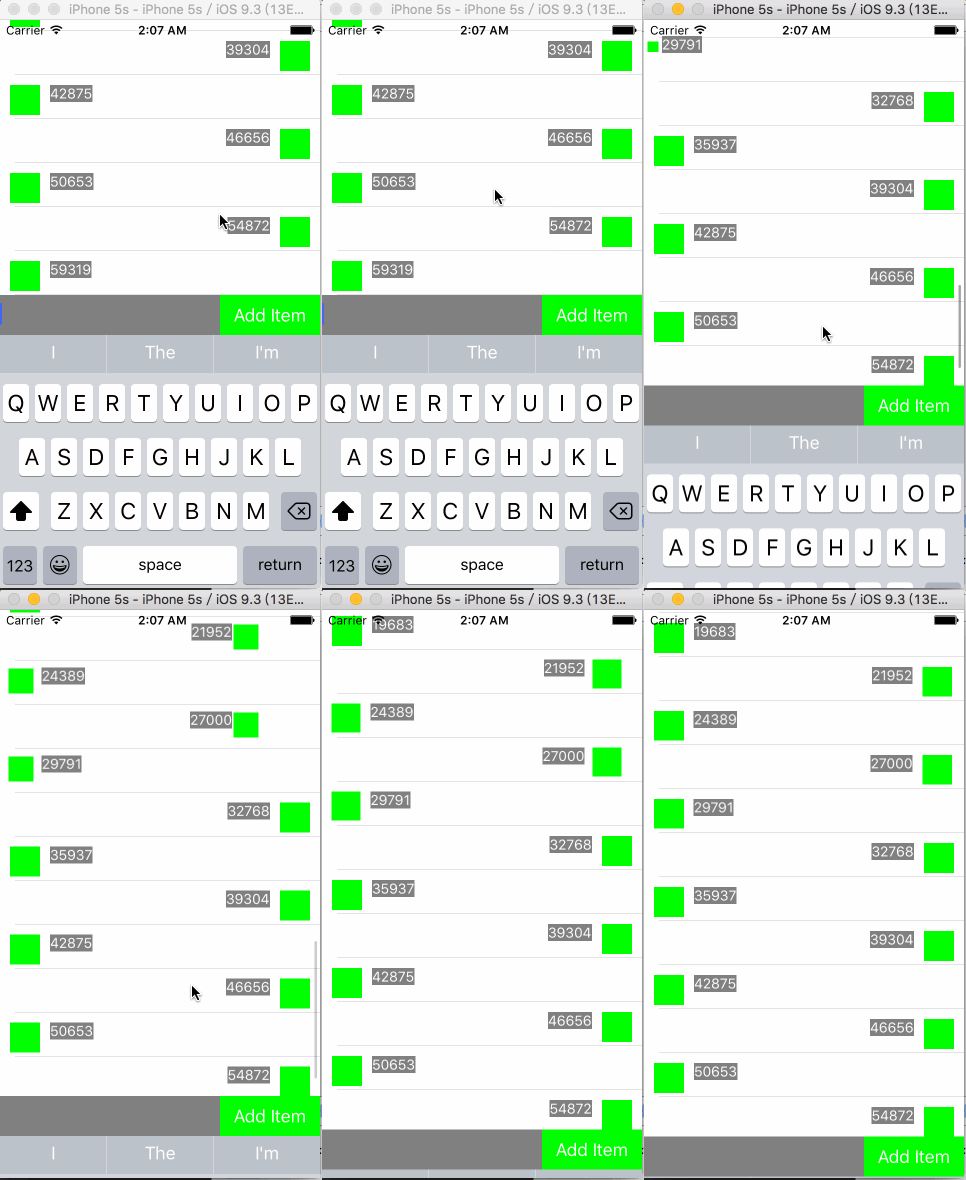
Here’s the problem:
When the keyboard hides, the avatars and content in the top few Cells of the TableView animate, and this animation is not what we want.
How do we remove this animation?
Cause
- When the keyboard hides, it hides with an animation, and the UITableView’s frame growing also happens within the animation context, so the UITableView grows with an animation.
- At the same time, because the UITableView’s frame grows, it can hold more Cells, so new Cells get created, and that creation also happens within the animation context.
Solution
There are two steps:
Step one
When changing the frame in the tableView’s cellForRowAtIndexPath, disable animation.
- (UITableViewCell *)tableView:(UITableView *)tableView cellForRowAtIndexPath:(NSIndexPath *)indexPath{
    ChatCell *cell = [tableView dequeueReusableCellWithIdentifier:@"Cell" forIndexPath:indexPath];

//    [self _fillCell:cell indexPath:indexPath];

    [UIView performWithoutAnimation:^{
        [self _fillCell:cell indexPath:indexPath];
    }];

    return cell;
}
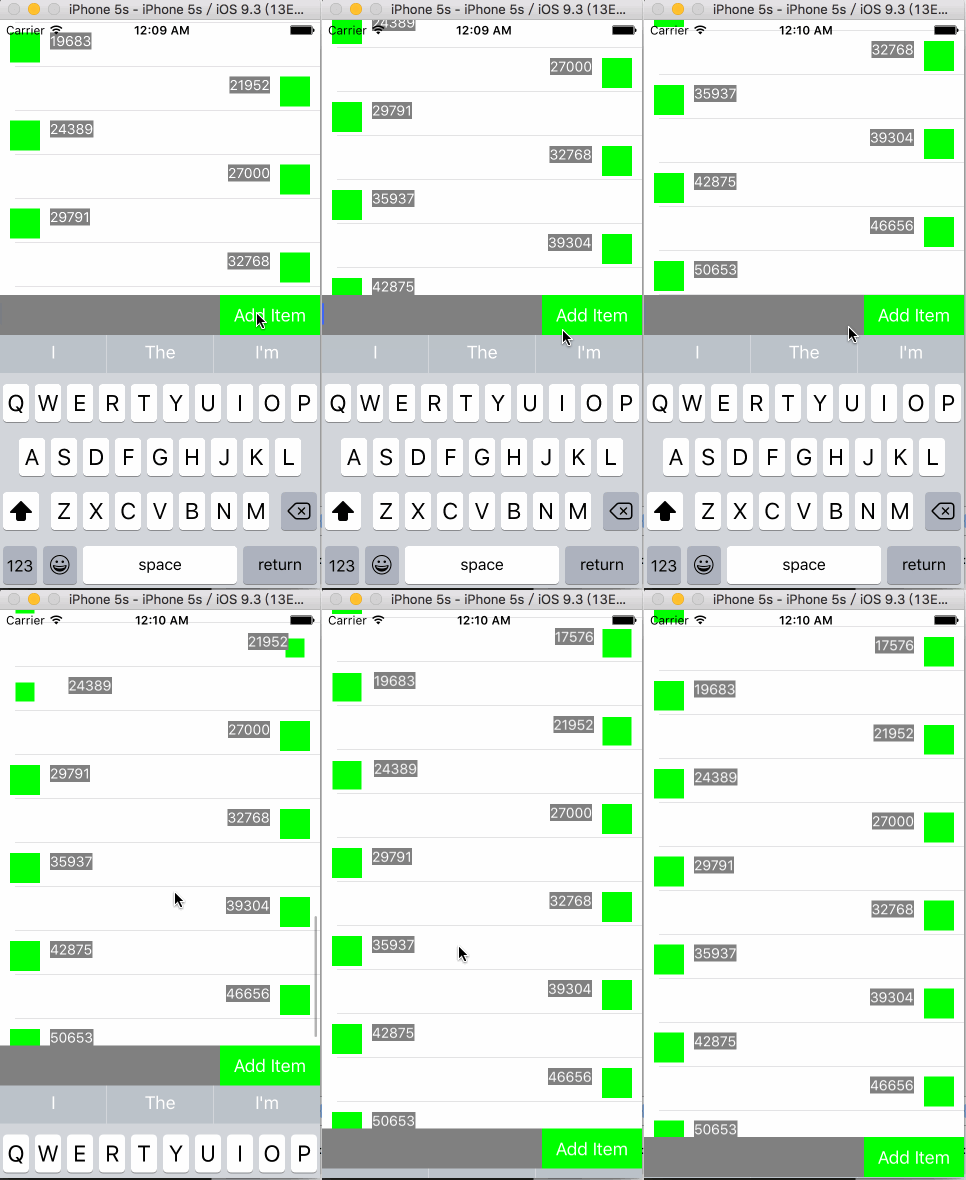
But this still isn’t enough. Changing the Cell size still has an effect.
Step two
Don’t change the tableView’s size, only change its position.
- (void)_setBottomOffset:(CGFloat)offset{
    // TableView变小
//    _bottomView.frame = CGRectMake(0, self.view.bounds.size.height - 40 - offset, self.view.bounds.size.width, 40);
//    _tableView.frame = CGRectMake(0, 0, self.view.bounds.size.width, self.view.bounds.size.height - 40 - offset);

    // TableView大小不变,只向上移动
    _bottomView.frame = CGRectMake(0, self.view.bounds.size.height - 40 - offset, self.view.bounds.size.width, 40);
    _tableView.frame = CGRectMake(0, -offset, self.view.bounds.size.width, self.view.bounds.size.height - 40);
}
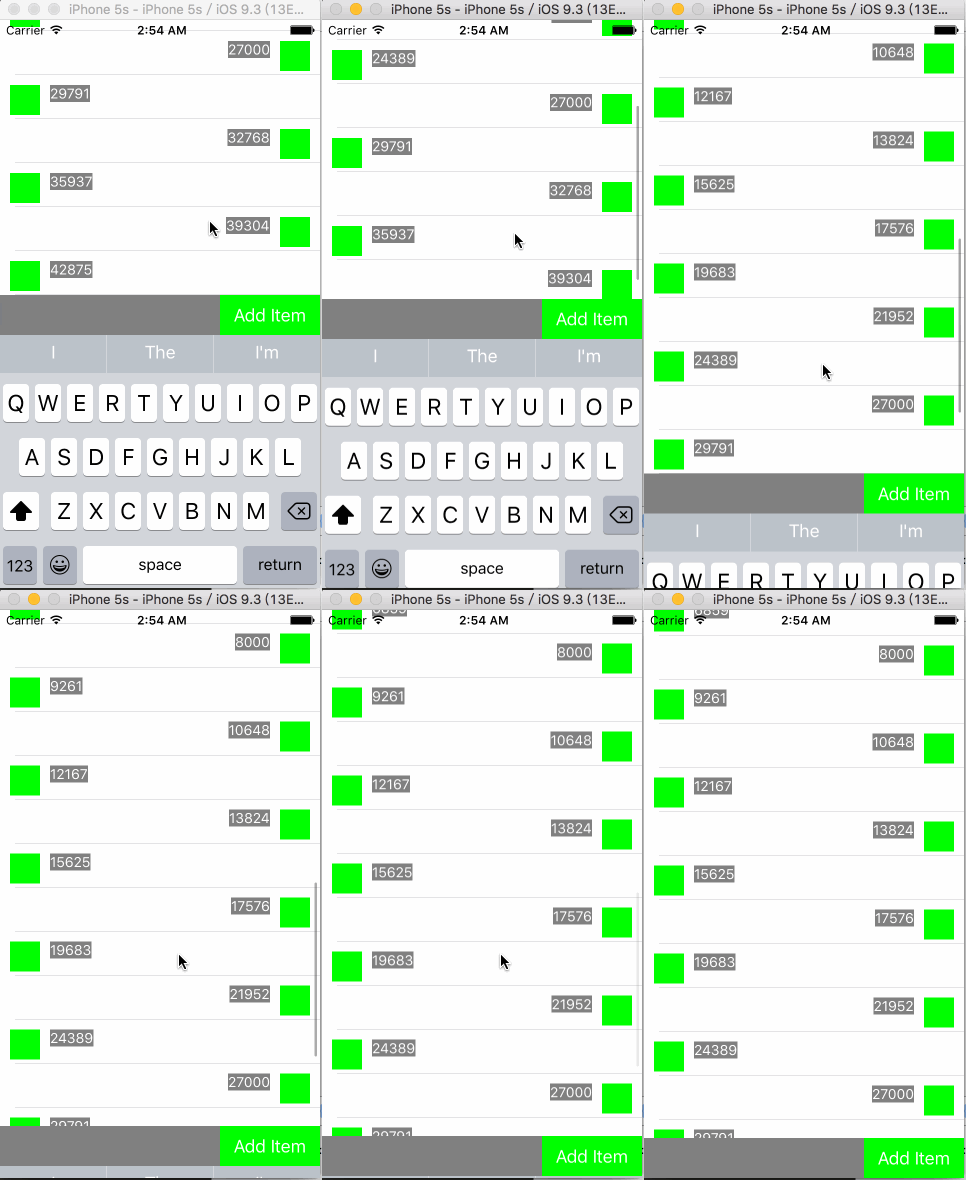
This is much better.
Step three
Changing the position introduces a problem. When there are very few messages (for example, just one), after changing the position the topmost message runs off the screen. We need to adjust the UITableView’s contentInset:
    @property (nonatomic,assign) CGFloat insetTop;

    // 初始化设置
    _insetTop = STATUS_BAR_HEIGHT + self.navigationController.navigationBar.bounds.size.height;
    _tableView.contentInset = UIEdgeInsetsMake(_insetTop, 0, 0, 0);

    // 响应底部键盘高度的改变
    CGFloat offset = _tableView.contentSize.height - _tableView.bounds.size.height;
    if(offset < 0){
        _tableView.contentInset = UIEdgeInsetsMake(_insetTop + height, 0, 0, 0);
    }else{
        _tableView.contentInset = UIEdgeInsetsMake(_insetTop, 0, 0, 0);
    }
Summary
It seems some third-party IM SDKs have similar problems. The Maimai app should be developed in-house, and it has this problem too. If the developers see this article, please fix it, haha.
背景
聊天界面,有两种实现方法:
- QQ的实现方式,也是大多数App的实现方式。每个类型的消息有各自不同的Cell,例如:TextCell,ImageCell等。
- 微信的实现方式。目前只知道微信这么干的。实现方式见这个文章。
这篇文章主要是讲第一种实现方式可能遇到的一个UI动画的小问题。 GitHub上有很多参考代码都是第一种实现方式(第二种没找到现成的代码),然而好多代码在实际应用时或多或少有些小问题。
思路
由于聊天消息中头像会在左侧,也会在右侧,且消息内容有很多种也会左对齐或右对齐。如果每种组合都做一个Cell,将会有大量的Cell出现。
- TextLeftCell
- TextRightCell
- ImageLeftCell
- ImageRightCell
这样不好,如果消息类型有几十种,则Cell就是两倍的数目。 (PS:如果一个Cell中,放两个View呢?LeftView和RightView。也不好,还是麻烦。)
一种解决方法是,在tableView的cellForRowAtIndexPath中根据消息类型(对方消息还是我的消息)改变头像、内容View的位置frame。
然而有个需求:
- 键盘弹出,TableView要跟着向上。
- TableView滑动时,收起键盘。
问题
这是一种实现方式,步骤如下:
- 当键盘弹出,控制TableView的frame变小。
- 新增消息。
- TableView向下滑动时同时收起键盘。改变TableView的frame恢复原有大小。
插播:上面的步骤是很容易出现的,改变tableView frame的大小也是一个容易想到的方法,当然也可以使用约束,改变TableView下面的View的大小(这种使用约束方式与改变frame大小类似,都会为这个小问题埋下坑)。
最终效果如下:
问题来了:
当键盘收起时,TableView中上面有几个Cell中的头像和内容会有个动画,这个动画并不是预期的
如何去掉这个动画?
原因
- 键盘收起时,会以动画的方式收起, UITableView 的frame变大也是在动画上下文中,因此UITableView会以动画方式变大。
- 同时由于UITableView frame变大,可容纳更多Cell,新的Cell会创建,创建过程也在动画的上下文中。
解决
有两步:
第一步
tableView的cellForRowAtIndexPath中改变frame时要禁用动画。
- (UITableViewCell *)tableView:(UITableView *)tableView cellForRowAtIndexPath:(NSIndexPath *)indexPath{
    ChatCell *cell = [tableView dequeueReusableCellWithIdentifier:@"Cell" forIndexPath:indexPath];

//    [self _fillCell:cell indexPath:indexPath];

    [UIView performWithoutAnimation:^{
        [self _fillCell:cell indexPath:indexPath];
    }];

    return cell;
}
然而这样还是不够,改变Cell大小时,还会有影响。
第二步
不改变tableView大小,仅改变位置。
- (void)_setBottomOffset:(CGFloat)offset{
    // TableView变小
//    _bottomView.frame = CGRectMake(0, self.view.bounds.size.height - 40 - offset, self.view.bounds.size.width, 40);
//    _tableView.frame = CGRectMake(0, 0, self.view.bounds.size.width, self.view.bounds.size.height - 40 - offset);

    // TableView大小不变,只向上移动
    _bottomView.frame = CGRectMake(0, self.view.bounds.size.height - 40 - offset, self.view.bounds.size.width, 40);
    _tableView.frame = CGRectMake(0, -offset, self.view.bounds.size.width, self.view.bounds.size.height - 40);
}
这样就比较好了。
第三步
改变位置会带来一个问题。当消息很少(例如一条),改变位置后,最上面的这一条消息就跑屏幕外面。需要调整UITableView的contentInset:
    @property (nonatomic,assign) CGFloat insetTop;

    // 初始化设置
    _insetTop = STATUS_BAR_HEIGHT + self.navigationController.navigationBar.bounds.size.height;
    _tableView.contentInset = UIEdgeInsetsMake(_insetTop, 0, 0, 0);

    // 响应底部键盘高度的改变
    CGFloat offset = _tableView.contentSize.height - _tableView.bounds.size.height;
    if(offset < 0){
        _tableView.contentInset = UIEdgeInsetsMake(_insetTop + height, 0, 0, 0);
    }else{
        _tableView.contentInset = UIEdgeInsetsMake(_insetTop, 0, 0, 0);
    }
总结
貌似有些第三方IM的sdk也有类似问题。脉脉app应该是自己开发的,也有这个问题。如果开发人员看到这篇文章,就修改下哈。