writing
How to Build an RSS Reader App如何编写一款 RSS 阅读器 App
· Development notes
Translated from Chinese — .
On this page
I finally shipped my first App, so here’s a quick summary. For this App, I count as a bit of a “full-stack developer” too.
This development effort mainly produced two things:
- TomatoRead App: a curated selection of iOS developer blog subscriptions. AppStore link.
- Blog list: sorted by last update time. Auto-refreshed every day.
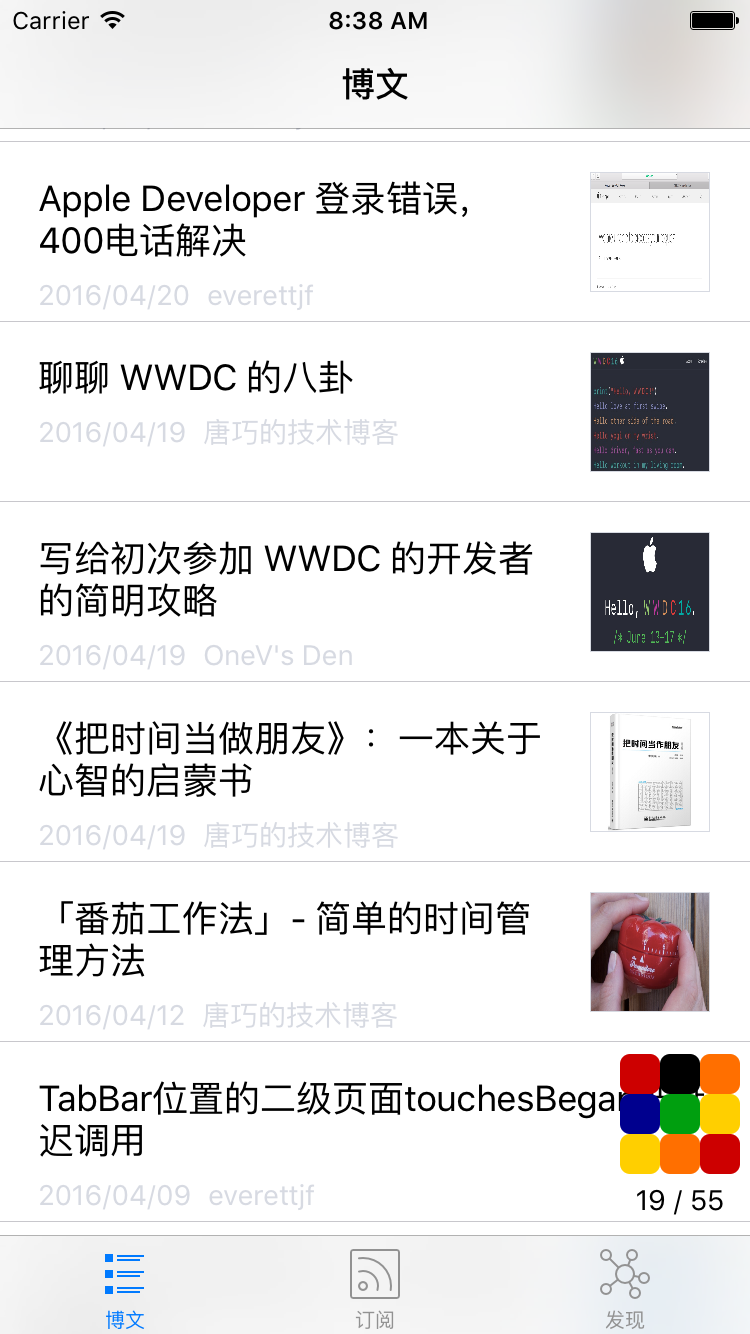
Three tabs: the first is the list of subscribed articles, the second is the blog list, and the third is various article/tutorial URLs I usually collect. As shown below:
Background
- Originally I wanted to build a big, all-encompassing developer navigation site where you could find the best URLs for whatever you want to learn, but I didn’t have that much time to collect URLs. Since my job is iOS development, I could focus only on iOS development URLs.
- So I wanted to build an App that displays the blogs I collected and their RSS subscription info through the App.
- The goal kept shrinking — maybe that’s the process of a fake need turning into a real need.
- For more background on this deeper tinkering, you can read this article.
Architecture
- Web server: for bookmarking URLs
- Static content server: provides the access interface for the App
- Crawler: crawls the article lists of blogs that don’t support RSS/Atom subscriptions
- App: the final presentation
Web server
The web server is mainly for collecting and deleting URLs.
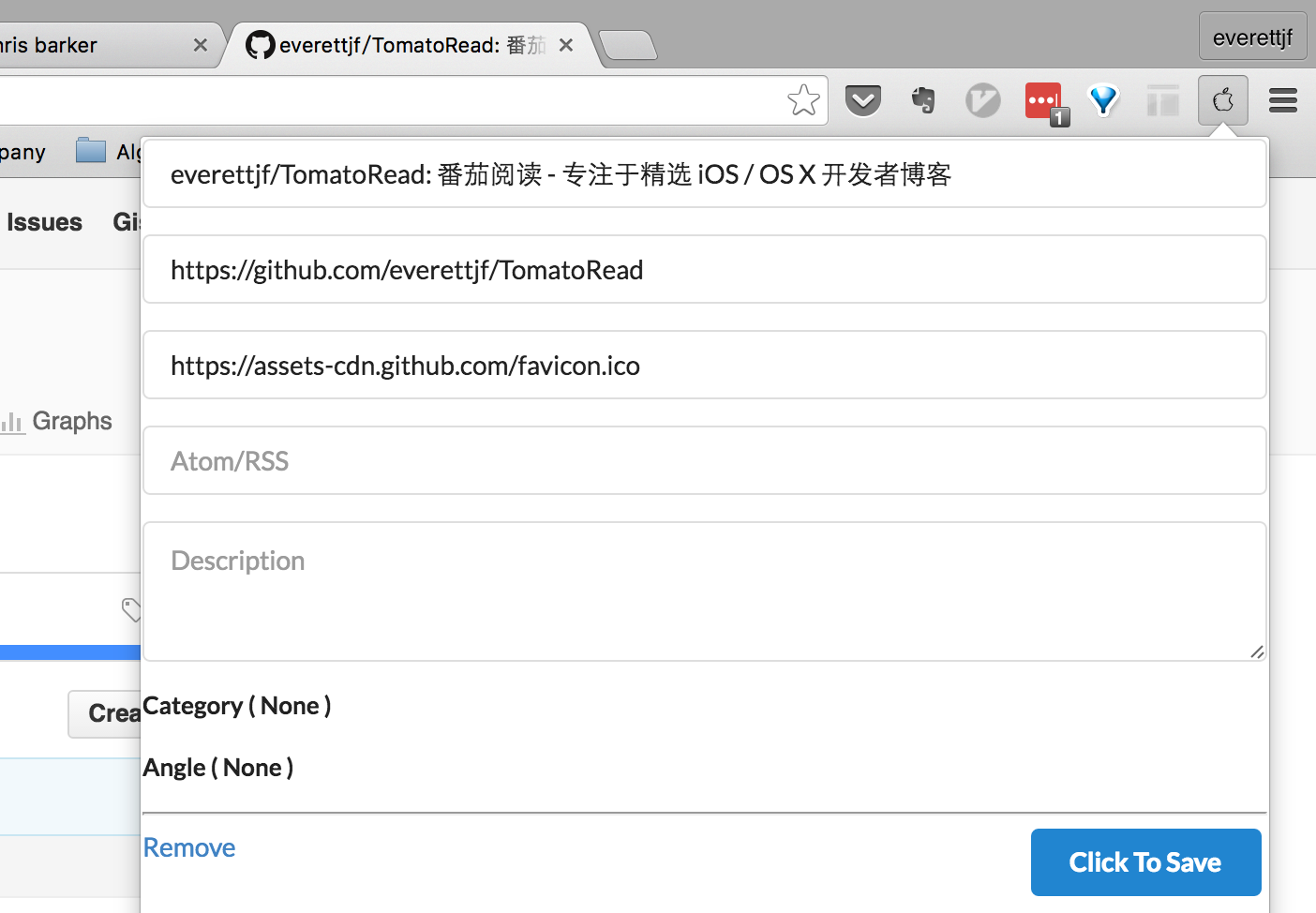
To make it convenient to bookmark a blog once you’ve seen it, you can write a Chrome extension. When you browse to a blog URL and click the Chrome extension, it automatically collects the current blog’s URL, title, and favicon. You can also add the subscription address.
This saves the hassle of recording blogs as plain text.
The web server is implemented with Django (I’m familiar with Python). Currently it’s accessible at http://iosblog.cc. Since the App doesn’t depend on this domain, it can be swapped out anytime later. This URL is only used to assist collection, not for public use.
Static content server
A VPS on Aliyun or other clouds, at the lowest spec, generally costs around 600 RMB a year, and the bandwidth and performance are both poor. But to let the App fetch data quickly, what do we do? I thought of how my blog uses GitHub Pages. We can periodically export the content I’ve collected to a json file and place it under GitHub Pages (for example, under my blog directory).
That way the Aliyun server doesn’t have to worry about small bandwidth or low specs. Amazon’s EC2 is even free for a year recently.
The existence of this layer of server lets us swap out the web server freely. The App doesn’t depend on the web server either.
Crawler
Some blogs have RSS or Atom subscriptions, but many blogs don’t. For example, the currently very popular Jianshu. There are many great iOS/OS X developer blogs on Jianshu.
After bookmarking some good Jianshu blogs, you can write a little crawler that only crawls the article lists of the specified blogs. When you tap such an article in the App, it opens directly in the browser.
scrapy is a great Python crawler framework, simple and easy to use. The code to crawl a URL’s article list is as follows:
    def parse(self, response):
        print response.url
        oid = self.url_to_oid[response.url]
        filepath = os.path.join(target_json_dir,'spider', 'jianshu', '%d.json'%oid)
        print filepath

        items = []
        for post in response.xpath('//div[@id="list-container"]/ul/li'):
            url = post.xpath('div/h4[@class="title"]/a/@href').extract_first()
            url = response.urljoin(url)

            title = post.xpath('div/h4[@class="title"]/a/text()').extract_first()
            title = title.strip()

            item = {}
            item['title'] = title
            item['link'] = url
            item['createtime'] = post.xpath('div/p[@class="list-top"]/span[@class="time"]/@data-shared-at').extract_first()
            item['image'] = post.xpath('a[@class="wrap-img"]/img/@src').extract_first()
            items.append(item)
Scrapy’s docs are very complete too; after reading the getting-started tutorial you can finish crawling this Jianshu article list.
There’s a small issue you can leave unsolved. A Jianshu blog’s homepage loads 10 articles by default (the count may not be exact), and the rest are loaded asynchronously as you scroll down. Since this is for subscriptions, fetching just the latest N is enough. (I haven’t researched how to fetch these asynchronously loaded articles. Maybe finding the backend request URL would make it easy to fetch.)
App
Open-source libraries
To quickly assemble this App, I mainly used the following two open-source libraries.
-
MWFeedParser: can be used to parse RSS/Atom, but during use some feeds have non-standard times, so you can modify the source directly to support more time formats.
-
KINWebBrowser: used to view the original text, or open articles from blogs that don’t support subscriptions.
Loading strategy
When you suddenly have 40+ subscription URLs, how do you load articles in a way that doesn’t feel too slow to the user?
- The server puts the more frequently updated and higher-quality blogs first (ranked first, increasing zorder).
- On first load, an animation plays; after loading 5 blogs, the animation shrinks to a spot that doesn’t interfere with the user, and the remaining blogs continue loading.
- Record each blog’s last article update date; the next time it checks for blog updates, it prioritizes recently updated blogs. (Some developer blogs haven’t updated in a long time, but their earlier articles are very good.) Display the latest content as fast as possible.
- After all blogs finish loading, let the user know. And make it easy to load the latest content.
Other optimization ideas:
- Give each blog a weight assigned by update frequency; in some cases you can directly ignore blogs whose weight is too low.
Displaying subscribed article content
The article content fetched from RSS/Atom subscriptions is a chunk of HTML code. It lacks CSS. The program needs to bundle a fairly general set of CSS internally.
Here I directly copied the CSS code from the Yiyue App. But this CSS renders some articles poorly. I’ll optimize it later.
Loading animation
Loading animations like MBProgressHUD are all globally blocking. They can’t meet the need of “load 5 blogs first, then keep showing progress without interfering with the user.” So I built my own.
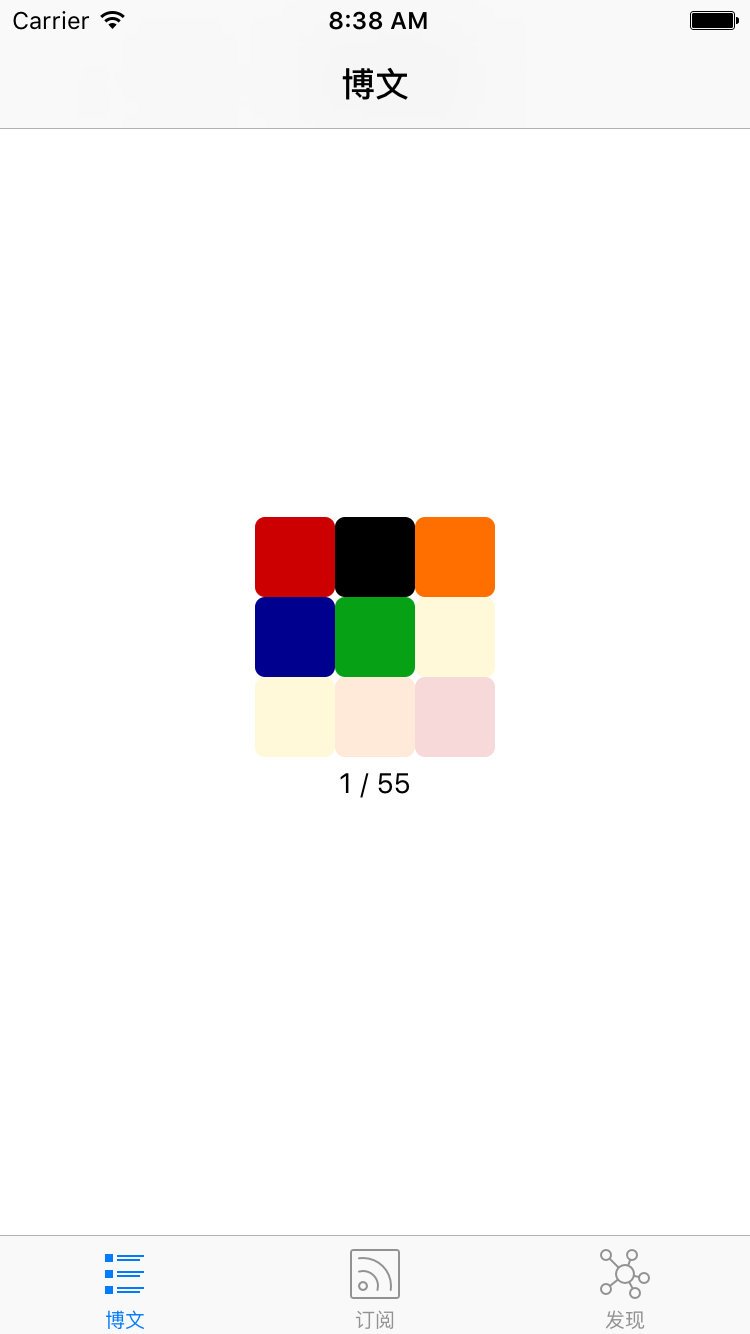
I’ve been watching “The Brain” lately and learning Rubik’s cube algorithms, and thought I could make a Rubik’s-cube-like animation. To keep it simple and quick to use, I used Facebook’s pop library — 9 colors fading in and out one by one, plus a status bar.
Third-party services
- Analytics: Umeng
- Crash analysis: Bugly
- Hotfix: JSPatch
Summary
I’ve been doing iOS work for nearly a year (with a 3-month pause in the middle being a stay-at-home dad). This is the first App I’ve shipped. Although the App is fairly simple, the evolution of this idea is worth reflecting on and summarizing.
Another purpose of building this App is to apply the new knowledge and new techniques I learn day to day to this App, treating it as my own little laboratory.
终于上线第一个App,简单总结。对这个App,自己也算是“全栈开发”了。
此次开发过程主要有两个产出:
- 番茄阅读App:精选了一些iOS开发者博客的订阅。AppStore地址。
- 博客列表:按最后更新时间排序。每天自动刷新。
三个Tab页,第一页为订阅的文章列表,第二页为博客列表,第三页为我平时收集的各种文章、教程等网址。 如下图:
背景
- 最初我是想做个大而全的开发者导航网站,想学什么都能找到最优质的网址,但没有那么多时间去搜集网址。由于工作是iOS开发,可以只关注iOS开发类的网址。
- 于是想做个App,将收集的博客以及博客的RSS订阅信息通过App展示出来。
- 目标不断的缩小,或许就是伪需求变为真实需求的过程。
- 更深入折腾的背景,可以看看这篇文章
架构
- Web服务器:用于收藏网址
- 静态内容服务器:用户提供App访问接口
- 爬虫:爬取不支持RSS/Atom订阅的博客文章列表
- App:最终展现
Web服务器
Web服务器主要用于网址收集和删除。
为了能看到一个博客后,方便的收藏博客,可以编写Chrome插件。当浏览到一个博客网址后,点击Chrome插件,Chrome插件会自动收集当前博客的网址、标题、favicon。还可以添加订阅地址。
免去了使用文本方式记录博客的麻烦。
Web服务器使用Django实现(熟悉Python)。目前可以使用 http://iosblog.cc访问,由于App并不依赖这个域名,后期可能、可以随时更换。这个网址仅用于辅助收集,不用于公开使用。
静态内容服务器
阿里云或其他各种云的VPS最低配置一般一年600元左右,而且带宽性能都较差。可又为了能让App较快的获取数据,怎么办。想到平时的博客使用GitHub Pages。可以把平时收藏到的内容,定时导出为json文件放到GitHub Pages下(例如我的博客目录下)。
而阿里云服务器就不用担心带宽太小、配置太低的问题了。亚马逊的EC2最近还免费一年。
这一层服务器的存在,让我们可以随便更换Web服务器。App也不依赖Web服务器。
爬虫
有的博客是有RSS或Atom订阅的,但还有很多博客没有订阅。例如现在很火的简书。简书上有很多不错的 iOS/OS X 开发者博客。
收藏了一些不错的简书博客后,可以写个小爬虫,只爬指定博客的文章列表。App中点击这类文章时,直接以浏览器的方式打开。
scrapy是Python很好的爬虫框架,使用起来简单易用。爬某个网址文章列表的代码如下:
    def parse(self, response):
        print response.url
        oid = self.url_to_oid[response.url]
        filepath = os.path.join(target_json_dir,'spider', 'jianshu', '%d.json'%oid)
        print filepath

        items = []
        for post in response.xpath('//div[@id="list-container"]/ul/li'):
            url = post.xpath('div/h4[@class="title"]/a/@href').extract_first()
            url = response.urljoin(url)

            title = post.xpath('div/h4[@class="title"]/a/text()').extract_first()
            title = title.strip()

            item = {}
            item['title'] = title
            item['link'] = url
            item['createtime'] = post.xpath('div/p[@class="list-top"]/span[@class="time"]/@data-shared-at').extract_first()
            item['image'] = post.xpath('a[@class="wrap-img"]/img/@src').extract_first()
            items.append(item)
Scrapy文档也很全,看完入门教程就能完成这个简书文章列表的爬取了。
有个小问题,可以不解决。简书博客首页的文章默认是加载10条(数不一定对),剩余文章是在向下滚动浏览时异步加载。由于是做订阅,只抓取最新的N条就足够了。(如何抓取异步加载的这些文章,我还没有研究。或许找到请求后台的地址,就很容易抓取了)
App
开源库
为了快速组装这个App,主要用了以下两个开源库。
-
MWFeedParser 可用于解析RSS/Atom,但使用过程中有些源的时间并不标准,可以直接修改源码,增加支持的时间。
-
KINWebBrowser 用于查看原文、或者打开不支持订阅的博客文章。
加载策略
当一下子拿到40多个订阅地址,如何能在让用户感觉不到太慢的前提下,把文章加载下来。
- 服务器把更新比较频繁的、且优质的几个博客放在前面(排序靠前,增加zorder)
- 首次加载动画,在加载5个博客后,动画缩小到不影响用户使用的地方,继续加载剩余博客。
- 记录博客的最后文章更新日期,以后再次检测博客更新时,优先检查最近更新过的博客。(有一些开发者博客很久不更新文章了,但之前的文章写的很好。)尽量最快的显示出最新内容。
- 所有博客都加载完成后,可以让用户知道。并能方便的加载最新内容。
其他可优化想法:
- 每个博客一个权值,根据更新频率分配,在某些情况下可以直接忽略权值过低的博客。
订阅文章内容显示
RSS/Atom订阅拿到的文章内容是一段html代码。缺少css。程序内部要内置一套较为通用的css。
这里目前直接copy了已阅App的css代码。但这个css对有些文章展示的兼容不好。以后再优化啦。
加载动画
类似MBProgressSUD的加载动画都是全局阻塞方式。不能满足 先加载5个博客后继续显示进度且不应影响用户使用的需求。于是自己造一个。
最近看最强大脑,在学习魔方算法,想来可以做个类似魔方的动画。为了简单、快速可用,可以用 facebook的 pop 库,9个颜色挨个淡入淡出,再加个状态栏。
第三方服务
- 统计:友盟
- 崩溃分析:bugly
- 热修复:JSPatch
总结
自己做iOS工作接近一年(中间暂停了3个月在家做奶爸了),这是第一个上架的App。虽然App较为简单,但这个想法的演变过程,值得我反思和总结。
开发这个App还有个目的,就是可以把自己平时学到的新知识、新技巧应用到这个App中来,作为自己的小实验室。