writing
How To Write A Simple Virus Scanner如何编写简易病毒扫描程序
· Development notes
Translated from Chinese — .
On this page
- Intended Audience
- Main Content
- What Is a Computer Virus
- The Development of Anti-Virus Technology
- Analyzing Computer Viruses
- Writing a Simple Virus Scanner
- Goals
- Feature-Based
- The Idea
- Machine Learning
- Obtaining Virus Samples
- Getting Started with Development
- Using pedump to Get File Attributes
- Converting File Attributes into Vectors
- Training the Model
- Testing the Model
- Remaining Issues
- Source Code
- Source of the Ideas Above
- Related Books
- Material Downloads
- Personal Summary
- December 7, 2014, tech talk at the OSChina Jinan City Circle event
- My first public-venue tech talk
- I’ve organized the content of this talk into a simple tutorial
Intended Audience
- Beginners interested in virus analysis
Main Content
- What is a computer virus
- The development of anti-virus technology
- Analyzing computer viruses
- Writing a simple virus scanner
What Is a Computer Virus
Definition of a Computer Virus
- In 1949, von Neumann gave the first definition of a virus in his paper “Theory of self-reproducing automata”:
"an automaton that can actually reproduce itself". - Wikipedia: A computer virus is a computer program that, produced under human or non-human circumstances and without the user’s knowledge or approval, can replicate or run itself. Reference
The First Computer Virus
-
In the 1960s, three people at Bell Labs implemented two programs on core memory; these two programs tried to copy themselves and kill the other program — a game called “Core War”.
-
The recognized first virus was born in 1971, a program called Creeper. Reference.
-
Reaper was a virus-like program created to remove Creeper.
Main Characteristics of Viruses
- Contagiousness
- Stealth
- Infectiousness
- Dormancy
- Triggerability
- Manifestation
- Destructiveness
- Mutability
Classification of Viruses
- Trojans, botnets (bots, a.k.a. “zombies/broilers”, DDOS)
- Harmful software (worms, spyware, rogue software, prank software)
- Script viruses (macro viruses)
- File-type viruses (infect files, reside in executables, etc.)
In addition, you can also refer to the virus signature classification of the open-source anti-virus software ClamAntiVirus, as shown:
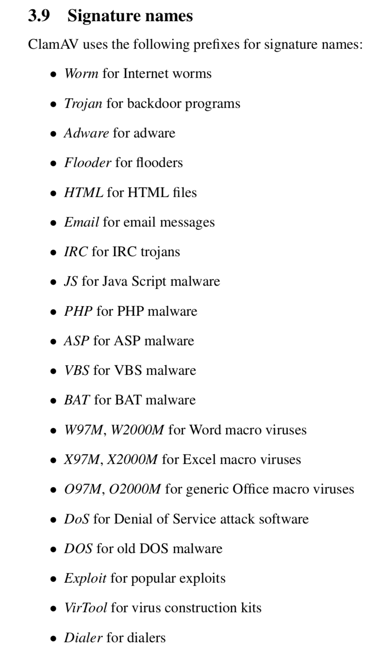
Of course, the above classification isn’t strict, and there’s no single classification standard. In my view, they can all be collectively called “malicious programs”.
The Harm of Viruses
- Blaster worm
- August 2003
- DDOS attack on windowsupdate.com
- Exploited the system’s RPC vulnerability to spread automatically
- Caused systems to reboot and crash
- Many variants appeared later
The virus author was quite something — he even wrote his own name, Parson, into the virus, and that's how he got caught.
- Prank virus
- Female ghost virus
- Year 2000
- When it broke out in the Taiwan region, it once caused someone to die after being sent to the hospital from being too badly scared
- Flame, Stuxnet, Duqu
- National-security level
- Flame targeted business intelligence of Iran’s oil sector, traceable back to 2007, but only discovered by Kaspersky in 2012. The program was very large.
- Stuxnet targeted Iran’s nuclear facilities
- Duqu targeted Iran’s industrial control data
- It’s said that an explosion at a certain Iranian rocket launch base was caused by a virus, though officials don’t acknowledge it.
- Reference
The Development of Anti-Virus Technology
Components of Anti-Virus Software
- Scanner
- Virus database
- Virtual machine (mainly for unpacking)
First-Generation File-Based Scanning Techniques
- String scanning technique
- Wildcard scanning technique
Second-Generation File-Based Scanning Techniques
- Smart scanning
- Near-exact matching
- Multiple signature sets
- Checksums, block checksums, cryptographic checksums, etc.
- Skeleton scanning
- Exact identification
ClamAV Hash-based & Body-based
Memory-Based
- Memory signatures
- To deal with packed programs
Behavior-Based
- Behavioral signatures
- For example: “a program copies itself to the system32 directory, then sets itself to auto-start, and finally deletes itself” — this behavior is suspicious.
- Active defense
- Micropoint
- 360 Security Guard
Cloud Scanning
- Leverages server capabilities
- A large number of clients report suspicious files
Multi-Engine
- 360’s QVM, cloud engine, Avira, BitDefender
This is just a business combination, with no substantive change.
Artificial Intelligence
- Machine learning, neural networks, etc.
- 360 QVM (Qihoo Support Vector Machine)
- A massive set of whitelist and virus samples
- Patent link
Analyzing Computer Viruses
PE Files
- Portable Executable
- Portable Executable
- PE was adapted from the Common Object File Format (COFF) used in Unix
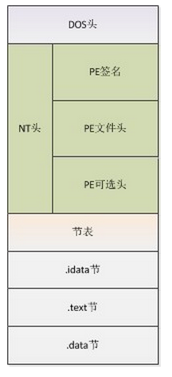
- Windows PE
- Linux ELF
- MacOS Mach-O
Basic Concepts
- IMAGE_DOS_HEADER
- MZ
- Mark Zbikowski, the original architect of MS-DOS
- Import Address Table
- Export table
- Program entry point
- IMAGE_NT_HEADERS
- Sections
- IMAGE_SECTION_HEADERS
- …
See winnt.h
Packing
- Compression of executable program resources
- Originally intended to protect the file
- Special algorithms
- Decompressed in memory
- For example: the UPX packer
Online Automated Analysis Tools
Static Analysis
IDA Pro PEView PEiD Sysinternals - string, autorun … Dependency Walker …
Dynamic Analysis
OllyDbg Windbg WireShark …
Other
Writing a Simple Virus Scanner
Goals
- Simple
- Scanning
- File-based
Feature-Based
- File Size
- Import Address Table (IAT)
- Section
- Resource (Version, Company)
- Packer
The Idea
If we compare the relationship of “a PE file to the operating system” to the relationship of “a person to the world”:
- Analogy for imported functions
- An import table containing CreateFile can be seen as a person holding a pen — the person poses no harm to the world.
- An imported function CreateService is like a person holding a small knife — slightly harmful to the world, but not that much.
- Imported functions SetWindowsHook or CreateRemoteThread are like a person holding a gun — now quite harmful to the world.
- Analogy for sections
- .text .rdata .data .rsrc .reloc are like a properly dressed good person.

- .upx .upx1 are like a bad person.

Machine Learning
- SVM - Support Vector Machine
- Supervised learning algorithm
- libsvm
- svm-toy.exe is simple and practical
Obtaining Virus Samples
Sites like Kafan or 52pojie also provide many samples.
Getting Started with Development
- Development language: Ruby
- Based on three libraries: rb-libsvm, pedump, sqlite3 You can install them like this
  > gem install rb-libsvm
  > gem intall pedump
  > gem install sqlite3
Using pedump to Get File Attributes
- imports : string list
- sections : string list
- packer : string
- version : string
- company : string
Converting File Attributes into Vectors
-
Convert packer into a vector 1 if there’s a packer, otherwise 0
-
version and company same as above.
-
Convert imported functions (imports) and sections into vectors
> You can do it like this:
> First get set(A), the set of all imported functions of all files under system32 of a clean, virus-free system
> Then get set(B), the set of all imported functions of a bunch of viruses (e.g. viruses obtained from virussign)
> set(C) = set(A) & set(B)
> set(D) = set(A) - set(B)
> set(E) = set(B) - set(A)
> This way, set(C), set(D), set(E) are given different weights.
- Finally, combine all attributes in order into a vector for the PE file
- You can obtain the database storing imports and sections via the following commands.
ruby rvsfetchiat.rb --health C:/Windows/System32
ruby rvsfetchiat.rb --virus E:/train_virus/files
ruby rvsfetchiat.rb --merge
- Get the attributes of a file via the following command
ruby rvsfetchiat.rb --file C:/Windows/System32/notepad.exe
Training the Model
Specify the folder storing the normal files to be trained and the folder of virus files.
ruby rvsscan.rb --train /Users/everettjf/Virus/train/train_health /Users/everettjf/Virus/train/train_virus
Testing the Model
ruby rvsscan.rb --scan /Users/everettjf/Virus/train/train_virus
ruby rvsscan.rb --scan /Users/everettjf/Virus/train/train_health
ruby rvsscan.rb --scan /Users/everettjf/Virus/train/test_virus
ruby rvsscan.rb --scan /Users/everettjf/Virus/train/test_health
Remaining Issues
- Training a large number of samples
- Tuning parameters to lower the false-positive rate
- Adding more key features, e.g. whether the OEP has been modified.
- Self-learning
Source Code
Source of the Ideas Above
QVM -> xiao70 -> me(everettjf)
Related Books
- “Encryption and Decryption”
- “The Art of Computer Virus Research and Defense”
- “Practical Malware Analysis”
-
“Hacker Anti-Detection Attack and Defense”
- “Programming Collective Intelligence”
- “Pattern Classification”
Material Downloads
Personal Summary
This talk had the following problems:
- Insufficient time estimation. Because I didn’t have a good grasp of how much content there was, and had no experience timing the presentation, I estimated 30 minutes, but it ended up running over an hour.
- Insufficient interaction. There was almost no interactive segment, no interaction with the audience.
- Insufficient focus on the content. Too much groundwork knowledge up front took up a lot of the early time. The final “machine learning implementation” part didn’t get enough explanation time.
Overall, I believe this talk deepened everyone’s understanding of viruses. I believe given another chance I’ll give more talks, working to foster a good programmer atmosphere in Jinan.
文章目录
- 2014年12月7日,开源中国济南城市圈活动技术分享
- 第一次公开场合技术分享
- 将此次分享的内容整理成简单的教程
面向读者
- 对病毒分析感兴趣的新手
主要内容
- 什么是计算机病毒
- 反病毒技术的发展
- 分析计算机病毒
- 编写简易的病毒扫描程序
什么是计算机病毒
计算机病毒的定义
- 1949年,冯诺依曼在论文《Theory of self-reproducing automata》中就第一次给出了病毒的定义:
“能够实际复制自身的自动机”。 - wikipedia:计算机病毒是一种在人为或非人为的情况下产生的、在用户不知情或未批准下,能自我复制或运行的电脑程序。 参考
第一个计算机病毒
-
19世纪60年代,贝尔实验室3个人,在磁芯存储器上实现了2个程序,这2个程序想办法复制自身并让杀掉对方的程序,称为“磁芯大战”的游戏。
-
公认的第一个病毒1971年诞生,叫做Creeper的程序。 参考.
-
Reaper是用来清除掉Creeper的类似病毒的程序。
病毒的主要特征
- 传播性
- 隐蔽性
- 感染性
- 潜伏性
- 可激发性
- 表现性
- 破坏性
- 变异性
病毒的分类
- 木马、僵尸网络(僵尸或称肉鸡,DDOS)
- 有害软件(蠕虫、间谍软件、流氓软件、恶作剧软件)
- 脚本病毒(宏病毒)
- 文件型病毒(感染文件,寄宿在可执行文件等)
此外,也可以参考开源杀毒软件ClamAntiVirus的病毒特征的分类,如图:
当然,以上分类并不严格,也没有一个分类标准。我认为,可以统称为“恶意程序”。
病毒的危害
- 冲击波蠕虫
- 2003年8月
- DDOS攻击windowsupdate.com
- 利用系统rpc漏洞,自动传播
- 造成系统重启、崩溃
- 后期产生很多变种
病毒作者很有意思,把自己的名字Parson也写到病毒中了,于是就被抓了。
- 恶作剧病毒
- 女鬼病毒
- 2000年
- 台湾地区发作时,曾经使人因为惊吓过度送往医院救治后身亡
- 火焰、震网、毒区
- 国家安全级别
- 火焰的目标位伊朗石油部门商业情报,可追朔到2007年,2012年才被卡巴斯基发现。程序很大。
- 震网的目标是伊朗核设施
- 毒区的目标是伊朗工业控制数据
- 据说伊朗某个火箭发射基地出现的一次爆炸就是病毒所致,只不过官方不承认。
- 参考
反病毒技术的发展
反病毒软件的组成
- 扫描器
- 病毒库
- 虚拟机(主要目的脱壳)
基于文件的第一代扫描技术
- 字符串扫描技术
- 通配符扫描技术
基于文件的第二代扫描技术
- 智能扫描法
- 近似精确匹配法
- 多套特征
- 校验和,分块校验,密码校验等
- 骨架扫描法
- 精确识别法
ClamAV Hash-based & Body-based
基于内存
- 内存特征
- 为了应对加壳程序
基于行为
- 行为特征
- 例如:“一个程序将自己复制到system32目录下,然后自启动,最后删除自己”,这个行为就是个可疑行为。
- 主动防御
- 微点
- 360安全卫士
云查杀
- 利用服务器能力
- 大量客户端上报可疑文件
多引擎
- 360的QVM、云引擎、小红伞、BitDefender
这个只是业务的组合,并没有实质性的改变。
人工智能
- 机器学习、神经网络等
- 360QVM(Qihoo Support Vector Machine)
- 海量的白名单及病毒样本
- 专利链接
分析计算机病毒
PE文件
- 可移植的可执行文件
- Portable Executable
- PE由Unix中的Common Object File Format(COFF)格式修改而来
- Windows PE
- Linux ELF
- MacOS Mach-O
基本概念
- IMAGE_DOS_HEADER
- MZ
- MS-DOS最初的架构师Mark Zbikowski
- 导入表 Import Address Table
- 导出表
- 程序入口点
- IMAGE_NT_HEADERS
- 节
- IMAGE_SECTION_HEADERS
- …
参考 winnt.h
加壳
- 可执行程序资源压缩
- 本意为保护文件
- 特殊的算法
- 在内存中解压
- 例如:UPX壳
在线自动分析工具
静态分析
IDA Pro PEView PEiD Sysinternals - string , autorun … Dependency Walker …
动态分析
OllyDbg Windbg WireShark …
其他
编写简易病毒扫描程序
目标
- 简易
- 扫描
- 基于文件
基于特征(feature-based)
- File Size
- Import Address Table(IAT)
- Section
- Resource (Version, Company)
- Packer
思想
如果把“PE文件与操作系统”的关系,比作“人与世界”的关系。
- 导入函数的类比
- 导入函数中包含CreateFile可以看做一个人拿着一支笔,人对世界没有什么危害。
- 导入函数CreateService就像人拿着一把小刀,对世界有了一点危害,但也不是那么大。
- 导入函数SetWindowsHook或CreateRemoteThread就像人拿着一把枪了,对世界危害就大了。
- 节的类比
- .text .rdata .data .rsrc .reloc就像一个穿着正常的好人。
- .upx .upx1 就像是一个坏人了。
机器学习
- SVM - Support Vector Machine 支持向量机
- 监督学习算法
- libsvm
- svm-toy.exe 简单实用
获取病毒样本
卡饭或吾爱破解上也都提供了很多样本。
开始开发
- 开发语言 Ruby
- 基于三个库 rb-libsvm , pedump , sqlite3 可以通过下面这样安装
  > gem install rb-libsvm
  > gem intall pedump
  > gem install sqlite3
pedump获取文件属性
- imports : string list
- sections : string list
- packer : string
- version : string
- company : string
将文件属性转换为向量(vector)
-
将packer转换为vector 有packer为1,否则为0
-
version和company同上。
-
将导入函数(imports)和节(sections)转换为向量(vector)
> 可以这样,
> 首先获取一个干净无毒的系统的system32下的所有文件的导入函数集合set(A)
> 再获取一堆病毒(例如从virussign上获取到的病毒)的所有导入函数集合set(B)
> set(C) = set(A) & set(B)
> set(D) = set(A) - set(B)
> set(E) = set(B) - set(A)
> 这样,set(C)set(D)set(E)给予不同的权值。
- 最后将所有属性按照顺序组合成一个PE文件的vector
- 可以通过下面的命令获取到存储imports和sections的数据库。
ruby rvsfetchiat.rb --health C:/Windows/System32
ruby rvsfetchiat.rb --virus E:/train_virus/files
ruby rvsfetchiat.rb --merge
- 通过下面的命令获取一个文件的属性
ruby rvsfetchiat.rb --file C:/Windows/System32/notepad.exe
训练模型
指定存储要训练的正常文件的文件夹和病毒文件的文件夹。
ruby rvsscan.rb --train /Users/everettjf/Virus/train/train_health /Users/everettjf/Virus/train/train_virus
测试模型
ruby rvsscan.rb --scan /Users/everettjf/Virus/train/train_virus
ruby rvsscan.rb --scan /Users/everettjf/Virus/train/train_health
ruby rvsscan.rb --scan /Users/everettjf/Virus/train/test_virus
ruby rvsscan.rb --scan /Users/everettjf/Virus/train/test_health
剩余问题
- 训练大量的样本
- 调整参数,降低误报率
- 加入更多关键的特征,例如OEP是否被修改。
- 自学习
源码
以上想法的来源
QVM -> xiao70 -> me(everettjf)
相关书籍
- 《加密与解密》
- 《计算机病毒防范艺术》
- 《病毒分析实战》
-
《黑客免杀攻防》
- 《集体智慧编程》
- 《模式分类》
资料下载
个人总结
此次分享存在以下问题:
- 时间估计不足。 前期由于对内容多少没有把握,且讲解的时间没有经验,估计了30分钟,但结果却超过了1个小时。
- 互动不足。 几乎没有互动环节,没有与听众进行互动。
- 内容侧重点不足。 前期铺垫知识过多,导致前期时间占用较多。最后的“机器学习实现”部分讲解时间不够充分。
总体来说,相信这次分享加深了大家对病毒的了解。相信再有机会还会进行分享,为济南营造好的程序员氛围做出努力哈。